
ImagenGPT Image
Create a 9:16 full-body editorial portrait poster
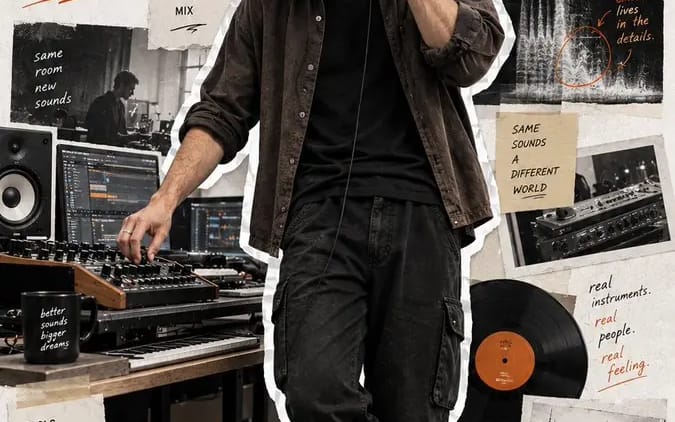
Create a 9:16 full-body editorial portrait poster for a modern [Profession]. Subject: [Subject] Outfit: [Outfit] Working action: [Working Action] Workflow: [Workflow] Tools: [Tools] Final output: [Final Output] Headline: [Headline]...
Prompt
Crea un póster editorial de retrato de cuerpo completo en 9:16 para un [Profession] moderno.

Sujeto: [Subject]
Atuendo: [Outfit]
Acción laboral: [Working Action]
Flujo de trabajo: [Workflow]
Herramientas: [Tools]
Resultado final: [Final Output]
Titular: [Headline]
Color de acento: [Accent Color]

Haz que el retrato realista de cuerpo completo sea el elemento visual dominante, ocupando el 75–85% de la altura del póster. Usa proporciones corporales naturales, piel y cabello realistas, materiales de ropa auténticos e iluminación creíble de lugar de trabajo. Muestra al sujeto trabajando de forma natural, sin posar ni mirar a la cámara.

Recorta la figura completa de la persona con un borde blanco de papel/calcomanía claramente visible y ligeramente irregular.

Usa un fondo de papel texturizado blanco hueso limpio y rodea al sujeto con elementos de collage editorial sobrios que muestren:
1. su flujo de trabajo,
2. herramientas y proceso,
3. el resultado final.

Usa fotos de papel rasgado, cinta adhesiva, bocetos, fragmentos de UI, diagramas, notas escritas a mano, flechas y frases breves de proceso. Mantén todos los elementos de apoyo relevantes para la profesión y visualmente secundarios con respecto al retrato.

Agrega el titular grande “[Headline]” y usa [Accent Color] para la tipografía y las anotaciones gráficas pequeñas.

Mantén el resultado general moderno, realista, con estilo y humano, como un retrato de creador, una historia de flujo de trabajo y un póster de álbum de recortes editorial, todo en uno.

Sin numeración, números de página, números de archivo, filtro vintage amarillo, efectos cyberpunk, poses corporativas rígidas, piel CGI, zapatos recortados, manos distorsionadas ni collage sobrecargado.
Cómo usar este prompt
- 1Copia el prompt exactamente y pégalo en tu modelo preferido o en un proyecto de Ideart.
- 2Sustituye detalles de producto, sujeto, audiencia y estilo por tu propio contexto.
- 3Genera primero un resultado base y luego remezcla la dirección más fuerte en una campaña, serie de imágenes o concepto de video.
Explorar rutas de prompts cercanas
Modelo
Construir desde este prompt
Convierte un prompt de imagen en un proyecto creativo terminado.
Guarda el prompt, añade imágenes de referencia o notas y deja que Ideart dé forma al siguiente paso de producción desde el mismo hilo creativo.