
ImagenAI
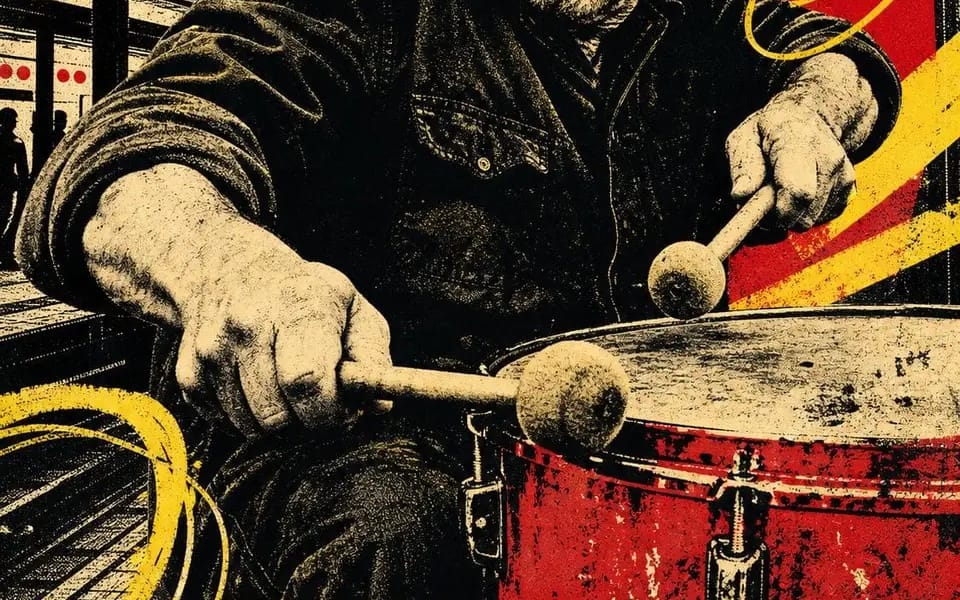
Impresión serigráfica de cuatro tintas
Four-ink screen print. Four people still working after everyone left. CITY BEAT — night session 02 OPEN SIGNAL — channel 08 / all night HIVE MIND — rooftop batch 07 FULL TORQUE — shift 04 / open late Locked: – four inks total: bone...
Prompt
Impresión serigráfica de cuatro tintas. Cuatro personas aún trabajando después de que todos se fueron.

CITY BEAT — night session 02
OPEN SIGNAL — channel 08 / all night
HIVE MIND — rooftop batch 07
FULL TORQUE — shift 04 / open late

Bloqueado:
– cuatro tintas en total: papel hueso, negro, escarlata, amarillo cromo. Nada más.
– el retrato está posterizado a semitono negro — sin grises en ninguna parte, solo puntos
– una forma roja plana detrás de la cabeza, haciendo el trabajo de un foco
– barras diagonales amarillas más bucles sueltos dibujados a mano garabateados sobre la imagen
– siluetas de ciudad llenando los espacios: pilares, torres de agua, grúas, horizonte
– una banda amarilla de ancho completo al pie, dos palabras en negrita condensada mayúscula negra, recortadas por ambos bordes
– una línea escrita a mano debajo — un turno, un canal, un lote, un número
– un pequeño glifo dibujado a mano: espiral, diana, hexágono, rayo
– desregistro, tinta pobre, grano del papel. Debe verse tirado, no renderizado.

Intercambios: [Trade] / [Two Word Title] / [Red Shape] / [Scrawl] / [Glyph] / [Shift Number]
Cómo usar este prompt
- 1Copia el prompt exactamente y pégalo en tu modelo preferido o en un proyecto de Ideart.
- 2Sustituye detalles de producto, sujeto, audiencia y estilo por tu propio contexto.
- 3Genera primero un resultado base y luego remezcla la dirección más fuerte en una campaña, serie de imágenes o concepto de video.
Explorar rutas de prompts cercanas
Modelo
Construir desde este prompt
Convierte un prompt de imagen en un proyecto creativo terminado.
Guarda el prompt, añade imágenes de referencia o notas y deja que Ideart dé forma al siguiente paso de producción desde el mismo hilo creativo.