
ImagenGPT Image
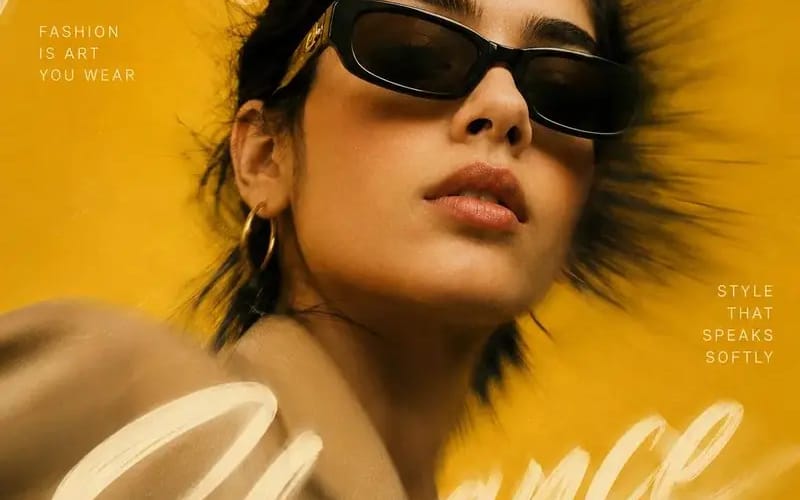
Create a high-end editorial fashion poster inspired
{ "REFERENCE_IMAGE": "[Reference Image]", "MAIN_HEADLINE": "[Main Headline]", "LEFT_TEXT": "[Left Text]", "RIGHT_TEXT": "[Right Text]", "FOOTER_TEXT": "[Footer Text]", "BACKGROUND_COLOR": "[Background Color]", "prompt": "Create a...
Prompt
{
  "REFERENCE_IMAGE": "[Reference Image]",
  "MAIN_HEADLINE": "[Main Headline]",
  "LEFT_TEXT": "[Left Text]",
  "RIGHT_TEXT": "[Right Text]",
  "FOOTER_TEXT": "[Footer Text]",
  "BACKGROUND_COLOR": "[Background Color]",

  "prompt": "Create a high-end editorial fashion poster inspired by luxury magazine covers and premium advertising campaigns. Preserve the identity of the subject from the [Reference Image] while matching the overall artistic style.

  Use a dramatic close-up portrait composition with the subject positioned slightly off-center. Capture the subject from a subtle low angle to create a powerful, confident appearance.

  Add a strong radial motion blur effect extending outward from the center of the image while keeping the subject's face sharp and highly detailed.

  Place [Main Headline] as one continuous handwritten brushstroke phrase flowing organically across the entire composition. Allow some portions of the lettering to appear behind the subject while other portions overlap the foreground.

  Add [Left Text] and [Right Text] as small uppercase editorial typography blocks with generous spacing.

  Place [Footer Text] subtly in one corner.

  Style details:
  - Oversized fashion sunglasses
  - Minimal jewelry
  - Natural skin texture
  - Wind-swept hair
  - Luxury fashion styling
  - Elegant pose
  - Cinematic color grading
  - Fine film grain
  - Soft highlights and deep shadows
  - Premium studio photography quality

  Background:
  - Clean monochromatic backdrop
  - Use [Background Color] as the dominant color
  - Dynamic zoom-blur effect
  - Soft glow and light bloom

  Visual style:
  - Vogue-inspired editorial design
  - Luxury advertising aesthetic
  - Photorealistic rendering
  - Premium typography composition
  - High-fashion magazine cover design

  Negative prompt:
  - watermark
  - logo
  - blurry face
  - distorted anatomy
  - duplicated accessories
  - plastic skin
  - excessive sharpening
  - oversaturated colors
  - low quality output",

  "aspect_ratio": "4:5"
}Cómo usar este prompt
- 1Copia el prompt exactamente y pégalo en tu modelo preferido o en un proyecto de Ideart.
- 2Sustituye detalles de producto, sujeto, audiencia y estilo por tu propio contexto.
- 3Genera primero un resultado base y luego remezcla la dirección más fuerte en una campaña, serie de imágenes o concepto de video.
Explorar rutas de prompts cercanas
Modelo
Construir desde este prompt
Convierte un prompt de imagen en un proyecto creativo terminado.
Guarda el prompt, añade imágenes de referencia o notas y deja que Ideart dé forma al siguiente paso de producción desde el mismo hilo creativo.