
ImagenGPT Image 2
AI Model Portrait Comparison
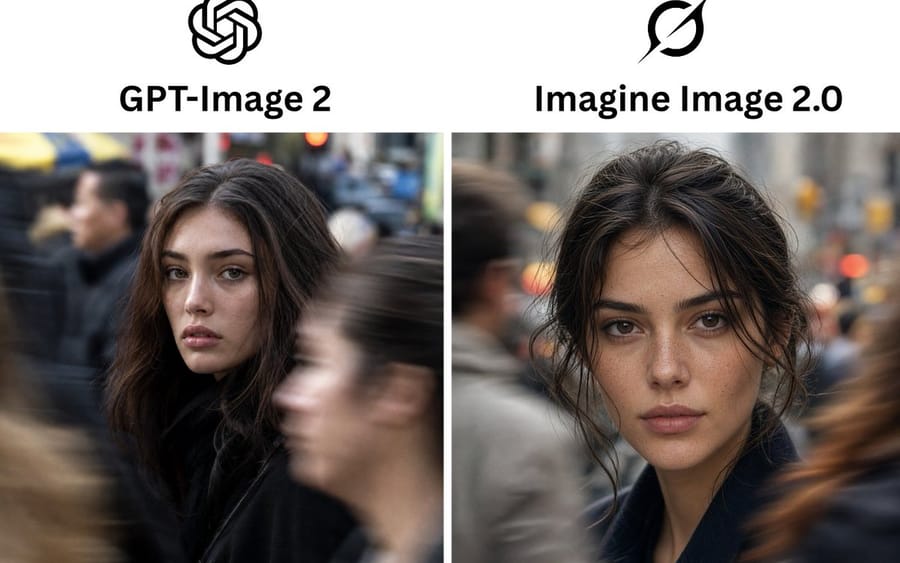
Creates a side-by-side social media comparison graphic of two AI image models using realistic urban portrait outputs.
Prompt
Objetivo: Crear un gráfico comparativo limpio lado a lado que muestre las salidas de dos modelos de imagen de IA como retratos callejeros realistas.

Lienzo: Imagen de comparación horizontal 3:2 para redes sociales, fondo blanco, alta resolución. Usa un diseño simple de dos columnas con un divisor vertical blanco y estrecho entre los paneles de imagen.

Diseño: El área del encabezado superior contiene exactamente 2 logotipos negros centrados sobre exactamente 2 nombres de modelo en negrita. Columna izquierda: Logotipo de nudo de OpenAI sobre el encabezado “{argument name="left model name" default="GPT-Image 2"}”. Columna derecha: Logotipo de círculo negro con barra diagonal estilo Grok sobre el encabezado “{argument name="right model name" default="Imagine Image 2.0"}”. Debajo de los encabezados hay exactamente 2 paneles de foto rectangulares del mismo tamaño: uno a la izquierda y otro a la derecha.

Contenido de la foto: Ambos paneles muestran un retrato callejero urbano cinematográfico y fotorrealista de la misma mujer joven en una ciudad concurrida. Ella tiene cabello {argument name="hair color" default="dark brown"}, maquillaje natural, cejas pobladas, labios suaves y una mirada directa y tranquila. Lleva un abrigo oscuro. El fondo es una acera de ciudad concurrida con peatones desenfocados por movimiento, poca profundidad de campo, tonos urbanos grises apagados y luces de tráfico cálidas con bokeh.

Panel de foto izquierdo: La mujer está ligeramente a la izquierda del centro, girada parcialmente hacia la cámara, con cabello suelto y voluminoso alrededor de su rostro. Un peatón grande y borroso cruza el primer plano a la derecha, ocultando parcialmente el área de la cara/cuerpo inferior; otra figura borrosa aparece a la izquierda. La imagen debe sentirse como una fotografía callejera real con cámara, con imperfecciones naturales y realismo documental.

Panel de foto derecho: La mujer está centrada más cerca de la cámara, mirando al frente con el cabello ligeramente despeinado y recogido suelto, con mechones que enmarcan el rostro. Su detalle facial es más nítido y pulido, con textura de piel y pecas visibles. Peatones borrosos pasan a ambos lados, incluyendo una figura gris a la izquierda y un desenfoque de movimiento marrón cálido a la derecha.

Estilo visual: Fotografía callejera fotorrealista con DSLR, luz natural, poca profundidad de campo, sensación de lente de 50 mm, textura de piel realista, gradación de color sutil y cinematográfica, alto detalle en los rostros, fuerte desenfoque de movimiento en los peatones que pasan, sin estilo de ilustración.

Texto y cantidad de elementos: Incluye exactamente 2 logotipos, exactamente 2 encabezados, exactamente 2 paneles de foto y exactamente 2 retratos femeninos principales. No agregues subtítulos adicionales, puntuaciones, etiquetas, bordes, marcas de agua o elementos de interfaz.Cómo usar este prompt
- 1Copia el prompt exactamente y pégalo en tu modelo preferido o en un proyecto de Ideart.
- 2Sustituye detalles de producto, sujeto, audiencia y estilo por tu propio contexto.
- 3Genera primero un resultado base y luego remezcla la dirección más fuerte en una campaña, serie de imágenes o concepto de vídeo.
Construir desde este prompt
Convierte un prompt de imagen en un proyecto creativo terminado.
Guarda el prompt, añade imágenes de referencia o notas y deja que Ideart dé forma al siguiente paso de producción desde el mismo hilo creativo.