
ImagenGPT Image 2
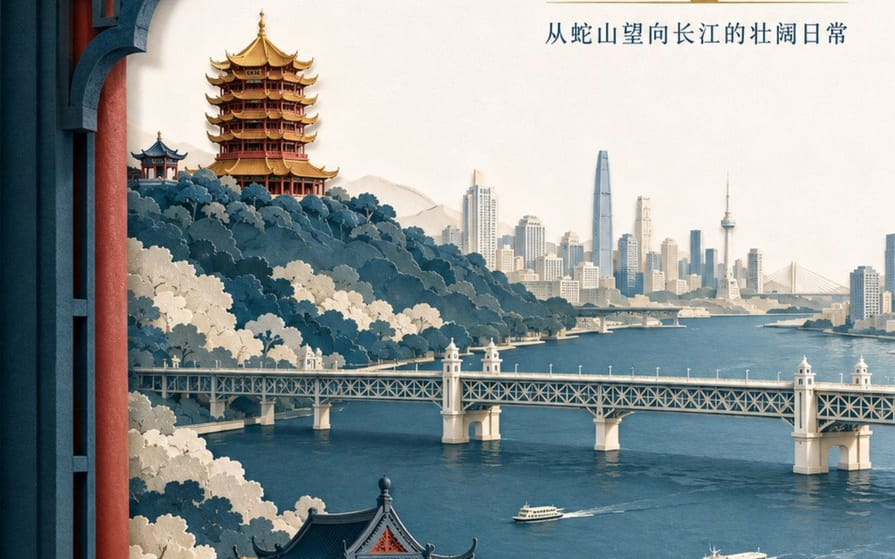
Layered Paper-Cut Illustration Poster
A detailed prompt for creating a sophisticated layered paper-cut illustration poster featuring Wuhan landmarks like the Yellow Crane Tower and the Yangtze River.
Prompt
Crea un póster de ilustración de papel recortado en capas de alta gama para la marca de turismo "{argument name="brand name" default="He Wang Wuhan"}" con el tema "{argument name="theme" default="Looking at the river from the tower, seeing the landscape skeleton of Wuhan at a glance"}" en formato vertical 3:4. La composición utiliza un encuadre de ventana en primer plano, con cinco a siete capas de papel grueso texturizado que forman la Colina de la Serpiente, la Torre de la Grulla Amarilla, el río Yangtsé, el Puente del río Yangtsé de Wuhan y el horizonte urbano de la orilla opuesta. La Torre de la Grulla Amarilla está situada en la cresta del fondo, con relaciones precisas entre aleros superpuestos, tejas vidriadas doradas y pilares bermellones. El Puente del río Yangtsé se extiende horizontalmente en el plano medio, con dos pequeños transbordadores en el río a escala controlada. Los bordes del papel son nítidos, con una iluminación suave uniforme desde la parte superior izquierda y sombras realistas entre las capas. Los colores son índigo, blanco cálido roto, rojo cinabrio y una pequeña cantidad de dorado para el foco visual. El título principal "{argument name="main title" default="Seeing the River City from the Tower"}" se coloca en el gran espacio en blanco de la parte superior derecha en dos líneas de tipografía Song moderna. El nombre de la marca "He Wang Wuhan" se coloca en la parte inferior izquierda en formato de sello de papel, manteniéndolo moderno en lugar de una imitación antigua.Cómo usar este prompt
- 1Copia el prompt exactamente y pégalo en tu modelo preferido o en un proyecto de Ideart.
- 2Sustituye detalles de producto, sujeto, audiencia y estilo por tu propio contexto.
- 3Genera primero un resultado base y luego remezcla la dirección más fuerte en una campaña, serie de imágenes o concepto de vídeo.
Explorar rutas de prompts cercanas
Modelo
Categorías
Construir desde este prompt
Convierte un prompt de imagen en un proyecto creativo terminado.
Guarda el prompt, añade imágenes de referencia o notas y deja que Ideart dé forma al siguiente paso de producción desde el mismo hilo creativo.