
ImagenGPT Image 2
Morning Sunlight Roomwear Portrait
A detailed cinematic portrait prompt capturing a calm morning scene of a woman in roomwear by a sunlit window with soft, realistic lighting and textures.
Prompt
Subject: {argument name="theme" default="Morning light on damp hair"}

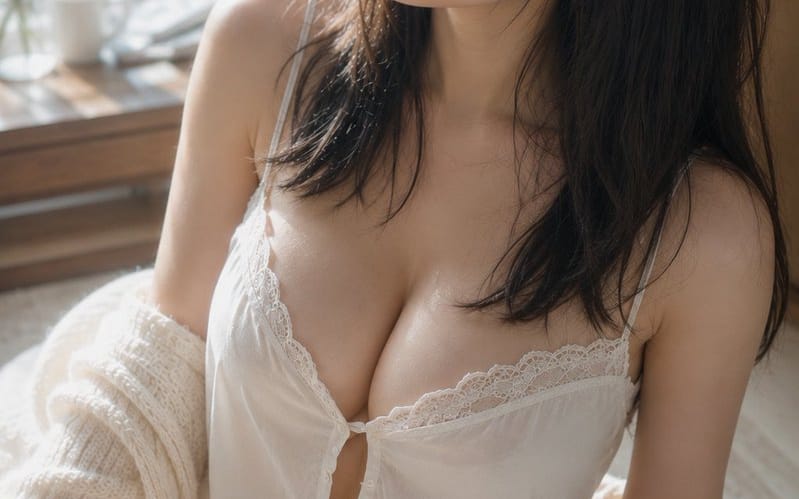
Subject: A vertical portrait of an {argument name="person" default="adult woman in white roomwear"} sitting on a rug by a bright window. The subject is positioned largely from the center to the right of the screen, showing from the top of the head to the thighs. The upper body occupies about two-thirds of the screen, leaving a soft background margin and the window on the left.

Character/Expression: Natural black semi-long hair. Thin strands of hair, slightly damp as if after a bath, run along the cheeks and neck, with thin bangs falling over the forehead. The head is slightly tilted toward the upper left of the screen, with a quiet gaze directed out the window. Relaxed eyes, slightly parted lips, and a calm expression with a hint of sleepiness remaining. Minimal makeup centered on pale beige and pink, showing natural skin with pores and fine hair.

Clothing/Pose: A white camisole with thin shoulder straps and delicate lace, and matching shorts. Small buttons and soft gathers at the chest, with the light fabric falling naturally with gravity. A cream-colored, coarsely knitted cardigan is dropped from the shoulders, hanging loosely over the elbows and forearms. The body is twisted slightly to the left, sitting with one leg bent toward the front in a natural posture with slightly offset shoulder heights.

Background/Light: A large window on the left. Outside the window, green leaves bathed in morning sun spread out in soft bokeh. A white cup, a small glass vase, and thin branches are placed sparingly on a wooden table by the window. The primary light is warm natural light streaming from the window at the top left. It creates soft highlights on the cheeks, bridge of the nose, collarbone, shoulders, arms, and thighs, while the right side of the hair and the back of the room sink into gentle shadows. Pale reflected light bounces back from the white cloth and floor.

Composition/Camera: Vertical 2:3. Close-up shot looking down from a slightly high position. A triangular composition with the face at the top center, the chest in the center, and the bent leg at the bottom left. The margin on the window side emphasizes the direction of the gaze, and the background is heavily blurred. 50mm equivalent, shallow depth of field near wide open. Focus is on the eyes and face, with the leg in the foreground and the window in the background softly blurred.

Texture/Style: A photorealistic indoor portrait shot only with natural light. Based on bright ivory and pale wood grains, with healthy skin tones and the green outside the window as subtle accent colors. Not overly smoothed, but precisely depicting skin texture, fine hair, the clumped feeling of damp hair, and the fibers of lace and knit. Low contrast with soft gradations like an elegant film photograph.

Negative: Underage-looking persons, unnatural faces, unnatural gazes, asymmetrical eyes, extra fingers, missing fingers, fusion of limbs, collapsed shoulders or joints, clothing digging in, unnatural transparency of fabric, hair or clothing defying gravity, shadows inconsistent with light sources, excessive skin correction, plastic-like skin, text, logos, watermarks.Cómo usar este prompt
- 1Copia el prompt exactamente y pégalo en tu modelo preferido o en un proyecto de Ideart.
- 2Sustituye detalles de producto, sujeto, audiencia y estilo por tu propio contexto.
- 3Genera primero un resultado base y luego remezcla la dirección más fuerte en una campaña, serie de imágenes o concepto de vídeo.
Construir desde este prompt
Convierte un prompt de imagen en un proyecto creativo terminado.
Guarda el prompt, añade imágenes de referencia o notas y deja que Ideart dé forma al siguiente paso de producción desde el mismo hilo creativo.