
ImagenGPT Image 2
Oriental Fantasy Celestial Realm
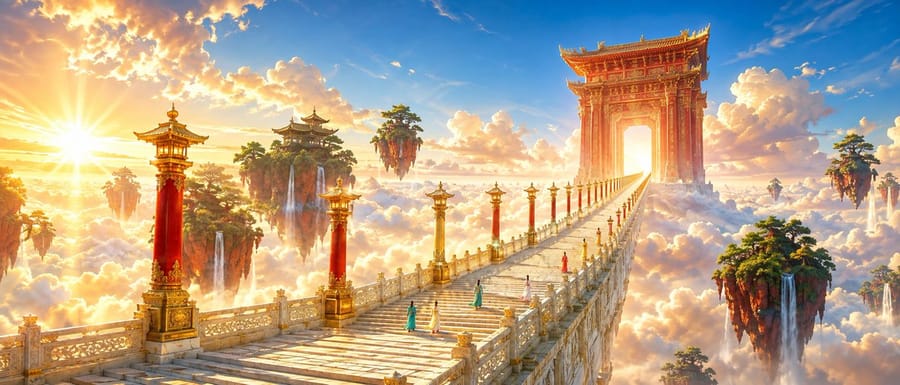
A complex cinematic prompt for a monumental oriental fantasy scene, featuring a golden jade staircase rising through a sea of clouds toward a celestial gate, inspired by traditional Xianxia aesthetics.
Prompt
Una escena cinematográfica brillante y magnífica de {argument name=\"theme\" default=\"oriental fantasy\"}, plano ultra panorámico cinematográfico. Perspectiva estricta de un punto, una gran escalera celestial pavimentada con jade dorado claro, que cruza un mar de nubes desde la esquina inferior izquierda y se reduce bruscamente hacia un punto de fuga en el tercio derecho del encuadre. Flanqueando las escaleras hay altos faroles en colores alternados {argument name=\"lamp post colors\" default=\"vermilion and gilding\"}, con su espaciado y tamaño disminuyendo según la profundidad. A lo lejos se alza una enorme puerta celestial tallada de color Danxia, con un cielo brillante que brilla a través de ella. Junto a las escaleras flotan varias islas montañosas rojas cubiertas de bosques de pinos esmeralda, con delgadas cascadas que caen en el mar de nubes blanco-dorado. {argument name=\"traveler count\" default=\"Five\"} jóvenes viajeros vestidos con túnicas largas en verde azulado, marfil y rojo coral ascienden las escaleras, todos vistos desde atrás y a una escala muy pequeña, sirviendo solo como referencia de tamaño. El cielo muestra un rico degradado de azul celeste y albaricoque dorado, con grandes nubes blancas iluminadas con bordes dorados cálidos por el sol poniente. La luz solar desde un ángulo bajo atraviesa la puerta desde la izquierda, creando siluetas claras a contraluz, rayos crepusculares y destellos estelares contenidos. Las sombras son azul-púrpura transparentes, evitando tonos grises. Una paleta de colores de alta luminosidad de azul celeste, albaricoque dorado, rojo cinabrio, verde esmeralda y blanco marfil, con alta saturación, colores luminosos, croma rico pero elegante y una separación limpia de cálidos y fríos. Los detalles arquitectónicos son precisos, el jade tiene texturas naturales y el dorado se usa solo para énfasis en los bordes. Fotograma de película cinematográfica, escala monumental, figuras humanas diminutas, fuerte perspectiva aérea, realismo fantástico refinado, sin gradación turbia, sin colores sombríos, sin niebla excesiva, sin texto, sin marca de agua.Cómo usar este prompt
- 1Copia el prompt exactamente y pégalo en tu modelo preferido o en un proyecto de Ideart.
- 2Sustituye detalles de producto, sujeto, audiencia y estilo por tu propio contexto.
- 3Genera primero un resultado base y luego remezcla la dirección más fuerte en una campaña, serie de imágenes o concepto de vídeo.
Construir desde este prompt
Convierte un prompt de imagen en un proyecto creativo terminado.
Guarda el prompt, añade imágenes de referencia o notas y deja que Ideart dé forma al siguiente paso de producción desde el mismo hilo creativo.