
이미지GPT Image 2
Twitter Profile Doodle Art Transformation
Converts a Twitter profile screenshot into a beautiful hand-drawn colored pencil doodle with a cute anime-style avatar.
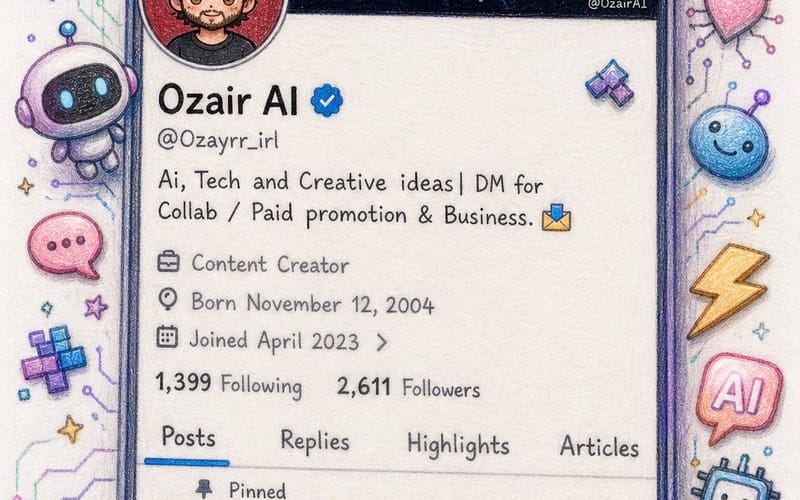
프롬프트
Create an image\nI'm sharing a screenshot of my real X (Twitter) profile. Recreate this as a beautiful hand-drawn colored pencil doodle illustration on white paper — same layout, same username {argument name="username" default="OzairAI"}, same follower counts, same pinned tweet content — but transform everything into cute doodle art style.\nStyle upgrades to add:\n— Profile picture: redraw as a chibi anime-style character with same face.\n— Banner: exactly same but drawn\n— Scatter cute AI-themed doodle stickers around the phone frame: tiny robots, circuit hearts, lightning bolts, pixel stars, glowing chat bubbles\n— Some stickers should break out of the phone border for a 3D pop-out illusion\n— Bio and tweets: keep same text but render in cute handwritten font style\n— Color palette: soft lavender, electric blue, warm gold, mint green\nVertical 9:13 format. Ultra photorealistic colored pencil texture, 8K, no extra text overlays, cinematic color grading.이 프롬프트 사용 방법
- 1프롬프트를 그대로 복사한 뒤 원하는 모델이나 Ideart 프로젝트에 붙여넣으세요.
- 2제품, 주제, 대상, 스타일 세부사항을 자신의 컨텍스트로 교체하세요.
- 3먼저 기준 결과를 생성한 뒤 가장 강한 방향을 캠페인, 이미지 세트 또는 비디오 콘셉트로 리믹스하세요.
이 프롬프트로 제작
이미지 프롬프트를 완성된 크리에이티브 프로젝트로 바꾸세요.
프롬프트를 저장하고 참조 이미지나 노트를 추가한 뒤 Ideart가 같은 창작 스레드에서 다음 제작 단계를 만들게 하세요.