
ภาพAI
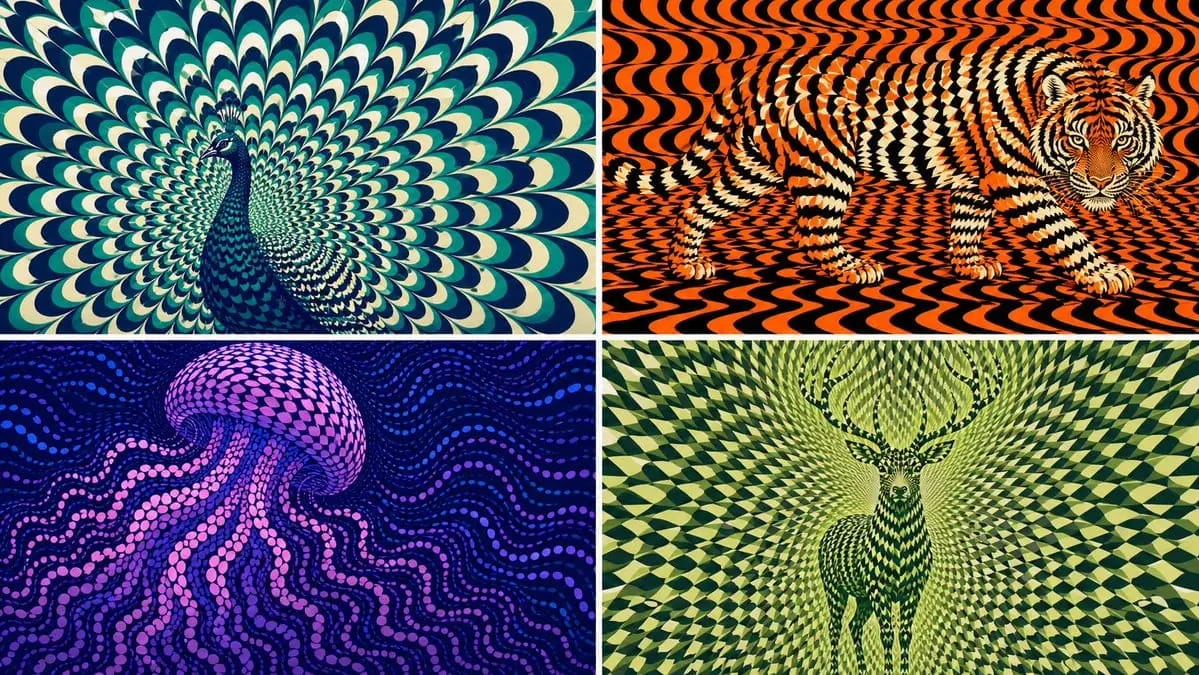
2x2 grid, 16:9 AI picks subjects class OpArtSubjectField
2x2 grid, 16:9 AI picks subjects class OpArtSubjectField: def __init__(self, subject="[Subject]", palette="[Palette]"): self. style = "high-contrast optical art, kinetic poster, graphic abstraction" self.canvas = "full-bleed pattern...
พรอมต์
2x2 grid, 16:9 AI เลือกตัวแบบ class OpArtSubjectField:
      def __init__(self, subject="[Subject]", palette="[Palette]"):
         self. style = "high-contrast optical art, kinetic poster, graphic abstraction"
         self.canvas = "full-bleed pattern field"
         self.subject = subject
         self.palette = AI_INFER("3-5 สีที่เข้ากับอารมณ์ ถิ่นที่อยู่ สัญลักษณ์ หรือพลังงานแบรนด์ของ SUBJECT")
      def infer_subject_silhouette(self):
         return AI_INFER(
             "เงา ท่าทาง โครงร่าง หรือโปรไฟล์ที่จดจำได้มากที่สุดของ SUBJECT"
         )
      def build_pattern_field(self):
         return """
         เติมเต็มแคนวาสทั้งหมดด้วยหน่วยซ้ำ ๆ หลายร้อยหรือหลายพันหน่วย
         หน่วยอาจเป็นกลีบดอก เกล็ด กระเบื้อง พระจันทร์เสี้ยว แถบ คลื่น แผ่นกลม ขนนก ใบมีด เศษชิ้น หรือเครื่องหมายคล้ายสัญลักษณ์
         ตัวแบบไม่ได้ถูกวาดเส้นรอบนอกโดยตรง
         ตัวแบบปรากฏขึ้นเพราะหน่วยซ้ำเปลี่ยนขนาด ทิศทาง ระยะห่าง ความสว่าง และสีภายในพื้นที่ของตัวแบบ
         หน่วยพื้นหลังยังคงใช้ภาษาภาพเดียวกันแต่ไหลต่างกัน
         """
      def illusion_rules(self):
         return """
         จากระยะไกล: SUBJECT ต้องอ่านออก
         จากระยะใกล้: เห็นเพียงหน่วยนามธรรมที่ซ้ำกัน
         ไม่มีเส้นขอบที่แข็ง ไม่มีการวาดโดยตรง ไม่มีภาพเงาที่แปะทับ
         ลวดลายเองเป็นตัวกำหนดรูปร่าง
         """
  # EXECUTE:
# เรนเดอร์ SUBJECT เป็นสนาม kinetic Op Art ที่หน่วยซ้ำก่อตัวเป็นภาพที่ซ่อนอยู่วิธีใช้พรอมต์นี้
- 1คัดลอกพรอมต์ตามเดิม แล้ววางลงในโมเดลที่ต้องการหรือโปรเจกต์ Ideart
- 2แทนที่รายละเอียดสินค้า หัวเรื่อง กลุ่มเป้าหมาย และสไตล์ด้วยบริบทของคุณ
- 3สร้างผลลัพธ์ฐานก่อน แล้วรีมิกซ์ทิศทางที่แข็งแรงที่สุดเป็นแคมเปญ ชุดภาพ หรือคอนเซปต์วิดีโอ
สำรวจเส้นทางพรอมต์ใกล้เคียง
โมเดล
สร้างต่อจากพรอมต์นี้
เปลี่ยนพรอมต์ ภาพ ให้เป็นโปรเจกต์สร้างสรรค์ที่เสร็จสมบูรณ์
บันทึกพรอมต์ เพิ่มรูปอ้างอิงหรือโน้ต แล้วให้ Ideart สร้างขั้นตอนการผลิตถัดไปจากเธรดสร้างสรรค์เดียวกัน