
ภาพAI
Def init(self, subject= Subject , particle= Particle Type )
class procedural_particle_sim: def __init__(self, subject="[Subject]", particle="[Particle Type]"): self.canvas = "infinite light-grey 3d void, soft shadow-catcher floor, studio ambient occlusion." self.geometry = f"a 3d mesh of...
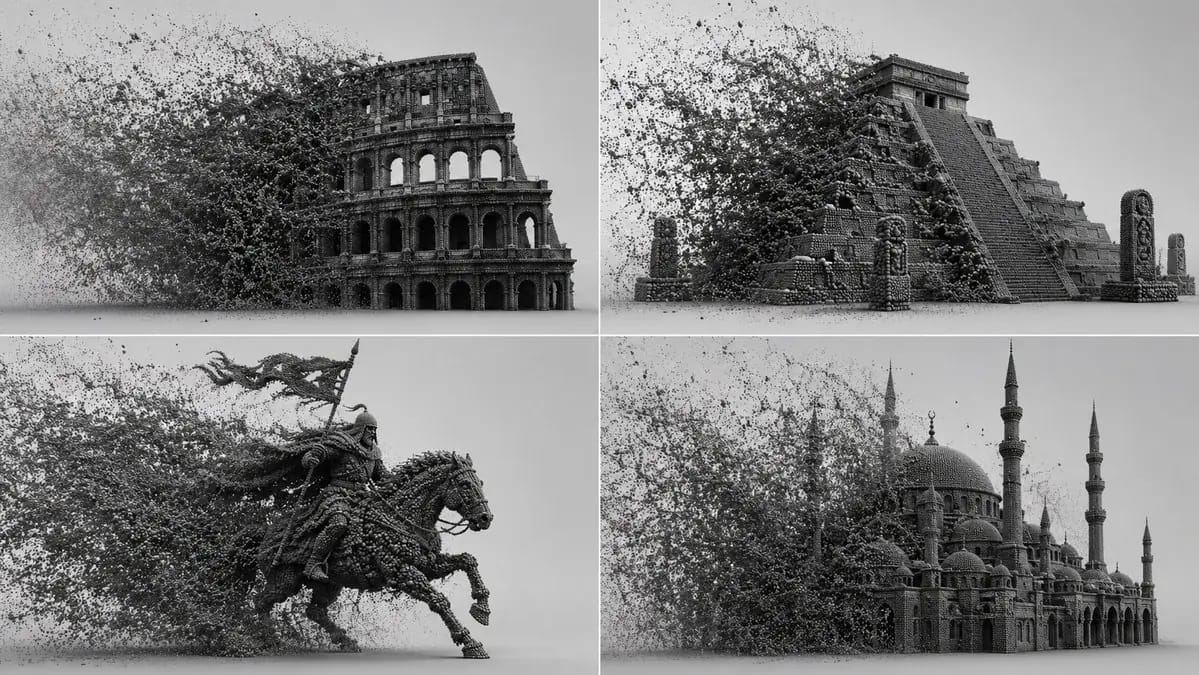
พรอมต์
class procedural_particle_sim:
    def __init__(self, subject="[Subject]", particle="[Particle Type]"):
        self.canvas = "infinite light-grey 3d void, soft shadow-catcher floor, studio ambient occlusion."
        self.geometry = f"a 3d mesh of {self.subject} completely voxelized into thousands of tiny, dense {self.particle}s."

    def apply_kinetic_forces(self, narrative="[Force Narrative]"):
        # ai auto-inference: calculate wind, turbulence, and attractors
        force_vector = infer_directional_velocity(narrative)
        swarm_logic = f"a massive, dense cloud of {self.particle}s filling the left frame, trailing and interacting with the {self.subject} via {force_vector}."
        return swarm_logic

    def render_settings(self):
        return "octane render, path tracing, perfectly spherical particles, deep micro-shadows between intersecting points, monochrome dark grey material."

render_simulation(procedural_particle_sim())วิธีใช้พรอมต์นี้
- 1คัดลอกพรอมต์ตามเดิม แล้ววางลงในโมเดลที่ต้องการหรือโปรเจกต์ Ideart
- 2แทนที่รายละเอียดสินค้า หัวเรื่อง กลุ่มเป้าหมาย และสไตล์ด้วยบริบทของคุณ
- 3สร้างผลลัพธ์ฐานก่อน แล้วรีมิกซ์ทิศทางที่แข็งแรงที่สุดเป็นแคมเปญ ชุดภาพ หรือคอนเซปต์วิดีโอ
สำรวจเส้นทางพรอมต์ใกล้เคียง
โมเดล
สร้างต่อจากพรอมต์นี้
เปลี่ยนพรอมต์ ภาพ ให้เป็นโปรเจกต์สร้างสรรค์ที่เสร็จสมบูรณ์
บันทึกพรอมต์ เพิ่มรูปอ้างอิงหรือโน้ต แล้วให้ Ideart สร้างขั้นตอนการผลิตถัดไปจากเธรดสร้างสรรค์เดียวกัน