
ResimNano Banana Pro
Sosyal Medya Tanıtım Kompozit İstemci
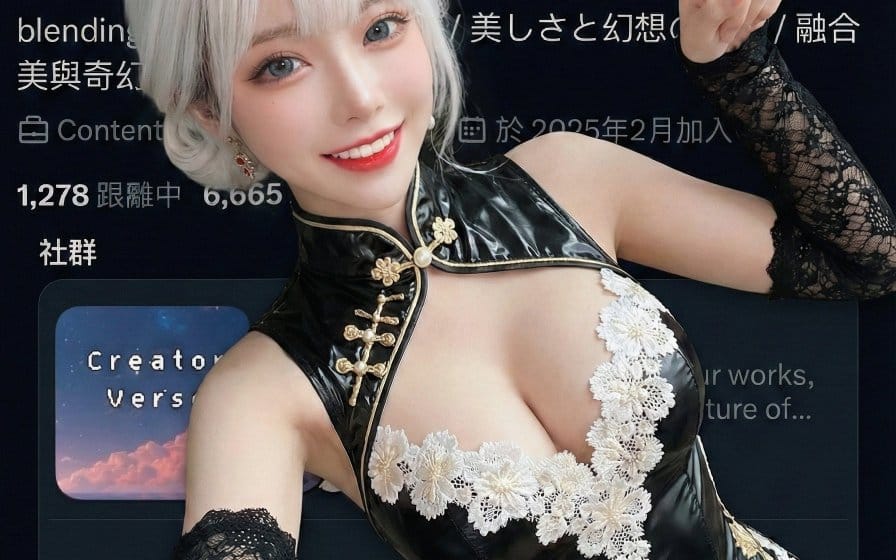
Bir karakterin (referans bir görüntüye dayalı olarak) bir sosyal medya profil sayfasının ekran görüntüsüne bindirildiği ve 'Takip Et' düğmesini aktif olarak işaret ettiği kompozit bir görüntü oluşturmak için tasarlanmış, oldukça yapılandırılmış bir Nano Banana Pro istemi. Kimlik tutarlılığı, yüksek açılı bir selfie perspektifi ve abone ol düğmesine basmayı taklit etmek için ayrıntılı el hareketleri belirtilerek bir influencer tanıtım stili hedeflenmektedir.
Prompt
```json
{
  "edit_type": "creative_composite_layering",
  "source": {
    "_hint": "Temel mantık: Karakter (Referans 1) Arka Plan Resminin (Referans 2) ÜZERİNE yerleştirildi.",
    "mode": "EDIT",
    "reference_images": {
      "first": "foreground_character_person",
      "second": "background_scenery_or_pattern"
    },
    "preserve_from_first": {
      "same_person_or_group": true,
      "same_faces": true,
      "same_hairstyles": true,
      "same_outfits": true
    }
  },
  "identity": {
    "keep_identity_consistent": true,
    "expression": "bright_engaging_smile_at_camera"
  },
  "camera_effect": {
    "_hint": "El ve yüz arasında derinlik hissi yaratan, yüksek açılı selfie tarzı.",
    "perspective": "high_angle_shot_looking_down",
    "style": "social_media_call_to_action",
    "depth_of_field": "focus_on_face_and_pointing_finger",
    "framing": "character_centered_with_space_at_top_right"
  },
  "pose": {
    "_hint": "Ana eylem: Yatar pozisyonda ancak 'Takip Et' düğmesi alanını (Sağ Üst) aktif olarak işaret ediyor.",
    "pose_style": "lying_down_or_reclining_on_back",
    "face_direction": "looking_directly_up_into_lens",
    "hand_gestures": {
      "right_hand_action": "pointing_index_finger",
      "target_direction": "upper_right_corner_45_degrees",
      "purpose": "mimicking_pressing_subscribe_button",
      "arm_position": "extended_towards_camera_top_right"
    },
    "body_language": "inviting_and_energetic",
    "style_tags": [
      "kpop_idol_fan_service",
      "influencer_promo_style",
      "dynamic_perspective"
    ]
  },
  "background_integration": {
    "_hint": "İkinci referans görsel arka plan/zemin olarak kullanılmıştır.",
    "method": "full_background_replacement",
    "target_area": "entire_canvas_behind_character",
    "content_source": "reference_image_second",
    "perspective_match": "flat_lay_style",
    "rules": {
      "character_must_be_top_layer": true,
      "leave_space_in_upper_right_for_ui": true
    }
  },
  "composition": {
    "_hi": ""
  }
}
```Bu prompt nasıl kullanılır
- 1Prompt’u aynen kopyalayın ve tercih ettiğiniz modele veya Ideart projesine yapıştırın.
- 2Ürün, konu, hedef kitle ve stil ayrıntılarını kendi bağlamınızla değiştirin.
- 3Önce bir temel sonuç üretin, ardından en güçlü yönü kampanyaya, görsel serisine veya video konseptine remixleyin.
Yakındaki prompt yollarını keşfet
Model
Bu prompt’tan inşa et
Bir resim prompt’unu tamamlanmış yaratıcı projeye dönüştürün.
Prompt’u kaydedin, referans görseller veya notlar ekleyin ve Ideart’ın aynı yaratıcı akıştan sonraki üretim adımını şekillendirmesine izin verin.