
ResimAI
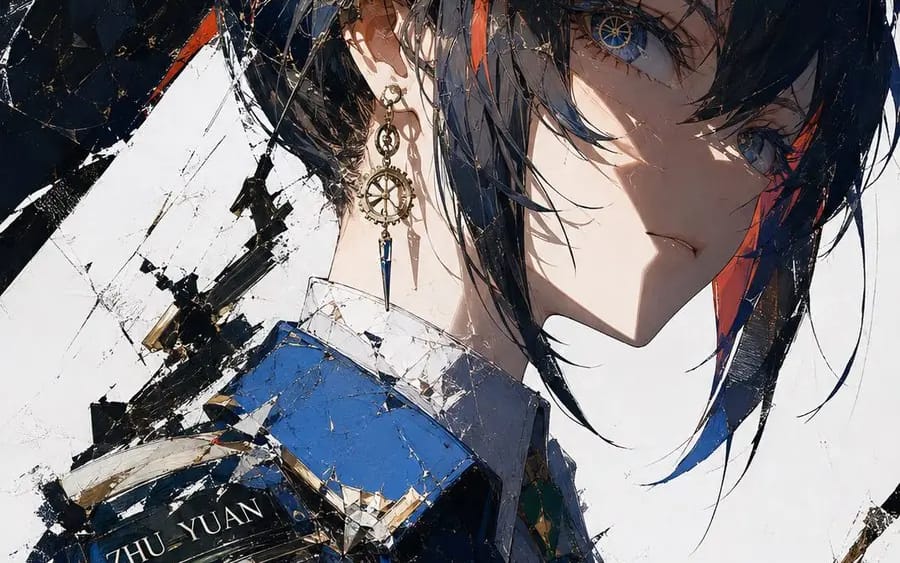
断刃时械刮刀风
{ "style_name": "断刃时械刮刀风", "medium": "数字刮刀油画、厚涂插画", "composition": "局部特写,撕裂笔刷裁切边缘,对角线构图,大面积留白", "lighting": "硬质侧逆光,锐利明暗交界,高对比度光影", "color_grading": "钴蓝+鎏金双色高对比,暖肤色过渡,纯白基底,低杂色", "texture": "刮刀堆叠笔触肌理,硬质油画质感,金属高光锐利", "visual_keywords":...
Prompt
{ "style_name": "断刃时械刮刀风",
  "medium": "数字刮刀油画、厚涂插画",
  "composition": "局部特写,撕裂笔刷裁切边缘,对角线构图,大面积留白",
  "lighting": "硬质侧逆光,锐利明暗交界,高对比度光影",
  "color_grading": "钴蓝+鎏金双色高对比,暖肤色过渡,纯白基底,低杂色",
  "texture": "刮刀堆叠笔触肌理,硬质油画质感,金属高光锐利",
  "visual_keywords": "蒸汽朋克、钟表瞳孔、齿轮配饰、破碎美学、二次元冷感插画",
  "constraints": "画面洁净,无多余杂质,结构精准,笔触统一硬朗,克制特效",
  "output_specs": "8K高清,插画精度,层次肌理完整"
}

n=10,角色为[角色名]Bu prompt nasıl kullanılır
- 1Prompt’u aynen kopyalayın ve tercih ettiğiniz modele veya Ideart projesine yapıştırın.
- 2Ürün, konu, hedef kitle ve stil ayrıntılarını kendi bağlamınızla değiştirin.
- 3Önce bir temel sonuç üretin, ardından en güçlü yönü kampanyaya, görsel serisine veya video konseptine remixleyin.
Yakındaki prompt yollarını keşfet
Model
Kategoriler
Bu prompt’tan inşa et
Bir resim prompt’unu tamamlanmış yaratıcı projeye dönüştürün.
Prompt’u kaydedin, referans görseller veya notlar ekleyin ve Ideart’ın aynı yaratıcı akıştan sonraki üretim adımını şekillendirmesine izin verin.