
Hình ảnhGPT Image 2
AI Model Routing Comparison Infographic
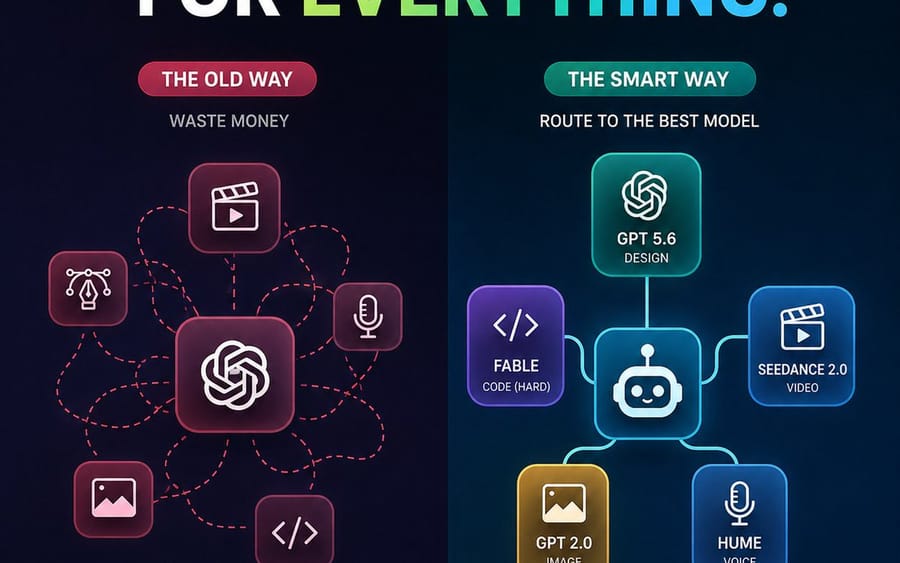
A square social media infographic comparing chaotic all-GPT usage with smart task-based AI model routing.
Prompt
Tạo một infographic công nghệ tương lai tối màu, hình vuông tỉ lệ 1:1 cho mạng xã hội, so sánh hai cách tiếp cận quy trình làm việc AI. Khung vẽ: 768x768 hoặc tương tự, nền chuyển từ xanh navy đậm sang đen với họa tiết lưới chấm mờ và một đường chia dọc ở giữa. Ở trên cùng, đặt một tiêu đề lớn in đậm viết hoa: “STOP USING GPT FOR {argument name="headline word" default="EVERYTHING"}.” Các từ “STOP USING GPT FOR” màu trắng, và từ cuối cùng là gradient từ trái sang phải từ xanh lá chanh sang xanh lam cyan, với dấu chấm màu cyan. Dùng phông chữ sans-serif đậm, sạch sẽ, độ tương phản cao, kết xuất sắc nét như vector.

Bố cục: hai cột cạnh nhau. Cột bên trái được dán nhãn là quy trình tồi, cột bên phải là quy trình cải tiến. Bên trái có chủ đề đỏ/hồng với nhãn dạng viên thuốc ghi “THE OLD WAY,” một phụ đề nhỏ “WASTE MONEY,” và biểu tượng nút thắt kiểu GPT/OpenAI hình vuông bo góc ở trung tâm. Xung quanh nó có đúng 5 biểu tượng tác vụ hình vuông bo góc nhỏ hơn được nối bằng các đường định tuyến đứt nét đỏ lộn xộn: 1 biểu tượng clapper/play video ở phía trên trung tâm, 2 biểu tượng bút vẽ/Bezier thiết kế ở bên trái, 3 biểu tượng micrô ở bên phải, 4 biểu tượng hình ảnh/ảnh ở phía dưới bên trái, 5 biểu tượng dấu ngoặc mã ở phía dưới bên phải. Các đường đứt nét lộn xộn uốn vòng và giao nhau, thể hiện sự hỗn loạn.

Cột bên phải có chủ đề xanh mòng két/xanh dương với nhãn dạng viên thuốc ghi “THE SMART WAY,” một phụ đề nhỏ “ROUTE TO THE BEST MODEL,” và biểu tượng bộ định tuyến robot hình vuông bo góc ở trung tâm. Kết nối nó bằng các đường liền mạch phát sáng sạch sẽ đến đúng 5 thẻ mô hình: 1 thẻ trên cùng với biểu tượng nút thắt OpenAI được dán nhãn “GPT 5.6” và “DESIGN,” 2 thẻ màu tím bên trái với dấu ngoặc mã được dán nhãn “{argument name="coding model" default="FABLE"}” và “CODE (HARD),” 3 thẻ màu xanh dương bên phải với biểu tượng clapper/play được dán nhãn “{argument name="video model" default="SEEDANCE 2.0"}” và “VIDEO,” 4 thẻ màu vàng phía dưới bên trái với biểu tượng hình ảnh được dán nhãn “{argument name="image model" default="GPT 2.0"}” và “IMAGE,” 5 thẻ màu xanh dương phía dưới bên phải với biểu tượng micrô được dán nhãn “{argument name="voice model" default="HUME"}” và “VOICE.” Dùng các thẻ glassmorphism bo góc với viền neon và ánh sáng mềm.

Chú thích dưới cùng: bên dưới cột trái, đặt một thanh trạng thái bo góc viền đỏ với biểu tượng X đỏ và văn bản “EXPENSIVE. CHAOTIC. INEFFICIENT.” Bên dưới cột phải, đặt một thanh trạng thái bo góc viền xanh mòng két/xanh lá với biểu tượng dấu kiểm xanh lá và văn bản “SMARTER. CHEAPER. BETTER RESULTS.” Giữ tất cả văn bản dễ đọc, căn giữa và căn thẳng hàng. Dùng độ tương phản mạnh, phong cách tiếp thị SaaS hiện đại, gradient tinh tế, điểm nhấn neon, không thêm logo, không watermark, không thêm văn bản nào ngoài các nhãn đã chỉ định.Cách dùng prompt này
- 1Sao chép prompt nguyên văn rồi dán vào mô hình bạn chọn hoặc dự án Ideart.
- 2Thay chi tiết sản phẩm, chủ thể, đối tượng và phong cách bằng ngữ cảnh của bạn.
- 3Tạo một kết quả nền trước, rồi remix hướng mạnh nhất thành chiến dịch, bộ ảnh hoặc concept video.
Xây từ prompt này
Biến prompt hình ảnh thành một dự án sáng tạo hoàn chỉnh.
Lưu prompt, thêm ảnh tham chiếu hoặc ghi chú, và để Ideart định hình bước sản xuất tiếp theo trong cùng luồng sáng tạo.