
Hình ảnhGPT Image 2
ChatGPT Mobile Photo Carousel Screenshot
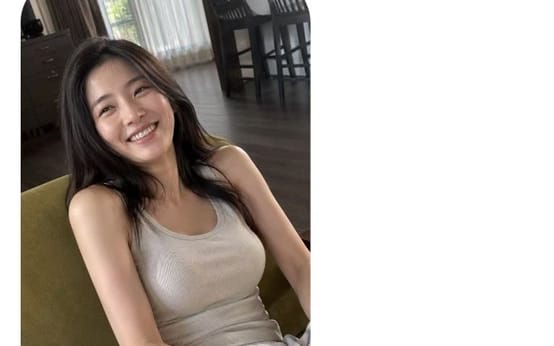
Generates a realistic ChatGPT iPhone screenshot featuring a Chinese image prompt and a candid portrait result with thumbnail variations.
Prompt
Mục tiêu: Tạo một ảnh chụp màn hình điện thoại dọc chân thực của ứng dụng ChatGPT trên di động đang hiển thị kết quả tạo ảnh, trong giao diện iOS sạch sẽ.

Khung vẽ: Ảnh chụp màn hình điện thoại dọc tỉ lệ 9:16, nền trắng, các cạnh vùng an toàn của iPhone bo tròn, thanh home indicator iOS màu đen ở dưới cùng. Thanh trạng thái ở trên cùng hiển thị 9:33 ở bên trái và đúng 4 mục trạng thái bên phải: các vạch tín hiệu di động, biểu tượng Wi-Fi, phần trăm pin hiển thị 51, và hình dạng pin.

Bố cục: Hàng điều hướng trên cùng chứa đúng 3 điều khiển: biểu tượng menu hamburger ở bên trái, biểu tượng soạn/chỉnh sửa nhỏ gần phía trên bên phải, và menu ba chấm ở tận cùng bên phải. Bên dưới nó, đặt một bong bóng tin nhắn người dùng bo tròn màu xám nhạt căn hơi lệch sang phải. Dưới bong bóng, thêm một nhãn phần màu xám nhỏ ghi “思考”. Dưới nhãn, hiển thị một thẻ ảnh được tạo lớn với các góc bo tròn, sau đó là một dải ngang gồm đúng 8 ảnh thu nhỏ. Ở dưới cùng, hiển thị một thanh nhập liệu bo tròn với biểu tượng dấu cộng, văn bản gợi ý, biểu tượng micrô, và một nút thoại hình tròn màu xanh dương.

Nội dung văn bản: Bong bóng tin nhắn người dùng chứa văn bản tiếng Trung: “{argument name="prompt text" default="Masochist系男友视角斜侧手持手机拍摄风格,风格清新干净,一种随性松弛氛围感,随手记录。绝美,表情随机;ar9:16\n\n连续10张单独图"}”. Văn bản gợi ý ở ô nhập liệu dưới cùng ghi “询问 ChatGPT”.

Chủ thể ảnh chính: Hình ảnh lớn được tạo là một bức chân dung cầm tay đời thường của {argument name="character description" default="a young East Asian woman with long dark hair"} đang ngồi trong nhà trên một chiếc ghế bọc nệm màu xanh lá, mỉm cười ấm áp về phía máy ảnh. Cô ấy mặc {argument name="outfit" default="a beige ribbed tank top and loose white pants"}. Tư thế mang cảm giác thư giãn và tự nhiên, được chụp từ góc máy điện thoại hơi cao, nghiêng theo góc nhìn bạn trai. Hai tay cô ấy đặt tự nhiên gần đùi, biểu cảm tươi sáng và tự nhiên, và ánh sáng là ánh sáng cửa sổ ban ngày dịu nhẹ.

Môi trường trong ảnh: Một phòng khách/phòng ăn ấm cúng trong căn hộ với sàn gỗ tối màu, rèm trắng mỏng, rèm hai bên sẫm hơn, một cửa sổ nhìn ra cây xanh bên ngoài, và một bàn ăn với những chiếc ghế cao tối màu ở phía sau. Giữ bức ảnh chân thực, hơi không hoàn hảo, và tự nhiên thay vì được trau chuốt như ảnh studio.

Lớp phủ điều khiển: Trên thẻ ảnh lớn, bao gồm đúng 2 nút phủ hình tròn mờ gần phía dưới: một nút bên trái có nhãn “编辑” và một nút bên phải với biểu tượng mũi tên tải lên/chia sẻ. Dải ảnh thu nhỏ chứa đúng 8 bản xem trước nhỏ bo tròn hiển thị các bức chân dung tương tự khác của cùng người phụ nữ; ảnh thu nhỏ cuối cùng được chọn với đường viền sáng mờ nhẹ.

Phong cách hình ảnh: Ảnh chụp màn hình iOS chân thực như ảnh chụp, lề trắng sạch sẽ, các thành phần giao diện màu xám dịu, khoảng cách ứng dụng di động chính xác, kiểu chữ giao diện tiếng Trung tự nhiên, không có hình mờ thừa, không có bảng bổ sung, không có hình ảnh được tạo thêm ngoài 1 ảnh chính và 8 ảnh thu nhỏ.Cách dùng prompt này
- 1Sao chép prompt nguyên văn rồi dán vào mô hình bạn chọn hoặc dự án Ideart.
- 2Thay chi tiết sản phẩm, chủ thể, đối tượng và phong cách bằng ngữ cảnh của bạn.
- 3Tạo một kết quả nền trước, rồi remix hướng mạnh nhất thành chiến dịch, bộ ảnh hoặc concept video.
Xây từ prompt này
Biến prompt hình ảnh thành một dự án sáng tạo hoàn chỉnh.
Lưu prompt, thêm ảnh tham chiếu hoặc ghi chú, và để Ideart định hình bước sản xuất tiếp theo trong cùng luồng sáng tạo.