
BildAI
Do this for 4 unforgettable days in human history 16:9
do this for 4 unforgettable days in human history 16:9, 2x2 grid: CONCEPT ANCHOR 1: "Stylized 3D animated rebel character — expressive oversized eyes, strong attitude pose, streetwear details, colorful hair, soft cinematic toy-like...
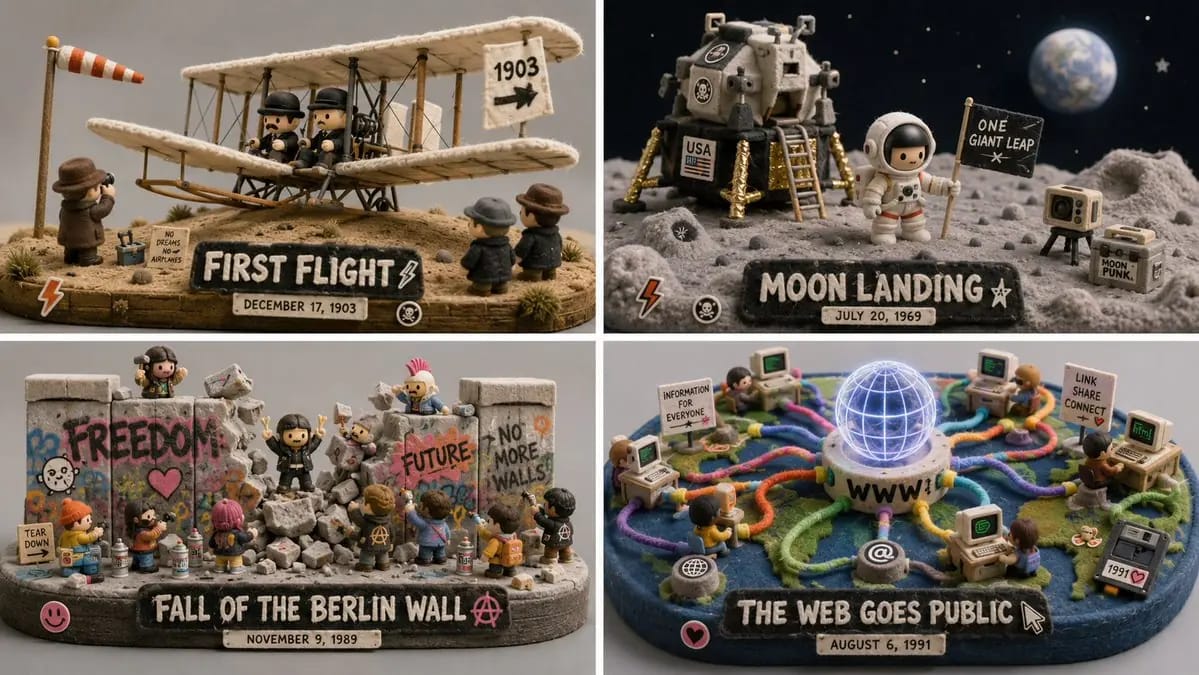
Mach das für 4 unvergessliche Tage in der Menschheitsgeschichte 16:9, 2x2 grid: KONZEPTANKER 1: "Stilisierte 3D-animierte Rebell-Figur — ausdrucksstarke übergroße Augen, starke Attitüde-Pose, Streetwear-Details, bunte Haare, weiches filmisches spielzeugartiges Rendering" :: KONZEPTANKER 2: "Flauschige grüne minimalistische Spielzeugwelt — moosige Textur, abgerundete Bäume, weiche Filzoberflächen, winzige Häuser, sanfte surreale Kreaturen, ruhiger grauer Hintergrund" :: KONZEPTANKER 3: "Isometrische Miniatur-Szene — kleine Requisiten, winziges Environmental Storytelling, Inszenierung im Puppenhaus-Maßstab, saubere Studiobeleuchtung" ANWEISUNG: Finde das exakte visuelle Zentrum dieser drei Konzepte. Ignoriere die wörtliche Figur, den Mülleimer, Tiere und Raum-Referenzen. Extrahiere nur die Stil- und Materiallogik. Render [Subject] als ein weiches, aber rebellisches Designer-Spielzeug-Diorama. STILREGELN: - Verwandle das Subjekt in einen stilisierten 3D-Charakter, ein Objekt, eine Kreatur oder eine Umgebung mit klarer Attitüde und ausdrucksstarker Formsprache. - Verwende weichen Filz, Moos, gestrickte Fasern, flauschiges Flocking, matten Ton und vinylartige Oberflächen. - Füge kleine Straßen- oder Alltagsdetails hinzu: Aufkleber, Kratzer, Requisiten, Miniaturgegenstände, Schilder, Behälter, Werkzeuge oder persönliche Gegenstände, die aus dem Subjekt abgeleitet werden. - Halte die Welt minimal und galerieartig, mit ruhigem grauem oder gedämpftem Pastellhintergrund. - Verwende leuchtende Akzentfarben nur dort, wo sie wichtig sind: haarähnliche Formen, graffitiartige Markierungen, Symbole, Accessoires, winzige Requisiten. - Mische Weichheit mit Rebellion: niedliche Oberflächentextur, aber selbstbewusste Pose und grafische Kante. - Verwende flache Studiobeleuchtung und eine saubere Produktaufnahme-Präsentation. AUSGABE: Eine sammelbare flauschige Designer-Spielzeug-Szene, in der [Subject] weich, ausdrucksstark, leicht punk und sehr haptisch wird.
So verwendest du diesen Prompt
- 1Kopiere den Prompt exakt und füge ihn dann in dein bevorzugtes Modell oder Ideart-Projekt ein.
- 2Ersetze Produkt-, Motiv-, Zielgruppen- und Stildetails durch deinen eigenen Kontext.
- 3Generiere zuerst ein Basisergebnis und remixe dann die stärkste Richtung in eine Kampagne, Bildserie oder ein Videokonzept.
Nahe Prompt-Pfade erkunden
Modell
Aus diesem Prompt bauen
Verwandle einen bild-Prompt in ein fertiges Kreativprojekt.
Speichere den Prompt, füge Referenzbilder oder Notizen hinzu und lass Ideart den nächsten Produktionsschritt aus demselben kreativen Thread formen.