
BildGPT Image 2
Moody Engagement Party Invitation
A cinematic wedding invitation design featuring a couple running through a dusk meadow beneath glowing handwritten engagement text.
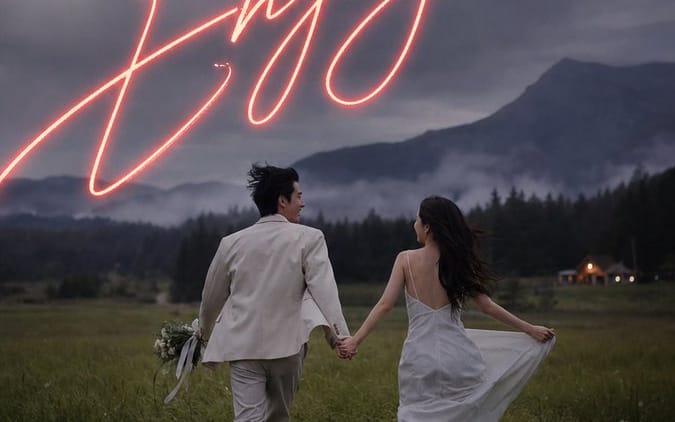
Create a vertical cinematic engagement party invitation poster using a moody outdoor photo-realistic style. The scene shows an engaged couple from behind, holding hands and running away through a dark green meadow at dusk toward misty forested mountains under a dramatic cloudy blue-gray sky. The groom wears a light cream suit and carries a small bouquet with trailing ribbons in his left hand; the bride wears a flowing white slip-style dress with an open back, holding the skirt out slightly as her long dark hair blows in the wind. Add a tiny warm-lit cabin or venue in the far right background, soft fog in the valley, natural film grain, low-contrast shadows, romantic editorial wedding photography, atmospheric and slightly underexposed. Overlay elegant invitation typography: at the top, small widely spaced uppercase serif text reading “PLEASE JOIN US FOR AN”, beneath it larger spaced uppercase serif text reading “ENGAGEMENT PARTY”. Across the upper-middle sky, place huge glowing handwritten neon script in warm coral-pink reading “{argument name="main script text" default="We're Engaged"}”, with realistic neon bloom and long sweeping strokes extending partly off the sides. Near the bottom center, add small centered white serif event details in four stacked groups: “{argument name="date" default="06.21.2025"}”, “AT {argument name="time" default="6:00 PM"}”, then larger spaced uppercase “{argument name="venue name" default="GREENFIELD ESTATE"}”, then small spaced uppercase “123 MEADOW LANE” and “WILLOWBROOK, OR”, and finally “RECEPTION TO FOLLOW”. Use a 9:16 portrait invitation layout, refined luxury wedding aesthetic, all text centered, crisp white letterspacing, no border, no watermark, keep the couple in the lower half and the glowing script dominant in the sky.So verwendest du diesen Prompt
- 1Kopiere den Prompt exakt und füge ihn dann in dein bevorzugtes Modell oder Ideart-Projekt ein.
- 2Ersetze Produkt-, Motiv-, Zielgruppen- und Stildetails durch deinen eigenen Kontext.
- 3Generiere zuerst ein Basisergebnis und remixe dann die stärkste Richtung in eine Kampagne, Bildserie oder ein Videokonzept.
Aus diesem Prompt bauen
Verwandle einen bild-Prompt in ein fertiges Kreativprojekt.
Speichere den Prompt, füge Referenzbilder oder Notizen hinzu und lass Ideart den nächsten Produktionsschritt aus demselben kreativen Thread formen.