
BildAI
Four-ink screen print
Four-ink screen print. Four people still working after everyone left. CITY BEAT — night session 02 OPEN SIGNAL — channel 08 / all night HIVE MIND — rooftop batch 07 FULL TORQUE — shift 04 / open late Locked: – four inks total: bone...
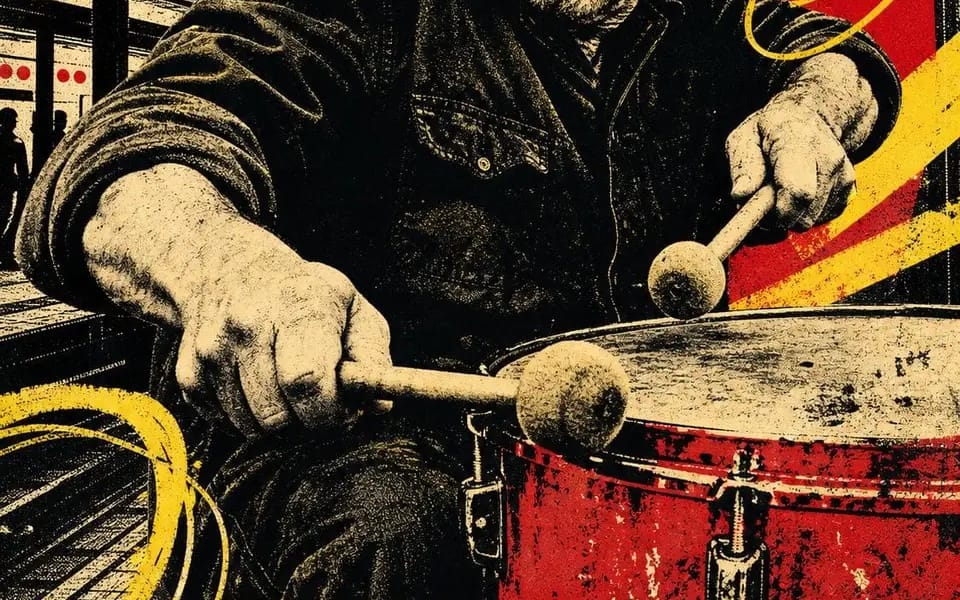
Vier-Farben-Siebdruck. Vier Leute arbeiten noch, nachdem alle gegangen sind.

STADTPULS — Nachtsession 02
OFFENES SIGNAL — Kanal 08 / die ganze Nacht
SCHWARMBEWUSSTSEIN — Dach-Charge 07
VOLLGAS — Schicht 04 / lange geöffnet

Festgelegt:
– vier Farben insgesamt: Knochenpapier, Schwarz, Scharlachrot, Chromgelb. Nichts anderes.
– das Porträt ist zu schwarzem Halbton posterisiert — keine Grautöne, nur Punkte
– eine flache rote Form hinter dem Kopf, die die Aufgabe eines Scheinwerfers übernimmt
– gelbe diagonale Balken plus lose handgezeichnete Schlaufen, über das Bild gekritzelt
– Stadtsilhouetten, die die Lücken füllen: Säulen, Wassertürme, Kräne, Skyline
– ein gelbes Band über die volle Breite am Fuß, zwei Wörter in fetten schwarzen kondensierten Großbuchstaben, an beiden Rändern beschnitten
– eine handbeschriftete Zeile darunter — eine Schicht, ein Kanal, eine Charge, eine Nummer
– eine kleine handgezeichnete Glyphe: Spirale, Zielscheibe, Sechseck, Blitz
– Fehlpassung, unterversorgte Farbe, Papierkorn. Es sollte gezogen aussehen, nicht gerendert.

Austausch: [Trade] / [Two Word Title] / [Red Shape] / [Scrawl] / [Glyph] / [Shift Number]
So verwendest du diesen Prompt
- 1Kopiere den Prompt exakt und füge ihn dann in dein bevorzugtes Modell oder Ideart-Projekt ein.
- 2Ersetze Produkt-, Motiv-, Zielgruppen- und Stildetails durch deinen eigenen Kontext.
- 3Generiere zuerst ein Basisergebnis und remixe dann die stärkste Richtung in eine Kampagne, Bildserie oder ein Videokonzept.
Nahe Prompt-Pfade erkunden
Modell
Aus diesem Prompt bauen
Verwandle einen bild-Prompt in ein fertiges Kreativprojekt.
Speichere den Prompt, füge Referenzbilder oder Notizen hinzu und lass Ideart den nächsten Produktionsschritt aus demselben kreativen Thread formen.