
BildGPT Image 2
Layered Paper-Cut Illustration Poster
A detailed prompt for creating a sophisticated layered paper-cut illustration poster featuring Wuhan landmarks like the Yellow Crane Tower and the Yangtze River.
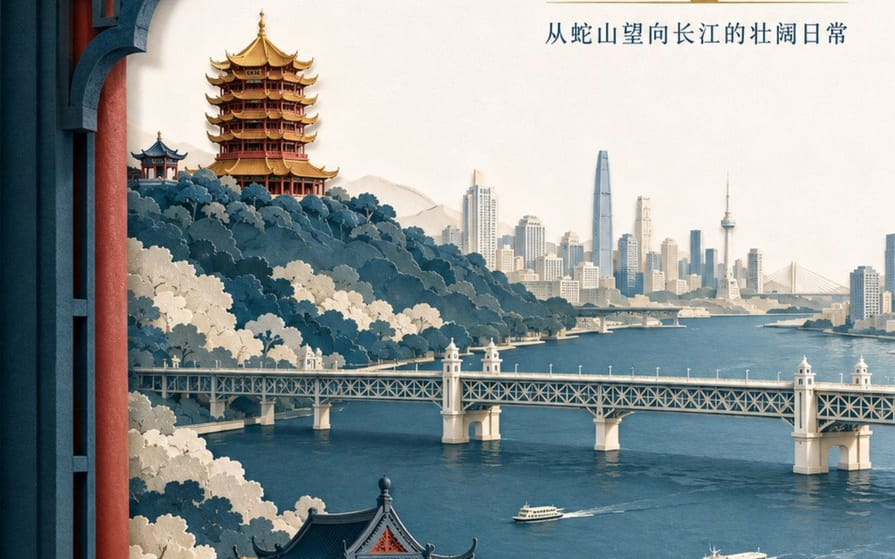
Erstellen Sie ein hochwertiges mehrschichtiges Scherenschnitt-Illustrationsposter für die Tourismusmarke "{argument name="brand name" default="He Wang Wuhan"}" mit dem Thema "{argument name="theme" default="Looking at the river from the tower, seeing the landscape skeleton of Wuhan at a glance"}" im 3:4-Hochformat. Die Komposition verwendet eine Rahmung durch ein Fenster im Vordergrund, wobei fünf bis sieben Schichten aus dickem, strukturiertem Papier Snake Hill, den Yellow Crane Tower, den Yangtze River, die Wuhan Yangtze River Bridge und die Skyline der Stadt am gegenüberliegenden Ufer bilden. Der Yellow Crane Tower befindet sich auf dem Bergrücken im Hintergrund, mit präzisen Beziehungen zwischen geschichteten Traufen, goldenen glasierten Ziegeln und zinnoberroten Säulen. Die Yangtze River Bridge erstreckt sich horizontal im Mittelgrund, mit zwei kleinen Fähren auf dem Fluss in kontrolliertem Maßstab. Die Papierkanten sind scharf, mit gleichmäßiger weicher Beleuchtung von oben links und realistischen Schatten zwischen den Schichten. Die Farben sind Indigo, warmes Off-White, Zinnoberrot und eine kleine Menge vergoldetes Gold für den visuellen Fokus. Der Haupttitel "{argument name="main title" default="Seeing the River City from the Tower"}" wird in den großen weißen Freiraum oben rechts in zwei Zeilen moderner Song-Schrift gesetzt. Der Markenname "He Wang Wuhan" wird unten links in Form eines Papiersiegels platziert, wobei er modern statt als Antikimitat gehalten wird.So verwendest du diesen Prompt
- 1Kopiere den Prompt exakt und füge ihn dann in dein bevorzugtes Modell oder Ideart-Projekt ein.
- 2Ersetze Produkt-, Motiv-, Zielgruppen- und Stildetails durch deinen eigenen Kontext.
- 3Generiere zuerst ein Basisergebnis und remixe dann die stärkste Richtung in eine Kampagne, Bildserie oder ein Videokonzept.
Nahe Prompt-Pfade erkunden
Modell
Aus diesem Prompt bauen
Verwandle einen bild-Prompt in ein fertiges Kreativprojekt.
Speichere den Prompt, füge Referenzbilder oder Notizen hinzu und lass Ideart den nächsten Produktionsschritt aus demselben kreativen Thread formen.