
BildGPT Image 2
Ink-Twin Doodle Stylization
A structured JSON-based prompt for stylizing an image with an 'ink-twin' doodle character mimicking the main subject's pose.
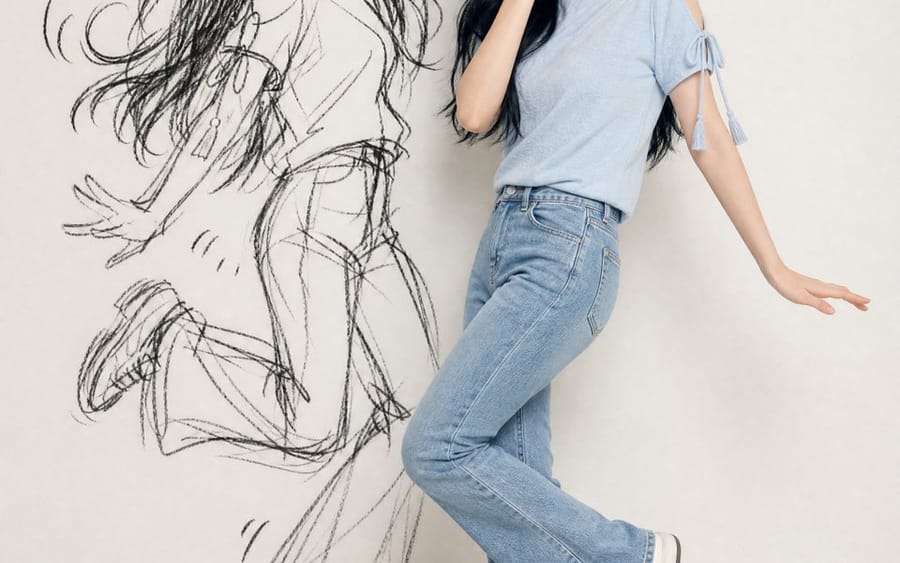
{
  "identity_ref": {
    "source": "hochgeladenes Foto",
    "lock": ["Gesicht", "Augen/Nase/Mund", "Hautton", "Haare (Länge/Textur/Farbe)", "Accessoires", "exaktes Outfit"],
    "rule": "keine erfundenen Details"
  },
  "composition": {"format": "vertikal 4:5/9:16", "figures": ["reales Motiv", "Ink-Twin-Doodle"], "layout": "nebeneinander, Posen vollständig sichtbar"},
  "real_subject": {"style": "photoreal, Ganzkörper", "outfit": "exakt an Referenz anpassen", "expression": "verspielt, verlegen, ertappt-charmant", "pose": "natürlich, abgeschwächte Version"},
  "ink_twin": {
    "style": "grobe schwarze Skizze/Kohle-Doodle an der Wand",
    "recognizability": "nur Silhouette (Haar-/Outfit-/Posenform)",
    "avoid": ["realistische 2. Person", "flacher Schatten", "farbiger Cartoon"],
    "energy": "verstärkt, chaotisch im Vergleich zum realen Motiv",
    "extras": "optional sparsame Comic-Markierungen (Bewegungslinien/Stern/Herz)"
  },
  "pose_rule": {
    "instruction": "jedes Mal eine neue verspielte/schelmische gemeinsame Pose",
    "avoid": ["Zeigen", "Fingerpistolen", "gespiegelte/wiederholte Posen"],
    "relationship": "Motiv = subtile Version; Zwilling = verstärkte Cartoon-Version, gleicher Takt"
  },
  "setting": {"background": "saubere minimale Wand (weiß/creme/grau)", "lighting": "weich, gleichmäßig, tageslichtartig, Gesicht sichtbar"},
  "mood": "verspielt, stylisch, chaotisch-lustig, teilbar",
  "negative_prompt": [
    "erfundene Erscheinung", "Outfit-Änderungen", "Zwilling als reale 2. Person",
    "flacher/gruseliger Schatten", "farbiger Cartoon-Zwilling", "schwache Ähnlichkeit",
    "Unordnung", "wiederholte/steife/gespiegelte Posen", "Text", "Wasserzeichen",
    "zusätzliche Gliedmaßen", "schlechte Hände"
  ]
}So verwendest du diesen Prompt
- 1Kopiere den Prompt exakt und füge ihn dann in dein bevorzugtes Modell oder Ideart-Projekt ein.
- 2Ersetze Produkt-, Motiv-, Zielgruppen- und Stildetails durch deinen eigenen Kontext.
- 3Generiere zuerst ein Basisergebnis und remixe dann die stärkste Richtung in eine Kampagne, Bildserie oder ein Videokonzept.
Nahe Prompt-Pfade erkunden
Modell
Aus diesem Prompt bauen
Verwandle einen bild-Prompt in ein fertiges Kreativprojekt.
Speichere den Prompt, füge Referenzbilder oder Notizen hinzu und lass Ideart den nächsten Produktionsschritt aus demselben kreativen Thread formen.