
BildGPT Image 2
Oriental Fantasy Celestial Realm
A complex cinematic prompt for a monumental oriental fantasy scene, featuring a golden jade staircase rising through a sea of clouds toward a celestial gate, inspired by traditional Xianxia aesthetics.
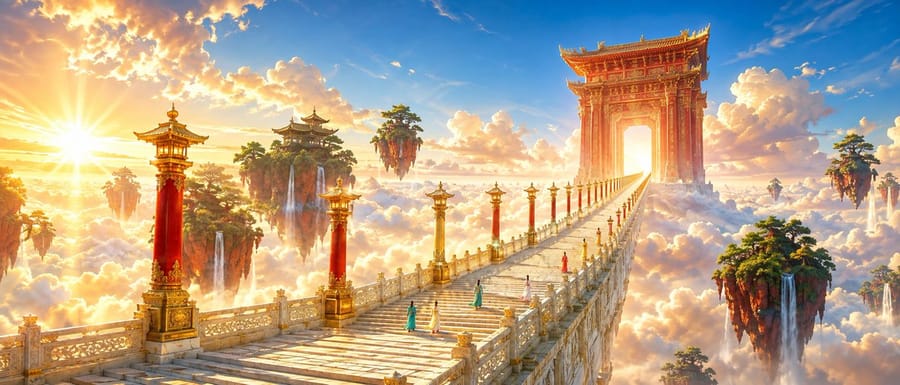
A bright and gorgeous {argument name="theme" default="oriental fantasy"} movie scene, cinematic ultra-wide shot. Strict one-point perspective, a grand celestial staircase paved with light-gold jade, crossing through a sea of clouds from the lower-left corner and sharply shrinking toward a vanishing point at the right third of the frame. Flanking the stairs are tall lamp posts in alternating {argument name="lamp post colors" default="vermilion and gilding"}, with their spacing and size decreasing according to depth. In the distance stands a massive Danxia-colored carved heavenly gate, with a bright sky shining through. Beside the stairs float several red mountain islands covered in emerald pine forests, with slender waterfalls falling into the golden-white sea of clouds. {argument name="traveler count" default="Five"} young travelers dressed in teal, ivory, and coral red long robes are ascending the stairs, all seen from behind and very small in scale, serving only as size references. The sky shows a rich gradient of azure and apricot gold, with large white clouds illuminated with warm gold edges by the setting sun. Low-angle sunlight passes through the gate from the left, creating clear backlighting silhouettes, crepuscular rays, and restrained starbursts. Shadows are transparent blue-purple, avoiding gray tones. A high-brightness color scheme of azure, apricot gold, cinnabar red, emerald green, and ivory white, featuring high saturation, luminous colors, rich but elegant chroma, and clean warm-cool separation. Architectural details are precise, jade has natural textures, and gilding is used only for edge emphasis. Cinematic film still, monumental scale, tiny human figures, strong aerial perspective, refined fantasy realism, no muddy grading, no gloomy colors, no excessive fog, no text, no watermark.So verwendest du diesen Prompt
- 1Kopiere den Prompt exakt und füge ihn dann in dein bevorzugtes Modell oder Ideart-Projekt ein.
- 2Ersetze Produkt-, Motiv-, Zielgruppen- und Stildetails durch deinen eigenen Kontext.
- 3Generiere zuerst ein Basisergebnis und remixe dann die stärkste Richtung in eine Kampagne, Bildserie oder ein Videokonzept.
Aus diesem Prompt bauen
Verwandle einen bild-Prompt in ein fertiges Kreativprojekt.
Speichere den Prompt, füge Referenzbilder oder Notizen hinzu und lass Ideart den nächsten Produktionsschritt aus demselben kreativen Thread formen.