
BildGPT Image 2
Cyber Blue Qwen Tech Review Poster
A high-energy vertical tech review thumbnail featuring a surprised presenter holding a glowing blue token with bold Chinese and model-name typography.
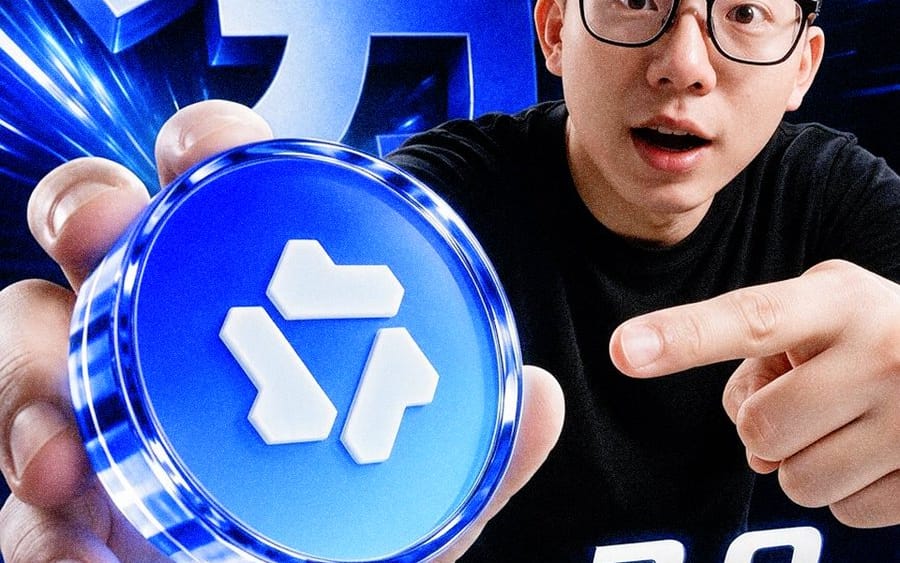
Create a dramatic vertical 4:5 tech influencer poster in a glossy cyber-blue style. A young East Asian man with short black hair, black rectangular glasses, and a surprised open-mouth expression leans toward the camera from the right side, wearing a plain black T-shirt. He holds a large glowing circular blue token close to the lens with his left hand in the lower-left foreground, making it appear oversized; the token has a transparent glassy rim, neon blue highlights, and a raised white geometric logo made of three separate block shapes on its face. His right hand points at the token from the right. Use an extreme wide-angle selfie perspective, strong depth distortion, crisp high-contrast lighting, and a dark black background filled with electric blue light streaks, lens flares, and motion lines. Add exactly 3 visible text elements: a huge 3D metallic-blue Chinese headline in the upper-left background reading {argument name="background Chinese headline" default="大力"}, a large italic white-and-blue title across the bottom reading {argument name="model title" default="Qwen3.8"}, and bold white Chinese text at the lower right reading {argument name="test label" default="实测"}. Make all typography extruded, glossy, beveled, and glowing with blue rim light. The composition should feel like a high-energy YouTube thumbnail or social media tech review announcement, ultra sharp, cinematic, slightly surreal, no extra text, no watermark.So verwendest du diesen Prompt
- 1Kopiere den Prompt exakt und füge ihn dann in dein bevorzugtes Modell oder Ideart-Projekt ein.
- 2Ersetze Produkt-, Motiv-, Zielgruppen- und Stildetails durch deinen eigenen Kontext.
- 3Generiere zuerst ein Basisergebnis und remixe dann die stärkste Richtung in eine Kampagne, Bildserie oder ein Videokonzept.
Nahe Prompt-Pfade erkunden
Modell
Kategorien
Aus diesem Prompt bauen
Verwandle einen bild-Prompt in ein fertiges Kreativprojekt.
Speichere den Prompt, füge Referenzbilder oder Notizen hinzu und lass Ideart den nächsten Produktionsschritt aus demselben kreativen Thread formen.