
ImageGPT Image 2
AI Model Routing Comparison Infographic
A square social media infographic comparing chaotic all-GPT usage with smart task-based AI model routing.
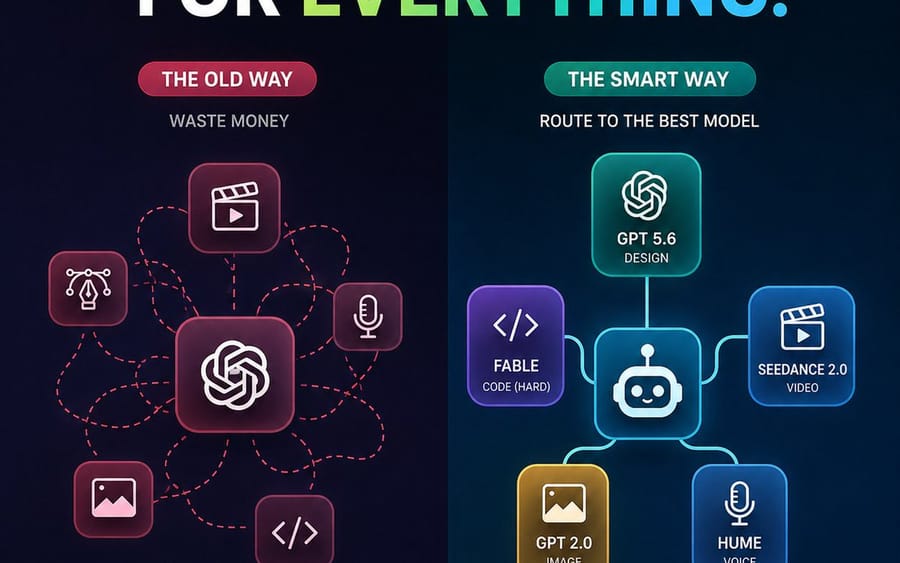
Créez une infographie tech futuriste sombre carrée 1:1 pour les réseaux sociaux comparant deux approches de flux de travail IA. Canevas : 768x768 ou similaire, fond bleu marine profond à noir avec une texture de grille pointillée subtile et une séparation verticale au centre. En haut, placez un énorme titre en gras en majuscules : “STOP USING GPT FOR {argument name="headline word" default="EVERYTHING"}.” Les mots “STOP USING GPT FOR” sont blancs, et le dernier mot est un dégradé de gauche à droite du vert citron au bleu cyan, avec un point cyan. Utilisez une police sans-serif épaisse et propre, un contraste élevé, un rendu net de type vectoriel.

Disposition : deux colonnes côte à côte. La colonne de gauche est étiquetée comme le mauvais flux de travail, la colonne de droite comme le flux de travail amélioré. Le côté gauche a un thème rouge/rose avec une étiquette en forme de pilule portant “THE OLD WAY”, un petit sous-titre “WASTE MONEY”, et une icône centrale en forme de carré arrondi de type nœud GPT/OpenAI. Autour d'elle se trouvent exactement 5 icônes de tâches en carré arrondi plus petites connectées par des lignes de routage en pointillés rouges désordonnées : 1 icône de clapet de vidéo/lecture en haut au centre, 2 icône de plume/Bezier de design à gauche, 3 icône de microphone à droite, 4 icône d'image/photo en bas à gauche, 5 icône de crochets de code en bas à droite. Les lignes pointillées désordonnées bouclent et se croisent, montrant le chaos.

La colonne de droite a un thème bleu sarcelle/bleu avec une étiquette en forme de pilule portant “THE SMART WAY”, un petit sous-titre “ROUTE TO THE BEST MODEL”, et une icône centrale en forme de carré arrondi de routeur robot. Connectez-le avec des lignes solides lumineuses et propres à exactement 5 cartes de modèle : 1 carte supérieure avec icône de nœud OpenAI étiquetée “GPT 5.6” et “DESIGN”, 2 carte violette de gauche avec crochets de code étiquetée “{argument name="coding model" default="FABLE"}” et “CODE (HARD)”, 3 carte bleue de droite avec icône de clapet/lecture étiquetée “{argument name="video model" default="SEEDANCE 2.0"}” et “VIDEO”, 4 carte dorée en bas à gauche avec icône d'image étiquetée “{argument name="image model" default="GPT 2.0"}” et “IMAGE”, 5 carte bleue en bas à droite avec icône de microphone étiquetée “{argument name="voice model" default="HUME"}” et “VOICE”. Utilisez des cartes arrondies en glassmorphism avec des contours néon et une lueur douce.

Appels en bas : sous la colonne de gauche, placez une barre de statut arrondie délimitée en rouge avec une icône X rouge et le texte “EXPENSIVE. CHAOTIC. INEFFICIENT.” Sous la colonne de droite, placez une barre de statut arrondie délimitée en bleu sarcelle/vert avec une icône de coche verte et le texte “SMARTER. CHEAPER. BETTER RESULTS.” Gardez tout le texte lisible, centré et aligné. Utilisez un fort contraste, un style marketing SaaS moderne, des dégradés subtils, des reflets néon, pas de logos supplémentaires, pas de filigrane, pas de texte supplémentaire au-delà des étiquettes spécifiées.Comment utiliser ce prompt
- 1Copiez le prompt tel quel, puis collez-le dans votre modèle préféré ou votre projet Ideart.
- 2Remplacez les détails de produit, sujet, audience et style par votre propre contexte.
- 3Générez d’abord un résultat de base, puis remixez la direction la plus forte en campagne, série d’images ou concept vidéo.
Créer à partir de ce prompt
Transformez un prompt image en projet créatif terminé.
Enregistrez le prompt, ajoutez des images de référence ou des notes, et laissez Ideart façonner la prochaine étape de production dans le même fil créatif.