
ImageGPT Image 2
Dim Candid Bedroom Portrait
A realistic phone-flash portrait prompt for creating a moody, candid indoor image with small accessory details and natural low-light grain.
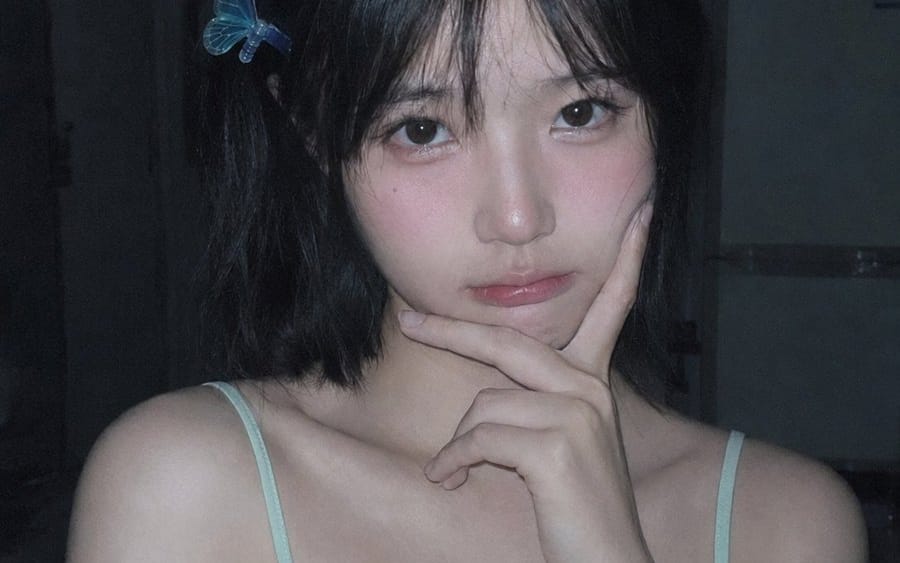
Créez une photo portrait réaliste et spontanée, prise tard dans la nuit, de {argument name="character name" default="a young East Asian woman"} assise à l'intérieur dans une chambre sombre ou une petite cuisine d'appartement, cadrée du haut de la poitrine jusqu'à juste au-dessus de la tête dans une composition verticale 3:4. Elle a les cheveux courts au carré, de couleur {argument name="hair color" default="black"}, avec une frange douce et désordonnée, la peau pâle, de grands yeux sombres, des lèvres subtilement brillantes, et une expression calme légèrement mélancolique tout en regardant directement l'objectif. Posez-la avec une main sous le menton, l'index sur la ligne de la mâchoire, les épaules détendues et légèrement dénudées. Elle porte une camisole à fines bretelles vert menthe pâle avec exactement 2 fines bretelles visibles et exactement 2 accessoires décoratifs : une pince à cheveux papillon bleu translucide sur le côté gauche de ses cheveux et une petite épingle à cheveux en forme d'arête de poisson argentée clipsée près de la bretelle gauche de la camisole. Utilisez un éclairage faible au flash intégré, des ombres bleutées froides, un grain numérique visible, un arrière-plan doucement sous-exposé, et un rendu brut de photo prise au téléphone plutôt qu'un portrait de studio. Les détails de l'arrière-plan doivent être sombres et légèrement flous : une porte ou un placard à gauche, un réfrigérateur ou une armoire à droite, et des objets ménagers indistincts sur le dessus. Gardez le visage naturel avec une légère texture de peau et un léger rougissement, pas de retouche lourde, pas de texte sauf une petite marque subtile ressemblant à une signature dans le coin inférieur droit si souhaité.Comment utiliser ce prompt
- 1Copiez le prompt tel quel, puis collez-le dans votre modèle préféré ou votre projet Ideart.
- 2Remplacez les détails de produit, sujet, audience et style par votre propre contexte.
- 3Générez d’abord un résultat de base, puis remixez la direction la plus forte en campagne, série d’images ou concept vidéo.
Explorer les chemins de prompts proches
Modèle
Créer à partir de ce prompt
Transformez un prompt image en projet créatif terminé.
Enregistrez le prompt, ajoutez des images de référence ou des notes, et laissez Ideart façonner la prochaine étape de production dans le même fil créatif.