
ImageGPT Image
Créez un portrait pleine longueur au format 9:16
Create a 9:16 full-body editorial portrait poster for a modern [Profession]. Subject: [Subject] Outfit: [Outfit] Working action: [Working Action] Workflow: [Workflow] Tools: [Tools] Final output: [Final Output] Headline: [Headline]...
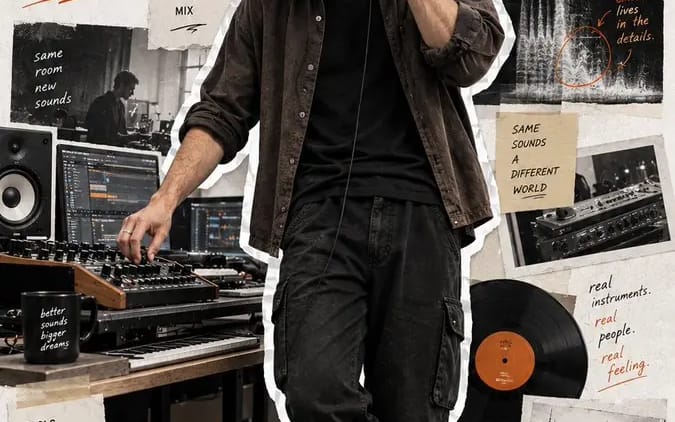
Créez un portrait pleine longueur au format 9:16, de type poster éditorial, pour un/une [Profession] moderne.

Sujet : [Sujet]
Tenue : [Tenue]
Action en cours : [Action en cours]
Workflow : [Workflow]
Outils : [Outils]
Rendu final : [Rendu final]
Titre : [Titre]
Couleur d’accent : [Couleur d’accent]

Faites du portrait pleine longueur réaliste l’élément visuel dominant, occupant 75 à 85 % de la hauteur du poster. Utilisez des proportions corporelles naturelles, une peau et des cheveux réalistes, des matières vestimentaires authentiques, ainsi qu’un éclairage de travail crédible. Montrez le sujet en train de travailler naturellement, sans poser ni regarder l’appareil photo.

Découpez la personne en pied avec un bord blanc/légèrement irrégulier, façon sticker sur papier.

Utilisez un fond en papier texturé blanc cassé propre, et entourez le sujet d’éléments de collage éditoriaux discrets montrant :
1. son workflow,
2. ses outils et son processus,
3. le résultat final.

Utilisez des photos découpées, du ruban adhésif, des croquis, des fragments d’interface, des diagrammes, des notes manuscrites, des flèches et de courtes phrases de processus. Gardez tous les éléments secondaires pertinents pour la profession et visuellement subordonnés au portrait.

Ajoutez le grand titre « [Titre] » et utilisez la [Couleur d’accent] pour la typographie et les petites annotations graphiques.

Gardez le résultat final moderne, réaliste, élégant et humain — à la fois portrait de créateur, récit de workflow et poster éditorial façon scrapbook.

Pas de numérotation, de numéros de page, de cotes d’archives, de filtre vintage jaune, d’effets cyberpunk, de pose corporate figée, de peau CGI, de chaussures coupées, de mains déformées ou de collage surchargé.
Comment utiliser ce prompt
- 1Copiez le prompt tel quel, puis collez-le dans votre modèle préféré ou votre projet Ideart.
- 2Remplacez les détails de produit, sujet, audience et style par votre propre contexte.
- 3Générez d’abord un résultat de base, puis remixez la direction la plus forte en campagne, série d’images ou concept vidéo.
Explorer les chemins de prompts proches
Modèle
Créer à partir de ce prompt
Transformez un prompt image en projet créatif terminé.
Enregistrez le prompt, ajoutez des images de référence ou des notes, et laissez Ideart façonner la prochaine étape de production dans le même fil créatif.