
ImageGPT Image 2
Morning Sunlight Roomwear Portrait
A detailed cinematic portrait prompt capturing a calm morning scene of a woman in roomwear by a sunlit window with soft, realistic lighting and textures.
Sujet : {argument name="theme" default="Morning light on damp hair"}

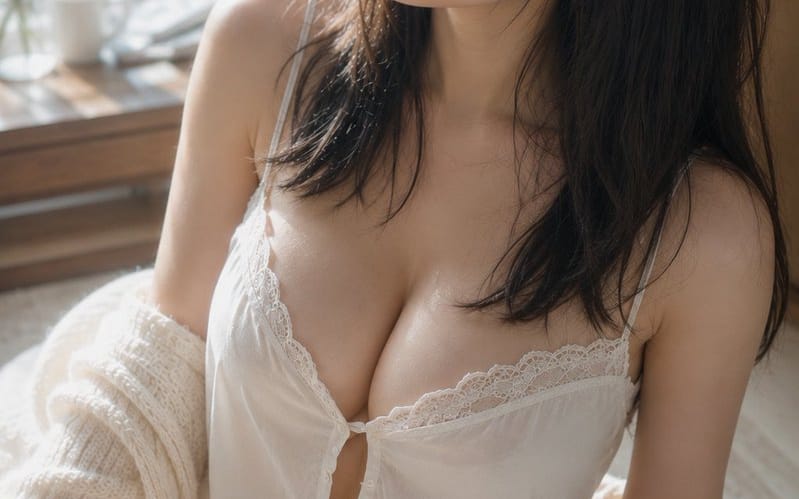
Sujet : Un portrait vertical d'une {argument name="person" default="adult woman in white roomwear"} assise sur un tapis près d'une fenêtre lumineuse. Le sujet est positionné en grande partie du centre vers la droite de l'écran, montré du sommet de la tête jusqu'aux cuisses. Le haut du corps occupe environ deux tiers de l'écran, laissant une douce marge de fond et la fenêtre à gauche.

Personnage/Expression : Cheveux noirs naturels mi-longs. De fines mèches, légèrement humides comme après un bain, courent le long des joues et du cou, avec une fine frange tombant sur le front. La tête est légèrement inclinée vers le haut à gauche de l'écran, avec un regard calme tourné vers l'extérieur, par la fenêtre. Yeux détendus, lèvres légèrement entrouvertes et expression calme avec une pointe de somnolence restante. Maquillage minimal centré sur un beige pâle et un rose pâle, montrant une peau naturelle avec pores et fin duvet.

Vêtements/Pose : Un caraco blanc à fines bretelles et dentelle délicate, et un short assorti. De petits boutons et de doux fronces au niveau de la poitrine, le tissu léger tombant naturellement sous l'effet de la gravité. Un cardigan crème grossièrement tricoté est tombé des épaules, pendant mollement sur les coudes et les avant-bras. Le corps est légèrement tourné vers la gauche, assise avec une jambe pliée vers l'avant dans une posture naturelle, les épaules légèrement décalées en hauteur.

Arrière-plan/Lumière : Une grande fenêtre à gauche. Dehors, des feuilles vertes baignées de soleil matinal s'étalent dans un doux bokeh. Une tasse blanche, un petit vase en verre et de fines branches sont disposés avec parcimonie sur une table en bois près de la fenêtre. La lumière principale est une chaude lumière naturelle provenant de la fenêtre en haut à gauche. Elle crée de doux reflets sur les joues, l'arête du nez, la clavicule, les épaules, les bras et les cuisses, tandis que le côté droit des cheveux et le fond de la pièce s'enfoncent dans des ombres douces. Une pâle lumière réfléchie rebondit depuis le tissu blanc et le sol.

Composition/Caméra : Vertical 2:3. Plan rapproché en plongée depuis une position légèrement en hauteur. Une composition triangulaire avec le visage en haut au centre, la poitrine au centre et la jambe pliée en bas à gauche. La marge du côté de la fenêtre souligne la direction du regard, et l'arrière-plan est fortement flouté. Équivalent 50mm, faible profondeur de champ proche de la pleine ouverture. La mise au point est sur les yeux et le visage, avec la jambe au premier plan et la fenêtre en arrière-plan doucement floutée.

Texture/Style : Un portrait d'intérieur photoréaliste pris uniquement en lumière naturelle. Basé sur un ivoire lumineux et des veines de bois pâle, avec des tons de peau sains et le vert à l'extérieur de la fenêtre comme couleurs d'accent subtiles. Pas excessivement lissé, mais dépeignant précisément la texture de la peau, les fins cheveux, l'aspect aggloméré des cheveux humides et les fibres de la dentelle et du tricot. Faible contraste avec des dégradés doux comme une élégante photographie argentique.

Négatif : Personnes d'apparence mineure, visages non naturels, regards non naturels, yeux asymétriques, doigts supplémentaires, doigts manquants, fusion des membres, épaules ou articulations affaissées, vêtements qui serrent, transparence non naturelle du tissu, cheveux ou vêtements défiant la gravité, ombres incohérentes avec les sources lumineuses, correction excessive de la peau, peau plastique, texte, logos, filigranes.Comment utiliser ce prompt
- 1Copiez le prompt tel quel, puis collez-le dans votre modèle préféré ou votre projet Ideart.
- 2Remplacez les détails de produit, sujet, audience et style par votre propre contexte.
- 3Générez d’abord un résultat de base, puis remixez la direction la plus forte en campagne, série d’images ou concept vidéo.
Créer à partir de ce prompt
Transformez un prompt image en projet créatif terminé.
Enregistrez le prompt, ajoutez des images de référence ou des notes, et laissez Ideart façonner la prochaine étape de production dans le même fil créatif.