
ImageGPT Image
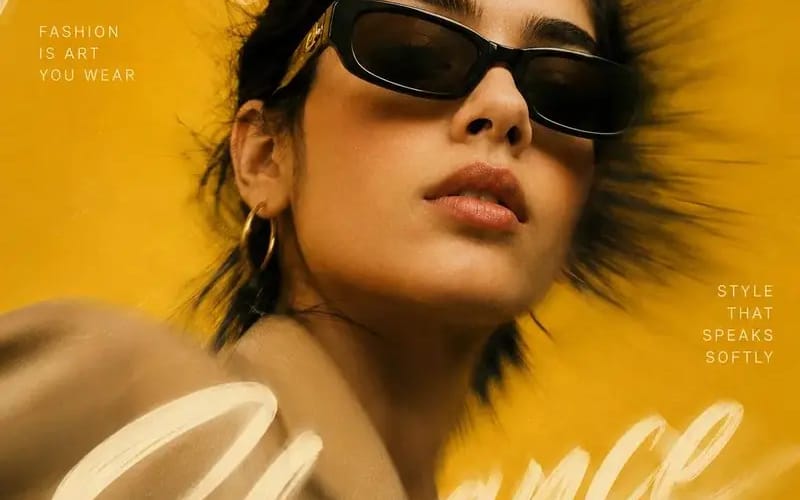
Create a high-end editorial fashion poster inspired
{ "REFERENCE_IMAGE": "[Reference Image]", "MAIN_HEADLINE": "[Main Headline]", "LEFT_TEXT": "[Left Text]", "RIGHT_TEXT": "[Right Text]", "FOOTER_TEXT": "[Footer Text]", "BACKGROUND_COLOR": "[Background Color]", "prompt": "Create a...
{
  "REFERENCE_IMAGE": "[Reference Image]",
  "MAIN_HEADLINE": "[Main Headline]",
  "LEFT_TEXT": "[Left Text]",
  "RIGHT_TEXT": "[Right Text]",
  "FOOTER_TEXT": "[Footer Text]",
  "BACKGROUND_COLOR": "[Background Color]",

  "prompt": "Create a high-end editorial fashion poster inspired by luxury magazine covers and premium advertising campaigns. Preserve the identity of the subject from the [Reference Image] while matching the overall artistic style.

  Use a dramatic close-up portrait composition with the subject positioned slightly off-center. Capture the subject from a subtle low angle to create a powerful, confident appearance.

  Add a strong radial motion blur effect extending outward from the center of the image while keeping the subject's face sharp and highly detailed.

  Place [Main Headline] as one continuous handwritten brushstroke phrase flowing organically across the entire composition. Allow some portions of the lettering to appear behind the subject while other portions overlap the foreground.

  Add [Left Text] and [Right Text] as small uppercase editorial typography blocks with generous spacing.

  Place [Footer Text] subtly in one corner.

  Style details:
  - Oversized fashion sunglasses
  - Minimal jewelry
  - Natural skin texture
  - Wind-swept hair
  - Luxury fashion styling
  - Elegant pose
  - Cinematic color grading
  - Fine film grain
  - Soft highlights and deep shadows
  - Premium studio photography quality

  Background:
  - Clean monochromatic backdrop
  - Use [Background Color] as the dominant color
  - Dynamic zoom-blur effect
  - Soft glow and light bloom

  Visual style:
  - Vogue-inspired editorial design
  - Luxury advertising aesthetic
  - Photorealistic rendering
  - Premium typography composition
  - High-fashion magazine cover design

  Negative prompt:
  - watermark
  - logo
  - blurry face
  - distorted anatomy
  - duplicated accessories
  - plastic skin
  - excessive sharpening
  - oversaturated colors
  - low quality output",

  "aspect_ratio": "4:5"
}Comment utiliser ce prompt
- 1Copiez le prompt tel quel, puis collez-le dans votre modèle préféré ou votre projet Ideart.
- 2Remplacez les détails de produit, sujet, audience et style par votre propre contexte.
- 3Générez d’abord un résultat de base, puis remixez la direction la plus forte en campagne, série d’images ou concept vidéo.
Explorer les chemins de prompts proches
Modèle
Créer à partir de ce prompt
Transformez un prompt image en projet créatif terminé.
Enregistrez le prompt, ajoutez des images de référence ou des notes, et laissez Ideart façonner la prochaine étape de production dans le même fil créatif.