
ImageAI
Vermilion photocopy tension editorial
{ "style": "vermilion-photocopy-tension-editorial", "aspect_ratio": "4:5", "style_rules": [ "one monochrome subject fills the poster at monumental scale, aggressively cropped by multiple edges", "harsh near-binary black-and-white...
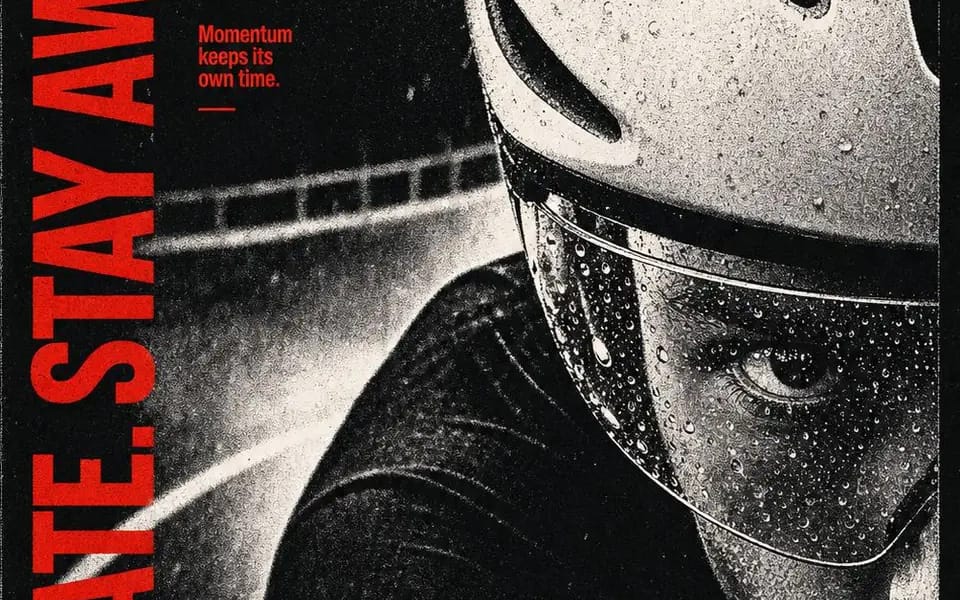
{
  "style": "vermilion-photocopy-tension-editorial",
  "aspect_ratio": "4:5",
  "style_rules": [
    "one monochrome subject fills the poster at monumental scale, aggressively cropped by multiple edges",
    "harsh near-binary black-and-white separation: crushed blacks #0B0B0B, chalky highlights #D8D6D1, almost no smooth midtones",
    "coarse photocopy dust, halftone speckling and toner breakup across the photo — analog wear, never digital glitch",
    "one vivid vermilion #F0160F reserved for every typographic and graphic intervention; no other color anywhere",
    "oversized heavy condensed uppercase headline runs as a vertical rail along one outer edge, cropped or compressed by the frame",
    "three compact annotation blocks in the opposite upper quadrant, tight leading, hard scale contrast against the headline",
    "type sits directly on the photograph — no boxes, cards, outlines or shadows",
    "one sharp diagonal vermilion shard crosses the photo; a second edge-born vermilion form branches organically like flooded screen-print ink",
    "asymmetric, edge-crowded, poster-flat — overlap creates tension, not depth; punk zine / independent music graphic mood",
    "render the vertical headline verbatim, letter by letter"
  ],
  "MAIN_TEXT": "BRAKE LATE. STAY AWAKE.",
  "SUBJECT": "an extreme close crop of a cyclist's rain-beaded helmet visor and one focused eye, guardrail blurred behind",
  "ANNOTATIONS": "Rain sharpens focus. / The corner arrives early. / Momentum keeps its own time.",
  "SHARD_DIRECTION": "a clean diagonal shard rising from the lower right",
  "EDGE_FORM": "a branching splatter form entering from the bottom edge"
}Comment utiliser ce prompt
- 1Copiez le prompt tel quel, puis collez-le dans votre modèle préféré ou votre projet Ideart.
- 2Remplacez les détails de produit, sujet, audience et style par votre propre contexte.
- 3Générez d’abord un résultat de base, puis remixez la direction la plus forte en campagne, série d’images ou concept vidéo.
Explorer les chemins de prompts proches
Modèle
Créer à partir de ce prompt
Transformez un prompt image en projet créatif terminé.
Enregistrez le prompt, ajoutez des images de référence ou des notes, et laissez Ideart façonner la prochaine étape de production dans le même fil créatif.