
ImageGPT Image
Two-dimensional alternative character illustration
Two-dimensional alternative character illustration of [Character Name], occupying approximately seventy-five percent of the frame in [Pose], with [Hair Style] and [Expression]. Oversized rounded cranium, a short flattened lower face, a...
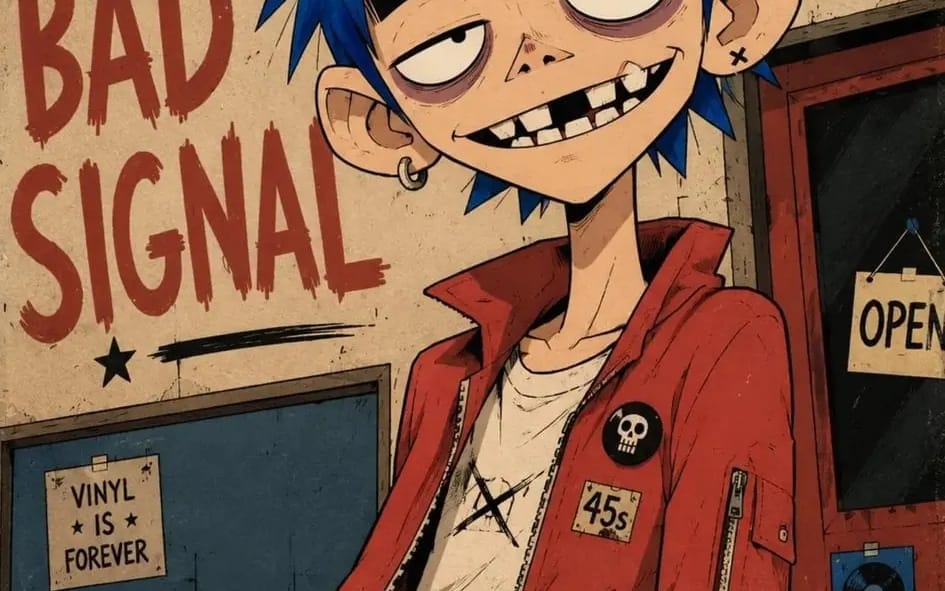
Two-dimensional alternative character illustration of [Character Name], occupying approximately seventy-five percent of the frame in [Pose], with [Hair Style] and [Expression]. Oversized rounded cranium, a short flattened lower face, a narrow jaw, a long thin neck, slightly oversized ears, huge pale oval eyes with tiny off-center pupils, extremely thick horizontal black eyebrows, heavy black upper eyelids, muted mauve under-eye rings, a tiny broad triangular nose, and a wide asymmetrical grin showing individually drawn irregular rectangular teeth, one clearly missing upper tooth, one chipped tooth and deep black gaps. Dress the character in [Clothing], simplified into broad graphic shapes with chunky seams, minimal folds and small hand-drawn accessories. Confident black ink contours using thick outer silhouettes, medium-weight facial lines, thin angular hair strands and only a few short scratch marks around the eyes, hair and clothing seams; use flat opaque color fields, one hard-edged cel-shadow shape per form, sparse pencil hatching, subtle ink wobble, slight color misregistration and restrained worn-paper texture. Controlled [Color Palette] palette, keeping every color clearly separated and moderately saturated. Place the character against [Background], reduced to large flat shapes, a few loosely drawn environmental details and oversized rough hand-painted lettering reading “[Text]”; use an off-center waist-up composition, a slight camera tilt, cropped background typography, loose poster margins and lightly weathered printed edges. 4:5 AR.
Comment utiliser ce prompt
- 1Copiez le prompt tel quel, puis collez-le dans votre modèle préféré ou votre projet Ideart.
- 2Remplacez les détails de produit, sujet, audience et style par votre propre contexte.
- 3Générez d’abord un résultat de base, puis remixez la direction la plus forte en campagne, série d’images ou concept vidéo.
Explorer les chemins de prompts proches
Modèle
Créer à partir de ce prompt
Transformez un prompt image en projet créatif terminé.
Enregistrez le prompt, ajoutez des images de référence ou des notes, et laissez Ideart façonner la prochaine étape de production dans le même fil créatif.