
ImageNano Banana Pro
Prompt pour la photographie de produits de joaillerie ultra-premium
Une invite très détaillée pour générer des photographies de produits conceptuelles ultra-premium de bijoux entrelacés avec un nœud en forme de cœur en corde de coton rose poudré, mettant l'accent sur la texture, l'éclairage et une esthétique commerciale haut de gamme.
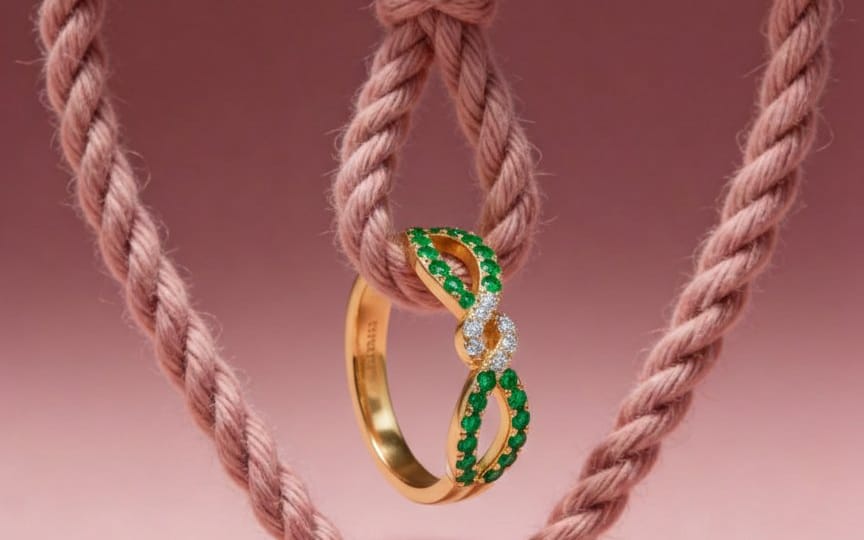
Photographie de produit de joaillerie conceptuelle ultra-premium avec symbolisme romantique.

Une corde en coton torsadée rose poudré doux, nouée en un cœur symétrique, suspendue verticalement au centre du cadre. La texture de la corde est très détaillée, avec des fibres visibles, une finition mate douce, légèrement moelleuse et tactile.

Placer @img1 naturellement entrelacé au centre du nœud en forme de cœur de la corde, comme s'il était délicatement tenu ou suspendu par la structure de la corde.

⚠️ Conserver la forme exacte du produit original, les proportions, le placement des pierres précieuses, la tonalité du métal, les reflets, les détails de gravure et le savoir-faire artisanal inchangés.
Pas de distorsion. Pas de refonte. Pas de modification de la géométrie du produit.

🎨 Arrière-plan

Fond uni mat rose poudré doux

Surface de studio lisse et sans couture

Profondeur de dégradé douce mais très subtile

Net, minimaliste, sans accessoires

💡 Éclairage

Éclairage de studio doux et diffus, venant de l'avant-haut

Légers reflets spéculaires sur le métal

Reflets des diamants nets mais naturels

Ombres de la corde douces et dimensionnelles

Ombre de profondeur subtile derrière la corde pour créer une illusion de flottement

📸 Appareil photo et composition

Composition verticale 4:5

Alignement parfait au centre

Produit flottant dans les airs

Aspect objectif macro 85 mm

Faible profondeur de champ f/3.2

Mise au point ultra-nette sur la bague

Texture de la corde détaillée mais en second plan

🧠 Ambiance et style

Campagne de luxe romantique

Symbolisme de « Lien », « Connexion », « Pour toujours »

Esthétique de marque de joaillerie haut de gamme

Éditorial de luxe Instagram

Réalisme commercial propre de style CGI

🚫 Règles de sortie

Pas de texte

Pas de filigrane

Pas de logo

Pas d'éléments supplémentaires

Rendu ultra-réaliste

Qualité publicitaire de joaillerie
Comment utiliser ce prompt
- 1Copiez le prompt tel quel, puis collez-le dans votre modèle préféré ou votre projet Ideart.
- 2Remplacez les détails de produit, sujet, audience et style par votre propre contexte.
- 3Générez d’abord un résultat de base, puis remixez la direction la plus forte en campagne, série d’images ou concept vidéo.
Explorer les chemins de prompts proches
Modèle
Créer à partir de ce prompt
Transformez un prompt image en projet créatif terminé.
Enregistrez le prompt, ajoutez des images de référence ou des notes, et laissez Ideart façonner la prochaine étape de production dans le même fil créatif.