
ImageGPT Image
Use the exact product reference
Use the exact product reference. Use the uploaded image as the sole and exact reference for the product. Preserve the product 1:1, including its official packaging, logo, typography, text, colors, proportions, shape, materials,...
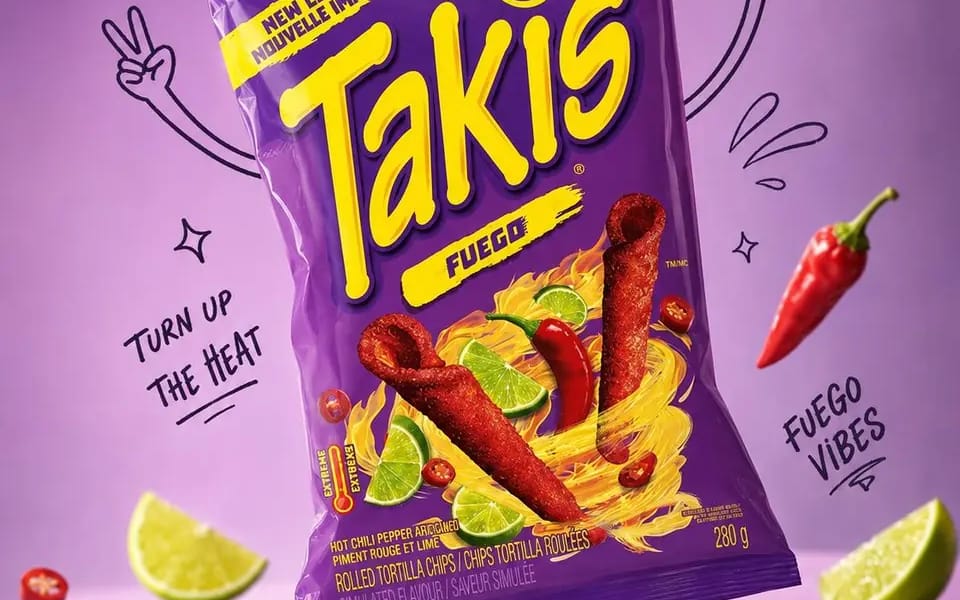
Use the exact product reference. Use the uploaded image as the sole and exact reference for the product. Preserve the product 1:1, including its official packaging, logo, typography, text, colors, proportions, shape, materials, textures, reflections, label details, and complete brand identity. Do not redesign, recolor, replace, distort, or modify any part of the packaging.
Create an ultra-realistic premium commercial advertisement with the product as the hero. Analyze its category, flavor, purpose, ingredients, target audience, packaging style, and brand personality to develop a unique, award-worthy advertising concept. Position the product in a natural, dynamic tilted pose.
Place it in a premium pastel studio environment inspired by the packaging colors, leaving clean negative space for advertising copy. Surround the product with expressive black marker doodles, including arms, legs, shoes, motion lines, sparkles, stars, bubbles, splashes, leaves, ribbons, icons, and concept-related props. The doodles must enhance the composition without covering the packaging, logo, or text.
Luxury editorial product photography, three-quarter angle, shallow depth of field, razor-sharp focus, soft diffused studio lighting, realistic reflections, floating shadows, premium color grading, and ultra-realistic materials.
Mood: Premium, playful, modern, sophisticated, energetic, memorable, brand-forward, scroll-stopping.
Output: 4:5 portrait, 2160×2700 (or equivalent), 8K quality.
Negative Prompt: Low quality, blur, incorrect branding, altered packaging, modified logo, text errors, recolored product, distorted proportions, unrealistic materials, excessive doodles, clutter, noise, oversaturation, AI artifacts, poor lighting, cropped product.
Comment utiliser ce prompt
- 1Copiez le prompt tel quel, puis collez-le dans votre modèle préféré ou votre projet Ideart.
- 2Remplacez les détails de produit, sujet, audience et style par votre propre contexte.
- 3Générez d’abord un résultat de base, puis remixez la direction la plus forte en campagne, série d’images ou concept vidéo.
Explorer les chemins de prompts proches
Modèle
Créer à partir de ce prompt
Transformez un prompt image en projet créatif terminé.
Enregistrez le prompt, ajoutez des images de référence ou des notes, et laissez Ideart façonner la prochaine étape de production dans le même fil créatif.