
ImageGPT Image 2
Maquette d'interface de livestream YouTube
Génère une interface utilisateur de livestream YouTube réaliste comprenant un lecteur vidéo avec des superpositions de chat, les détails de la chaîne et des champs de texte personnalisables.
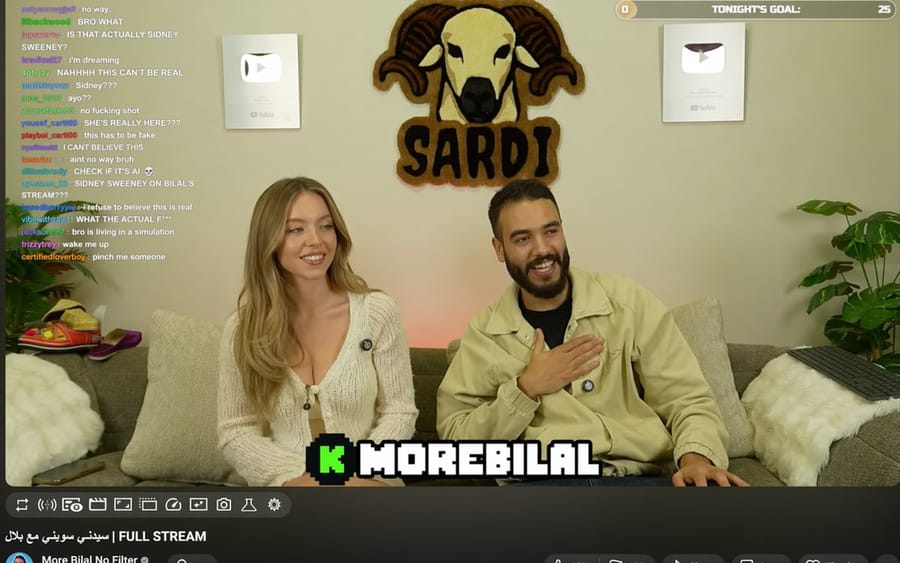
{
  "type": "UI de livestream YouTube",
  "top_nav": {
    "logo": "YouTube Premium",
    "search": "{argument name=\"search query\" default=\"bilal fraiha\"}",
    "icons": 3
  },
  "player": {
    "subjects": [
      "{argument name=\"female guest\" default=\"Sydney Sweeney\"} en cardigan blanc",
      "homme barbu en veste beige en train de rire"
    ],
    "bg": "canapé, 2 boutons lecture argentés, logo bélier 'SARDI'",
    "overlays": {
      "chat": {"pos": "gauche", "count": 15, "desc": "noms d'utilisateur colorés, texte blanc"},
      "goal": {"pos": "en haut à droite", "text": "OBJECTIF DE CE SOIR : 0 à 25"},
      "banner": {"pos": "en bas au centre", "text": "K {argument name=\"streamer name\" default=\"MOREBILAL\"}"}
    },
    "controls": {"count": 10}
  },
  "details": {
    "title": "{argument name=\"video title\" default=\"FULL STREAM | سيدني سويني مع بلال\"}",
    "channel": "{argument name=\"channel name\" default=\"More Bilal No Filter\"}",
    "buttons": 5
  }
}Comment utiliser ce prompt
- 1Copiez le prompt tel quel, puis collez-le dans votre modèle préféré ou votre projet Ideart.
- 2Remplacez les détails de produit, sujet, audience et style par votre propre contexte.
- 3Générez d’abord un résultat de base, puis remixez la direction la plus forte en campagne, série d’images ou concept vidéo.
Explorer les chemins de prompts proches
Modèle
Créer à partir de ce prompt
Transformez un prompt image en projet créatif terminé.
Enregistrez le prompt, ajoutez des images de référence ou des notes, et laissez Ideart façonner la prochaine étape de production dans le même fil créatif.