
छविAI
2x2 grid, 16:9, 4 AI inferred dystopian subjects,topics
2x2 grid, 16:9, 4 AI inferred dystopian subjects,topics: // Canvas grid 600x800 (vertical panel). Each cell encodes ink level + style ownership. // 1. Photo ink-ification: // - For each cell, compute luminance from [Location Plate]...
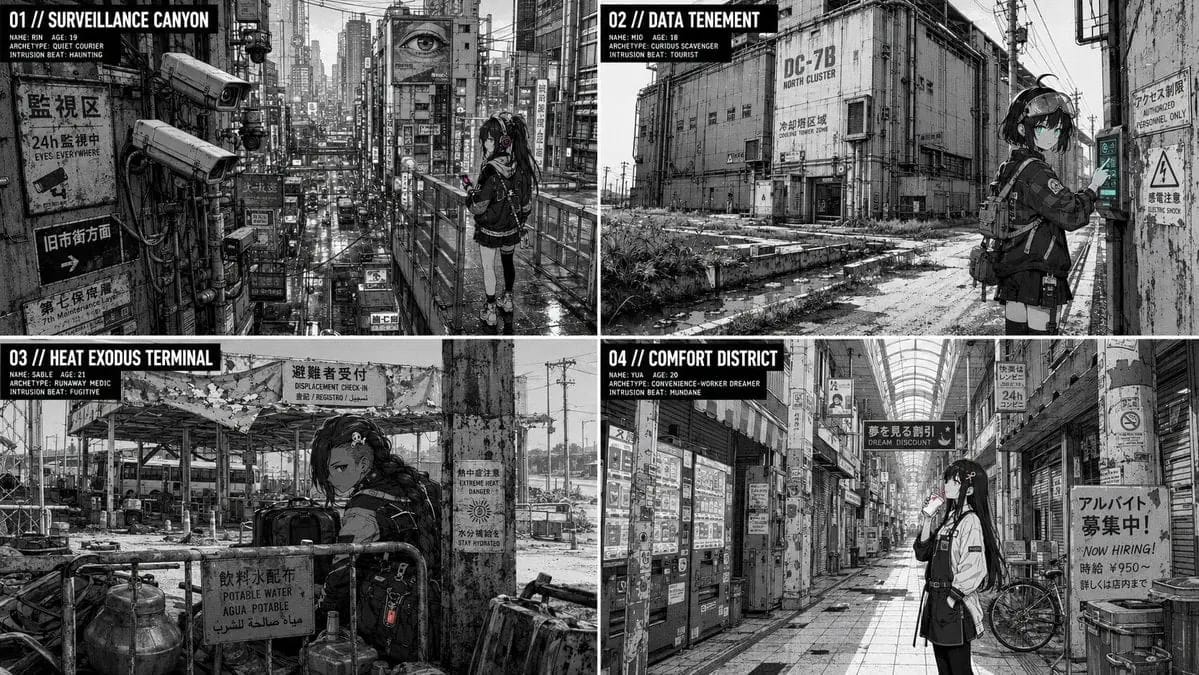
प्रॉम्प्ट
2x2 grid, 16:9, 4 AI inferred dystopian subjects,topics: // Canvas grid 600x800 (vertical panel). प्रत्येक सेल ink level + style ownership encode करता है।
// 1. Photo ink-ification:
//    - प्रत्येक सेल के लिए, [Location Plate] photo से luminance compute करें।
//    - L > 200 -> paper-white (0). L < 80 -> solid black (1). Else -> mid-tone (2).
//    - Mid-tone cells को declared LPI पर halftone dot array के साथ patterned किया जाता है।
//    - Edge detection: जिन cells में luminance gradient threshold से अधिक होता है, वे mechanical line (3) बन जाते हैं — uniform thickness, no taper.
// 2. Character rendering:
//    - [Char Seed] का उपयोग करके, scene में एक छोटी figure (cell area के 25% से कम) रखें।
//    - Figure cells dominant style में drawn होते हैं: line dominant द्वारा owned, flats dominant द्वारा, light dominant द्वारा।
//    - Subordinate style background elements (props, textures) में आ सकता है, लेकिन character face cells पर कभी नहीं (mask द्वारा defined)। If dissolved, subordinate elements dominant line के साथ redrawn होते हैं। If declared, styles के बीच boundary cells explicitly एक अलग color के होते हैं। If oscillating, subordinate केवल character के पीछे depth planes में (depth map द्वारा assigned)।
//    - Silhouette anchor: hair shape + accessory किसी भी scale पर pure black में preserved।
//    - Color key: accent color केवल eye cells और एक prop cell cluster में आता है।
// 3. Interaction:
//    - tourist के लिए: character's contact cells में sun vector के अनुसार shadow cluster offset होता है (e.g., shadow cells 5 pixels down-right)।
//    - fugitive के लिए: photo से mid-tone clutter cells character के सामने partially (overlap) रखे जाते हैं।
//    - haunting के लिए: no shadow, no interaction.
// 4. Grain-and-artifact: noise cells की एक layer (JPEG artifacts, dust) केवल photo-derived cells में जोड़ी जाती है, character में नहीं।
// 5. Lens distortion: canvas के edges पर, character cells को barrel distortion simulate करने के लिए थोड़ा displaced किया जाता है जो photo से match करता है।
// Final cell grid को high-res ink-ified image के रूप में render करें।
इस प्रॉम्प्ट का उपयोग कैसे करें
- 1प्रॉम्प्ट को ठीक वैसा ही कॉपी करें, फिर अपने पसंदीदा मॉडल या Ideart प्रोजेक्ट में पेस्ट करें।
- 2प्रोडक्ट, विषय, ऑडियंस और स्टाइल डिटेल को अपने संदर्भ से बदलें।
- 3पहले एक बेसलाइन परिणाम जनरेट करें, फिर सबसे मजबूत दिशा को कैंपेन, इमेज सेट या वीडियो कॉन्सेप्ट में रीमिक्स करें।
पास के प्रॉम्प्ट पथ देखें
मॉडल
इस प्रॉम्प्ट से बनाएं
छवि प्रॉम्प्ट को तैयार क्रिएटिव प्रोजेक्ट में बदलें।
प्रॉम्प्ट सेव करें, रेफ़रेंस इमेज या नोट्स जोड़ें और Ideart को उसी क्रिएटिव थ्रेड से अगला उत्पादन कदम आकार देने दें।