
छविAI
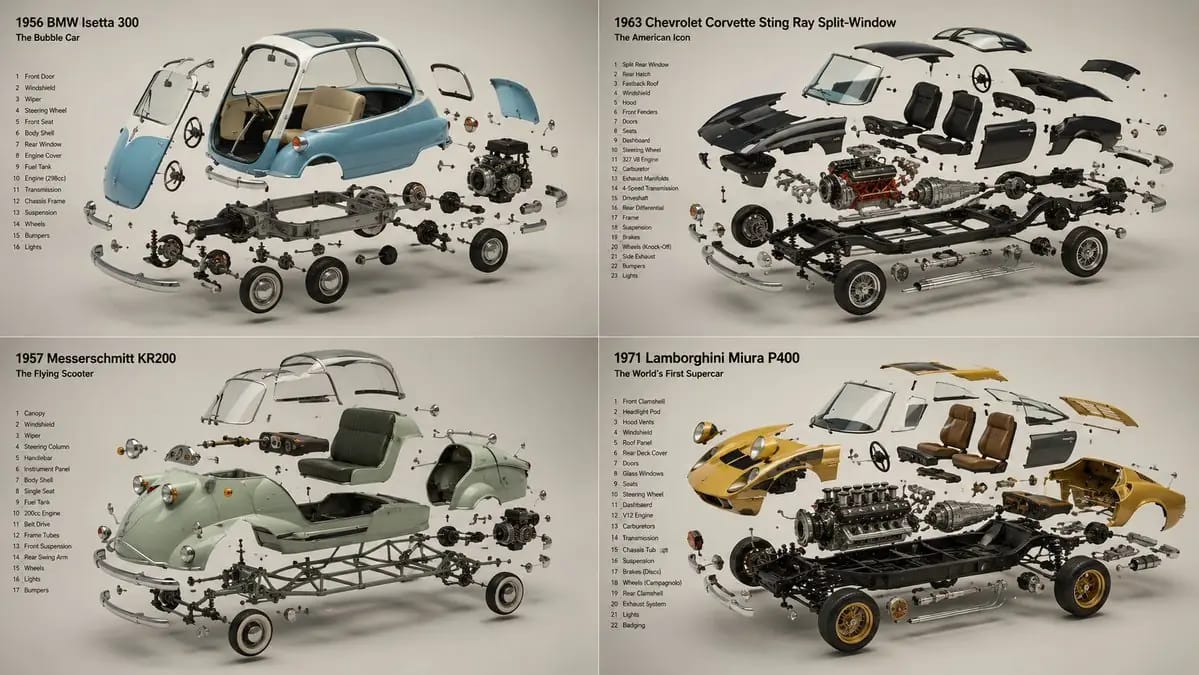
2x2 grid, 16:9, do this for 4 unusual classic cars that were
2x2 grid, 16:9, do this for 4 unusual classic cars that were real: INPUT ::= [Product] STEP_1 :: infer the components - every part or ingredient, separated and identified - the assembly order — components arrayed the way they combine -...
प्रॉम्प्ट
2x2 grid, 16:9, यह उन 4 असामान्य क्लासिक कारों के लिए करें जो वास्तविक थीं: INPUT ::= [Product] STEP_1 :: घटकों का अनुमान लगाएँ - हर हिस्सा या सामग्री, अलग और पहचानी हुई - असेंबली क्रम — घटक उस तरह व्यवस्थित जैसे वे संयोजित होते हैं - क्या संरचनात्मक है, क्या सक्रिय है, अंदर क्या रहस्य है - वह एक तत्व जो बताता है कि यह कैसे काम करता है STEP_2 :: suspension का अनुमान लगाएँ - हर घटक अपने ही तल में तैरता हुआ, शून्य गुरुत्व में टिका हुआ - constellation logic: एक साफ़ अक्ष के साथ exploded, या किसी केंद्र की परिक्रमा करता हुआ - ऐसी दूरी जो जानबूझकर लगे, कभी बिखरी हुई नहीं - hero element सबसे बड़ा और आगे, बाकी पीछे हटते हुए STEP_3 :: reveal story का अनुमान लगाएँ - अंदर क्या है / यह कैसे बनता है / यह किस चीज़ से बना है - cutaway या cross-sectioned घटक जो दावे को साबित करता है - कच्ची सामग्री finished product जितनी ही सुंदर रेंडर की गई STEP_4 :: ground and air का अनुमान लगाएँ - seamless background, one hue, घटक ही एकमात्र विषय - soft directional light हर तैरते तत्व को एकजुट करती हुई - हर टुकड़ा हवा में लटका होने के बावजूद एक ईमानदार कोमल छाया डालता हुआ STEP_5 :: render spec - focus-stacked ताकि हर suspended element तेज़ हो - studio product lighting, हर हिस्से पर controlled reflections - forbidden: visible wires, inconsistent scale, parts lit differently - material honesty हर घटक पर, raw और finished दोनों समान
इस प्रॉम्प्ट का उपयोग कैसे करें
- 1प्रॉम्प्ट को ठीक वैसा ही कॉपी करें, फिर अपने पसंदीदा मॉडल या Ideart प्रोजेक्ट में पेस्ट करें।
- 2प्रोडक्ट, विषय, ऑडियंस और स्टाइल डिटेल को अपने संदर्भ से बदलें।
- 3पहले एक बेसलाइन परिणाम जनरेट करें, फिर सबसे मजबूत दिशा को कैंपेन, इमेज सेट या वीडियो कॉन्सेप्ट में रीमिक्स करें।
पास के प्रॉम्प्ट पथ देखें
मॉडल
इस प्रॉम्प्ट से बनाएं
छवि प्रॉम्प्ट को तैयार क्रिएटिव प्रोजेक्ट में बदलें।
प्रॉम्प्ट सेव करें, रेफ़रेंस इमेज या नोट्स जोड़ें और Ideart को उसी क्रिएटिव थ्रेड से अगला उत्पादन कदम आकार देने दें।