
छविAI
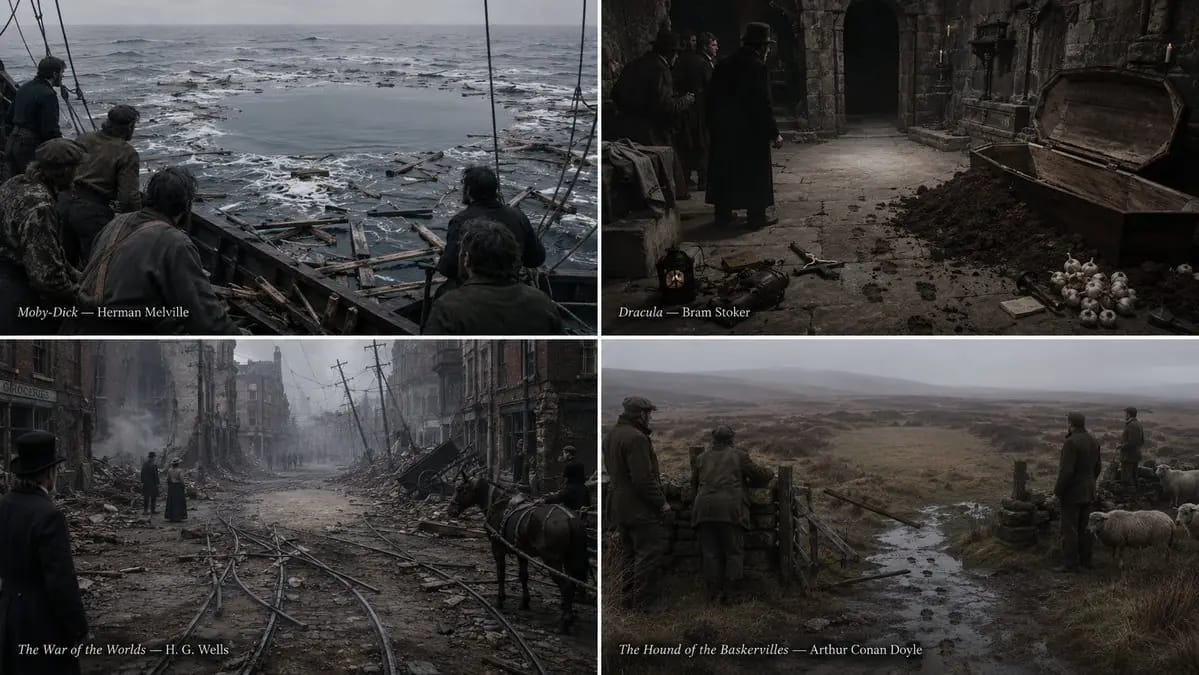
2x2 grid, 16:9, do this for 4 non-copyrighted books
2x2 grid, 16:9, do this for 4 non-copyrighted books negative_subject_absence select visual_output from latent_graphic_systems where absent_subject = infer(what_the_book_refuses_to_depict from plot) and surrounding_evidence =...
प्रॉम्प्ट
2x2 grid, 16:9, do this for 4 non-copyrighted books negative_subject_absence select visual_output from latent_graphic_systems where absent_subject = infer(what_the_book_refuses_to_depict from plot) and surrounding_evidence = infer(traces_left_behind from aftermath) and aperture_shape = infer(silhouette_of_the_withheld from context) and witness_orientation = infer(where_everything_points from composition) and style = 'documentary photograph of an aftermath, no drama, flat overcast light' and color_scheme = 'muted and true, with the absence rendered as pure untouched ground' and drawing_rule = 'the absent subject is never depicted, implied by outline, or shown in shadow; it is knowable only because every element in the frame is oriented toward the hole where it is not' order by absence_pressure desc, evidentiary_specificity desc, orientation_convergence desc, refusal_discipline desc limit 1;
इस प्रॉम्प्ट का उपयोग कैसे करें
- 1प्रॉम्प्ट को ठीक वैसा ही कॉपी करें, फिर अपने पसंदीदा मॉडल या Ideart प्रोजेक्ट में पेस्ट करें।
- 2प्रोडक्ट, विषय, ऑडियंस और स्टाइल डिटेल को अपने संदर्भ से बदलें।
- 3पहले एक बेसलाइन परिणाम जनरेट करें, फिर सबसे मजबूत दिशा को कैंपेन, इमेज सेट या वीडियो कॉन्सेप्ट में रीमिक्स करें।
इस प्रॉम्प्ट से बनाएं
छवि प्रॉम्प्ट को तैयार क्रिएटिव प्रोजेक्ट में बदलें।
प्रॉम्प्ट सेव करें, रेफ़रेंस इमेज या नोट्स जोड़ें और Ideart को उसी क्रिएटिव थ्रेड से अगला उत्पादन कदम आकार देने दें।