
छविAI
Class EditorialManifestoPoster: def init(self, topic= TOPIC
class EditorialManifestoPoster: def __init__(self, topic="[TOPIC]", subject="[SUBJECT]"): self.format = "vertical campaign poster / cover art / billboard" self. camera = "low-angle street fashion photography" self.environment =...
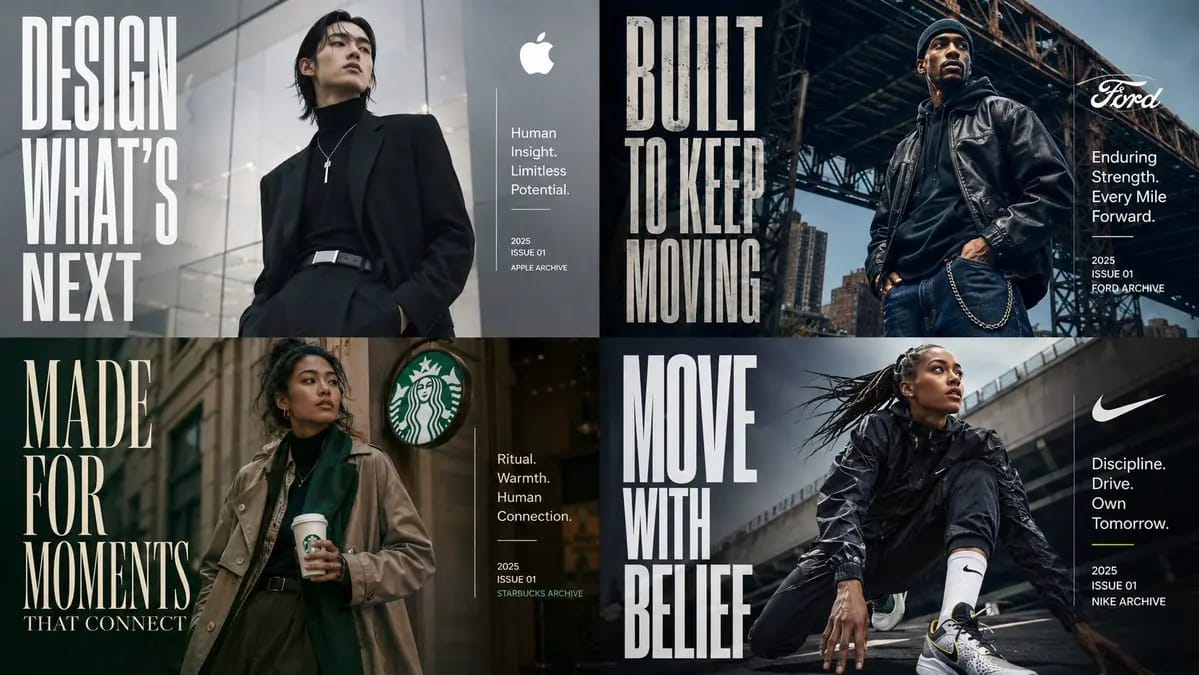
प्रॉम्प्ट
class EditorialManifestoPoster: def __init__(self, topic="[TOPIC]", subject="[SUBJECT]"): self.format = "वर्टिकल कैंपेन पोस्टर / कवर आर्ट / बिलबोर्ड" self. camera = "लो-एंगल स्ट्रीट फैशन फोटोग्राफी" self.environment = AI_INFER("एक शहरी सेटिंग, आर्किटेक्चरल बैकड्रॉप, या संदर्भात्मक वातावरण जो TOPIC के अनुरूप हो") self.mood = AI_INFER("सिनेमैटिक, आकांक्षी, भविष्योन्मुख, प्रीमियम, सांस्कृतिक रूप से प्रासंगिक") def infer_brand_language(self): return { "headline_phrase": AI_INFER("TOPIC से व्युत्पन्न 2-5 शब्दों का मैनिफेस्टो वाक्यांश"), "subheadline": AI_INFER("संक्षिप्त श्रेणी विवरण या पोज़िशनिंग लाइन"), "microcopy": AI_INFER("छोटे सहायक विवरण, क्षमताएँ, थीम, या टैगलाइन"), "year_or_drop": AI_INFER("लॉन्च वर्ष, अंक संख्या, सीज़न, संस्करण, या आर्काइव मार्क") } def build_visual_hierarchy(self): return """ एक आत्मविश्वासी हीरो सब्जेक्ट को केंद्र में या थोड़ा केंद्र से हटकर रखें। विशाल कंडेंस्ड टाइपोग्राफी का उपयोग संरचनात्मक दृश्य तत्व के रूप में करें, न कि केवल लेबल के रूप में। हेडलाइन को कंपोज़िशन के एक तरफ एक बड़े वर्टिकल ब्लॉक पर होना चाहिए। विपरीत दिशा में शीर्षक, विवरण, माइक्रो-कॉपी, और तारीख के लिए एक छोटा साफ़ इन्फो ब्लॉक जोड़ें। वातावरण को सब्जेक्ट और टाइपोग्राफी का समर्थन करना चाहिए, उन्हें अभिभूत किए बिना। """ # EXECUTE: # TOPIC को एक प्रीमियम एडिटोरियल पोस्टर के रूप में रेंडर करें जहाँ सब्जेक्ट भौतिक रूप से ब्रांड संदेश का प्रतीक हो। # कोई हार्ड-कोडेड टेक्स्ट, स्टाइलिंग, या फैशन विवरण नहीं, जब तक आपूर्ति न की गई हो।इस प्रॉम्प्ट का उपयोग कैसे करें
- 1प्रॉम्प्ट को ठीक वैसा ही कॉपी करें, फिर अपने पसंदीदा मॉडल या Ideart प्रोजेक्ट में पेस्ट करें।
- 2प्रोडक्ट, विषय, ऑडियंस और स्टाइल डिटेल को अपने संदर्भ से बदलें।
- 3पहले एक बेसलाइन परिणाम जनरेट करें, फिर सबसे मजबूत दिशा को कैंपेन, इमेज सेट या वीडियो कॉन्सेप्ट में रीमिक्स करें।
पास के प्रॉम्प्ट पथ देखें
मॉडल
श्रेणियाँ
इस प्रॉम्प्ट से बनाएं
छवि प्रॉम्प्ट को तैयार क्रिएटिव प्रोजेक्ट में बदलें।
प्रॉम्प्ट सेव करें, रेफ़रेंस इमेज या नोट्स जोड़ें और Ideart को उसी क्रिएटिव थ्रेड से अगला उत्पादन कदम आकार देने दें।