
छविGPT Image
Create a 3D isometric diorama illustration of an original
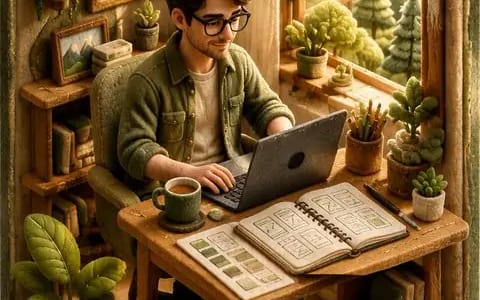
Create a 3D isometric diorama illustration of an original character named [Character Name], peacefully working or practicing a creative activity in a nature-inspired environment, sitting at a wooden desk near a large open window with...
प्रॉम्प्ट
[Character Name] नाम के एक मूल पात्र का 3D आइसोमेट्रिक डायोरामा चित्रण बनाएँ, जो प्रकृति-प्रेरित वातावरण में शांतिपूर्वक काम कर रहा हो या कोई रचनात्मक गतिविधि कर रहा हो, एक लकड़ी की मेज़ पर एक बड़ी खुली खिड़की के पास बैठा हो, जिसमें धूप अंदर आ रही हो और बाहर कोमल हरियाली दिखाई दे रही हो।

पात्र [Ui Ux Designer] से प्रेरित होना चाहिए और उसकी एक अनूठी दृश्य पहचान होनी चाहिए, जिसमें कोमल, प्राकृतिक कपड़े, जैविक बनावटें और एक शांत, आत्मनिरीक्षणशील व्यक्तित्व शामिल हो। पूरे दृश्य में हस्तनिर्मित फेल्ट सौंदर्य होना चाहिए, जिसमें कोमल गोल आकार, दिखाई देने वाले सिलाई विवरण और साफ़, परिष्कृत बनावटें हों।

डायोरामा [Material Style] से बनी एक गोल किनारों वाली घन संरचना के अंदर बंद है, जिसमें सूक्ष्म षट्कोणीय अनुपात हैं।

वातावरण में शांतिपूर्ण, प्रकृति से जुड़ी जीवनशैली की मजबूत झलक होनी चाहिए, जिसमें पौधे, प्राकृतिक लकड़ी का फर्नीचर, कोमल वस्त्र और न्यूनतम सजावट शामिल हों।

मेज़ पर [Object One], [Object Two], [Object Three] जैसी छोटी विस्तृत वस्तुएँ शामिल करें।

प्रकाश उज्ज्वल, कोमल और प्राकृतिक होना चाहिए, जिसमें खिड़की से गर्म धूप की किरणें अंदर आ रही हों, जो एक शांत और हवादार वातावरण बनाती हों, और डायोरामा के बाहर साफ़ सफ़ेद पृष्ठभूमि हो।

8:20 में रेंडर करें, ultra-detailed, photorealistic style।

डायोरामा की INNER दीवार पर सिला हुआ एक छोटा सिलाई वाला कपड़े का नाम टैग शामिल करें (क्यूब के अंदर ऊपर-बाएँ कोने में), जो दृश्य में स्पष्ट रूप से एकीकृत हो, तैरता हुआ न हो और संरचना के बाहर न हो, प्रदर्शित करते हुए
इस प्रॉम्प्ट का उपयोग कैसे करें
- 1प्रॉम्प्ट को ठीक वैसा ही कॉपी करें, फिर अपने पसंदीदा मॉडल या Ideart प्रोजेक्ट में पेस्ट करें।
- 2प्रोडक्ट, विषय, ऑडियंस और स्टाइल डिटेल को अपने संदर्भ से बदलें।
- 3पहले एक बेसलाइन परिणाम जनरेट करें, फिर सबसे मजबूत दिशा को कैंपेन, इमेज सेट या वीडियो कॉन्सेप्ट में रीमिक्स करें।
पास के प्रॉम्प्ट पथ देखें
मॉडल
इस प्रॉम्प्ट से बनाएं
छवि प्रॉम्प्ट को तैयार क्रिएटिव प्रोजेक्ट में बदलें।
प्रॉम्प्ट सेव करें, रेफ़रेंस इमेज या नोट्स जोड़ें और Ideart को उसी क्रिएटिव थ्रेड से अगला उत्पादन कदम आकार देने दें।