
छविGPT Image
Create a 9:16 full-body editorial portrait poster
Create a 9:16 full-body editorial portrait poster for a modern [Profession]. Subject: [Subject] Outfit: [Outfit] Working action: [Working Action] Workflow: [Workflow] Tools: [Tools] Final output: [Final Output] Headline: [Headline]...
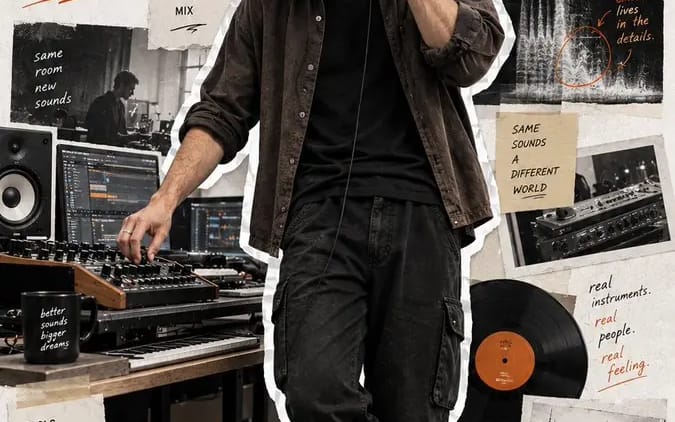
प्रॉम्प्ट
एक आधुनिक [Profession] के लिए 9:16 फुल-बॉडी एडिटोरियल पोर्ट्रेट पोस्टर बनाएं।

विषय: [Subject]
पोशाक: [Outfit]
कार्य गतिविधि: [Working Action]
वर्कफ़्लो: [Workflow]
उपकरण: [Tools]
अंतिम आउटपुट: [Final Output]
शीर्षक: [Headline]
एक्सेंट रंग: [Accent Color]

वास्तविक फुल-बॉडी पोर्ट्रेट को प्रमुख दृश्य बनाएं, जो पोस्टर की ऊंचाई का 75–85% हिस्सा घेरे।

प्राकृतिक शारीरिक अनुपात, वास्तविक त्वचा और बाल, प्रामाणिक कपड़ों की सामग्री, और विश्वसनीय कार्यस्थल प्रकाश का उपयोग करें।

विषय को स्वाभाविक रूप से काम करते हुए दिखाएं, पोज़ देते हुए या कैमरे की ओर देखते हुए नहीं।

पूरे व्यक्ति को स्पष्ट रूप से दिखाई देने वाली, थोड़ी अनियमित सफेद कागज/स्टिकर सीमा के साथ काटें।

साफ ऑफ-व्हाइट बनावट वाले कागज की पृष्ठभूमि का उपयोग करें और विषय को संयमित एडिटोरियल कोलाज तत्वों से घेरें जो दिखाते हैं:
1. उनका वर्कफ़्लो,
2. उपकरण और प्रक्रिया,
3. तैयार परिणाम।

फटे कागज की तस्वीरें, टेप, स्केच, UI अंश, आरेख, हस्तलिखित नोट्स, तीर, और छोटे प्रक्रिया वाक्यांशों का उपयोग करें। सभी सहायक तत्वों को पेशे से प्रासंगिक रखें और पोर्ट्रेट के लिए दृश्य रूप से गौण रखें।

बड़ा शीर्षक “[Headline]” जोड़ें और टाइपोग्राफी और छोटे ग्राफिक एनोटेशन के लिए [Accent Color] का उपयोग करें।

समग्र परिणाम को आधुनिक, यथार्थवादी, स्टाइलिश और मानवीय रखें—जैसे एक क्रिएटर पोर्ट्रेट, वर्कफ़्लो कहानी, और एडिटोरियल स्क्रैपबुक पोस्टर एक साथ।

कोई नंबरिंग, पृष्ठ संख्या, संग्रह संख्या, पीला विंटेज फ़िल्टर, साइबरपंक प्रभाव, कठोर कॉर्पोरेट पोज़िंग, CGI त्वचा, कटे हुए जूते, विकृत हाथ, या भीड़भाड़ वाला कोलाज नहीं।
इस प्रॉम्प्ट का उपयोग कैसे करें
- 1प्रॉम्प्ट को ठीक वैसा ही कॉपी करें, फिर अपने पसंदीदा मॉडल या Ideart प्रोजेक्ट में पेस्ट करें।
- 2प्रोडक्ट, विषय, ऑडियंस और स्टाइल डिटेल को अपने संदर्भ से बदलें।
- 3पहले एक बेसलाइन परिणाम जनरेट करें, फिर सबसे मजबूत दिशा को कैंपेन, इमेज सेट या वीडियो कॉन्सेप्ट में रीमिक्स करें।
पास के प्रॉम्प्ट पथ देखें
मॉडल
इस प्रॉम्प्ट से बनाएं
छवि प्रॉम्प्ट को तैयार क्रिएटिव प्रोजेक्ट में बदलें।
प्रॉम्प्ट सेव करें, रेफ़रेंस इमेज या नोट्स जोड़ें और Ideart को उसी क्रिएटिव थ्रेड से अगला उत्पादन कदम आकार देने दें।