
छविGPT Image
Create a cinematic fashion editorial portrait at blue hour
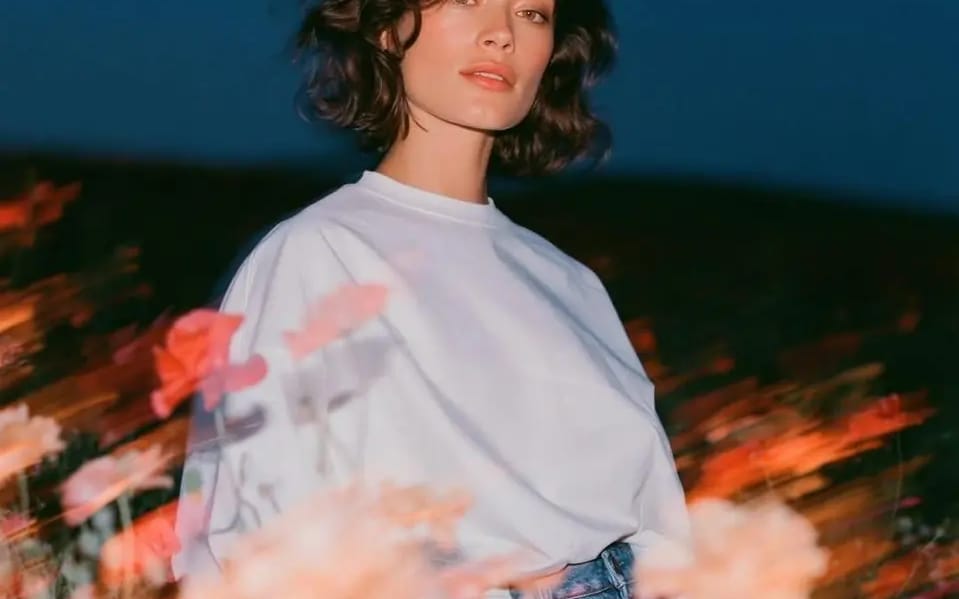
Create a cinematic fashion editorial portrait at blue hour in an open wildflower field. A beautiful young woman with short, softly wavy dark hair and natural makeup stands among blooming pink and white poppies, wearing an oversized...
प्रॉम्प्ट
खुले जंगली फूलों के खेत में blue hour पर एक cinematic fashion editorial portrait बनाएं। छोटे, हल्के लहरदार गहरे बालों और natural makeup वाली एक सुंदर युवती खिलते गुलाबी और सफेद poppies के बीच खड़ी है, जिसने oversized सफेद crew-neck T-shirt को high-waisted vintage blue jeans में tucked किया हुआ है। वह शांत, effortless भाव से सीधे कैमरे में देखती है, जबकि हल्की हवा उसके बालों को हिलाती है।
slow shutter और rear-curtain flash का उपयोग करके फोटो खींचें, subject को पूरी तरह sharp रखें, जबकि foreground के फूल चमकती motion-blur streaks और frame में तिरछे फैलती painterly light trails बनाते हैं। Warm flash illumination model को गहरे navy twilight sky के सामने freeze करती है, जिससे cool ambient light और warm floral highlights के बीच striking contrast बनता है।
Foreground में भारी रूप से blurred फूल, soft bokeh, translucent ghosting, चमकती streaks, dreamy long-exposure movement और subtle lens bloom से भरा हुआ है। Background न्यूनतम distractions के साथ एक गहरे meadow में विलीन हो जाता है, जिससे subject पर जोर पड़ता है।
Editorial fashion photography, luxury campaign aesthetic, cinematic color grading, Kodak Portra 400 tones, soft skin texture, natural color rendition, high dynamic range, realistic fabric folds, premium styling, shallow depth of field, ultra-detailed, photorealistic, 85mm lens, f/1.8, ISO 400, 1/5s exposure with rear-curtain flash, crisp eyes, volumetric atmosphere, award-winning fashion photography, magazine cover quality, 4:5 aspect ratio.
इस प्रॉम्प्ट का उपयोग कैसे करें
- 1प्रॉम्प्ट को ठीक वैसा ही कॉपी करें, फिर अपने पसंदीदा मॉडल या Ideart प्रोजेक्ट में पेस्ट करें।
- 2प्रोडक्ट, विषय, ऑडियंस और स्टाइल डिटेल को अपने संदर्भ से बदलें।
- 3पहले एक बेसलाइन परिणाम जनरेट करें, फिर सबसे मजबूत दिशा को कैंपेन, इमेज सेट या वीडियो कॉन्सेप्ट में रीमिक्स करें।
पास के प्रॉम्प्ट पथ देखें
मॉडल
श्रेणियाँ
इस प्रॉम्प्ट से बनाएं
छवि प्रॉम्प्ट को तैयार क्रिएटिव प्रोजेक्ट में बदलें।
प्रॉम्प्ट सेव करें, रेफ़रेंस इमेज या नोट्स जोड़ें और Ideart को उसी क्रिएटिव थ्रेड से अगला उत्पादन कदम आकार देने दें।