
छविGPT Image 2
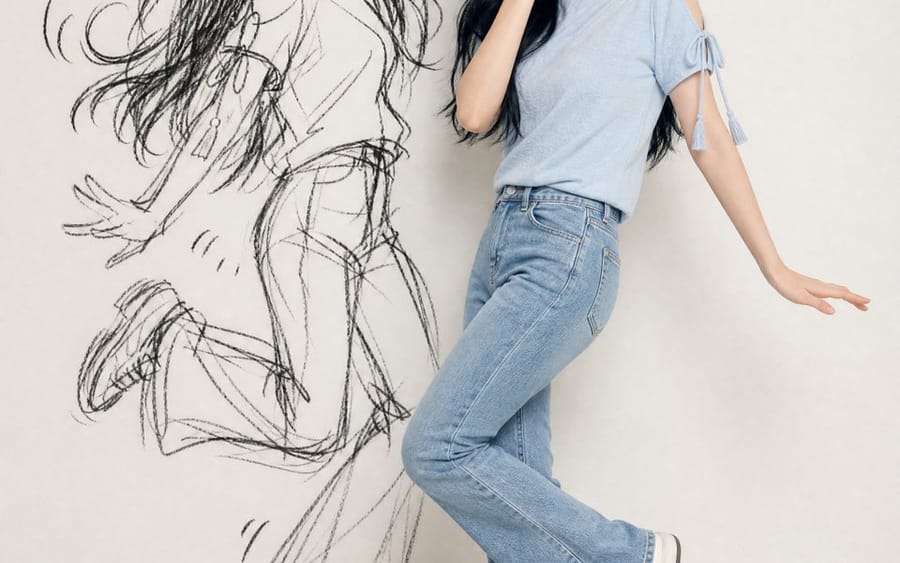
Ink-Twin Doodle Stylization
A structured JSON-based prompt for stylizing an image with an 'ink-twin' doodle character mimicking the main subject's pose.
प्रॉम्प्ट
{
  "identity_ref": {
    "source": "अपलोड की गई फ़ोटो",
    "lock": ["चेहरा", "आँखें/नाक/मुँह", "त्वचा का रंग", "बाल (लंबाई/बनावट/रंग)", "एक्सेसरीज़", "सटीक आउटफिट"],
    "rule": "कोई मनगढ़ंत विवरण नहीं"
  },
  "composition": {"format": "vertical 4:5/9:16", "figures": ["असली सब्जेक्ट", "ink-twin डूडल"], "layout": "साथ-साथ, पोज़ पूरी तरह दिखाई दें"},
  "real_subject": {"style": "photoreal, full-body", "outfit": "रेफ़रेंस से बिल्कुल मिलान करें", "expression": "चंचल, शरमाई हुई, पकड़े जाने वाली मोहकता", "pose": "स्वाभाविक, संयमित संस्करण"},
  "ink_twin": {
    "style": "दीवार पर खुरदुरा काला स्केच/चारकोल डूडल",
    "recognizability": "केवल सिल्हूट (बाल/आउटफिट/पोज़ का आकार)",
    "avoid": ["वास्तविक दूसरा व्यक्ति", "सपाट छाया", "रंगीन कार्टून"],
    "energy": "बढ़ा-चढ़ा, अराजक बनाम असली सब्जेक्ट",
    "extras": "वैकल्पिक विरल कॉमिक चिह्न (मोशन लाइन्स/स्टार/हार्ट)"
  },
  "pose_rule": {
    "instruction": "हर बार नया चंचल/शरारती साझा पोज़",
    "avoid": ["इशारा करना", "फ़िंगर-गन", "मिरर/दोहराए गए पोज़"],
    "relationship": "सब्जेक्ट = सूक्ष्म संस्करण; twin = बढ़ा-चढ़ा कार्टून संस्करण, वही बीट"
  },
  "setting": {"background": "साफ़ न्यूनतम दीवार (सफ़ेद/क्रीम/ग्रे)", "lighting": "नरम, समान, दिन की रोशनी जैसी, चेहरा दिखाई दे"},
  "mood": "चंचल, स्टाइलिश, अराजक-मज़ेदार, शेयर करने योग्य",
  "negative_prompt": [
    "मनगढ़ंत रूप", "आउटफिट में बदलाव", "twin को असली दूसरा व्यक्ति",
    "सपाट/डरावनी छाया", "रंगीन कार्टून twin", "कमज़ोर समानता",
    "अव्यवस्था", "दोहराए/कठोर/मिरर पोज़", "टेक्स्ट", "वॉटरमार्क",
    "अतिरिक्त अंग", "खराब हाथ"
  ]
}इस प्रॉम्प्ट का उपयोग कैसे करें
- 1प्रॉम्प्ट को ठीक वैसा ही कॉपी करें, फिर अपने पसंदीदा मॉडल या Ideart प्रोजेक्ट में पेस्ट करें।
- 2प्रोडक्ट, विषय, ऑडियंस और स्टाइल डिटेल को अपने संदर्भ से बदलें।
- 3पहले एक बेसलाइन परिणाम जनरेट करें, फिर सबसे मजबूत दिशा को कैंपेन, इमेज सेट या वीडियो कॉन्सेप्ट में रीमिक्स करें।
पास के प्रॉम्प्ट पथ देखें
मॉडल
इस प्रॉम्प्ट से बनाएं
छवि प्रॉम्प्ट को तैयार क्रिएटिव प्रोजेक्ट में बदलें।
प्रॉम्प्ट सेव करें, रेफ़रेंस इमेज या नोट्स जोड़ें और Ideart को उसी क्रिएटिव थ्रेड से अगला उत्पादन कदम आकार देने दें।