
छविGPT Image
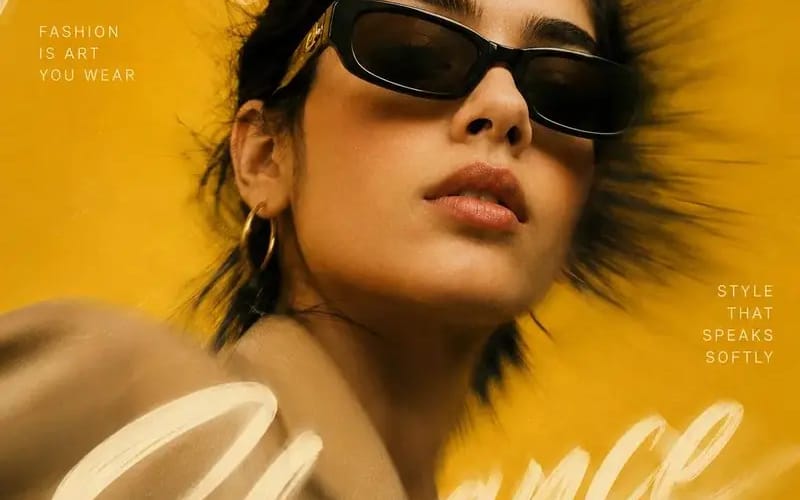
Create a high-end editorial fashion poster inspired
{ "REFERENCE_IMAGE": "[Reference Image]", "MAIN_HEADLINE": "[Main Headline]", "LEFT_TEXT": "[Left Text]", "RIGHT_TEXT": "[Right Text]", "FOOTER_TEXT": "[Footer Text]", "BACKGROUND_COLOR": "[Background Color]", "prompt": "Create a...
प्रॉम्प्ट
{
  "REFERENCE_IMAGE": "[Reference Image]",
  "MAIN_HEADLINE": "[Main Headline]",
  "LEFT_TEXT": "[Left Text]",
  "RIGHT_TEXT": "[Right Text]",
  "FOOTER_TEXT": "[Footer Text]",
  "BACKGROUND_COLOR": "[Background Color]",

  "prompt": "लक्ज़री मैगज़ीन कवर और प्रीमियम विज्ञापन अभियानों से प्रेरित एक हाई-एंड एडिटोरियल फैशन पोस्टर बनाएं। [Reference Image] से विषय की पहचान बनाए रखें, साथ ही समग्र कलात्मक शैली से मेल खाएं।\n\n  एक नाटकीय क्लोज़-अप पोर्ट्रेट कंपोज़िशन का उपयोग करें जिसमें विषय थोड़ा ऑफ-सेंटर स्थित हो। विषय को एक सूक्ष्म लो एंगल से कैप्चर करें ताकि एक शक्तिशाली, आत्मविश्वासी रूप बने।\n\n  छवि के केंद्र से बाहर की ओर फैलता हुआ एक मजबूत radial motion blur प्रभाव जोड़ें, जबकि विषय का चेहरा तेज और अत्यधिक विस्तृत रखें।\n\n  [Main Headline] को एक सतत handwritten brushstroke वाक्यांश के रूप में रखें जो पूरी रचना में स्वाभाविक रूप से बहता है। अक्षरों के कुछ हिस्सों को विषय के पीछे दिखने दें जबकि अन्य हिस्से अग्रभूमि को ओवरलैप करें।\n\n  [Left Text] और [Right Text] को छोटे uppercase editorial typography ब्लॉक के रूप में पर्याप्त स्पेसिंग के साथ जोड़ें।\n\n  [Footer Text] को एक कोने में सूक्ष्म रूप से रखें।\n\n  शैली विवरण:\n  - ओवरसाइज़्ड फैशन सनग्लासेस\n  - मिनिमल ज्वेलरी\n  - नेचुरल स्किन टेक्सचर\n  - विंड-स्वेप्ट हेयर\n  - लक्ज़री फैशन स्टाइलिंग\n  - एलिगेंट पोज़\n  - सिनेमैटिक कलर ग्रेडिंग\n  - फाइन film grain\n  - सॉफ्ट हाइलाइट्स और डीप शैडोज़\n  - प्रीमियम स्टूडियो फोटोग्राफी क्वालिटी\n\n  पृष्ठभूमि:\n  - क्लीन मोनोक्रोमैटिक बैकड्रॉप\n  - [Background Color] को प्रमुख रंग के रूप में उपयोग करें\n  - डायनामिक zoom-blur effect\n  - सॉफ्ट ग्लो और लाइट ब्लूम\n\n  दृश्य शैली:\n  - Vogue-inspired editorial design\n  - लक्ज़री विज्ञापन सौंदर्य\n  - फोटोरियलिस्टिक रेंडरिंग\n  - प्रीमियम टाइपोग्राफी कंपोज़िशन\n  - हाई-फैशन मैगज़ीन कवर डिज़ाइन\n\n  Negative prompt:\n  - watermark\n  - logo\n  - blurry face\n  - distorted anatomy\n  - duplicated accessories\n  - plastic skin\n  - excessive sharpening\n  - oversaturated colors\n  - low quality output",

  "aspect_ratio": "4:5"
}इस प्रॉम्प्ट का उपयोग कैसे करें
- 1प्रॉम्प्ट को ठीक वैसा ही कॉपी करें, फिर अपने पसंदीदा मॉडल या Ideart प्रोजेक्ट में पेस्ट करें।
- 2प्रोडक्ट, विषय, ऑडियंस और स्टाइल डिटेल को अपने संदर्भ से बदलें।
- 3पहले एक बेसलाइन परिणाम जनरेट करें, फिर सबसे मजबूत दिशा को कैंपेन, इमेज सेट या वीडियो कॉन्सेप्ट में रीमिक्स करें।
पास के प्रॉम्प्ट पथ देखें
मॉडल
इस प्रॉम्प्ट से बनाएं
छवि प्रॉम्प्ट को तैयार क्रिएटिव प्रोजेक्ट में बदलें।
प्रॉम्प्ट सेव करें, रेफ़रेंस इमेज या नोट्स जोड़ें और Ideart को उसी क्रिएटिव थ्रेड से अगला उत्पादन कदम आकार देने दें।