
सोशल मीडिया प्रोमो कंपोजिट प्रॉम्प्ट
एक अत्यधिक संरचित नैनो बनाना प्रो प्रॉम्प्ट, जिसे एक मिश्रित छवि बनाने के लिए डिज़ाइन किया गया है, जहाँ एक चरित्र (एक संदर्भ छवि पर आधारित) को एक सोशल मीडिया प्रोफ़ाइल पेज के स्क्रीनशॉट पर सुपरइम्पोज़ किया गया है, जो सक्रिय रूप से 'फ़ॉलो' बटन की ओर इशारा कर रहा है। यह पहचान की निरंतरता, एक हाई-एंगल सेल्फ़ी परिप्रेक्ष्य, और सब्सक्राइब बटन दबाने की नकल करने के लिए विस्तृत हाथ के इशारों को निर्दिष्ट करता है, जिसका लक्ष्य एक इन्फ्लुएंसर प्रोमो शैली है।
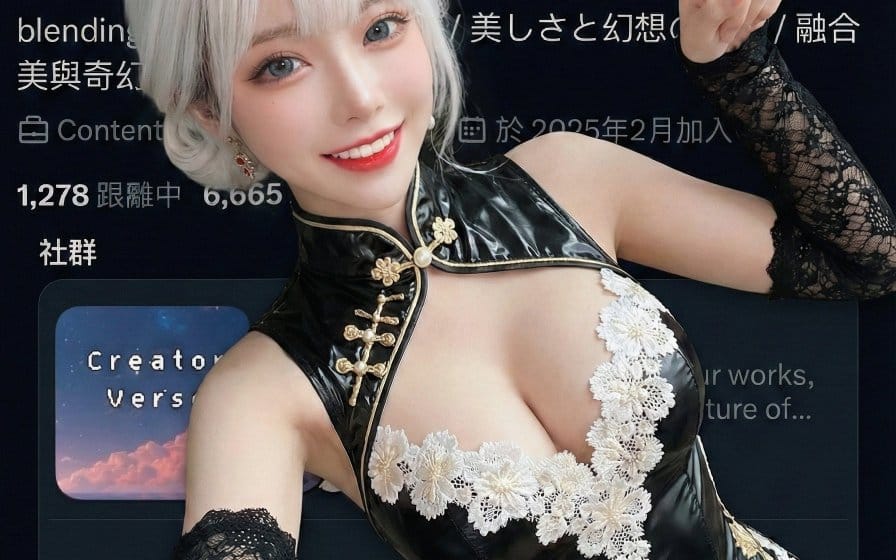
प्रॉम्प्ट
```json
{
  "edit_type": "creative_composite_layering",

  "source": {
    "_hint": "आधार तर्क: कैरेक्टर (संदर्भ 1) बैकग्राउंड इमेज (संदर्भ 2) के ऊपर सुपरइम्पोज्ड है।",
    "mode": "EDIT",
    "reference_images": {
      "first": "foreground_character_person",
      "second": "background_scenery_or_pattern"
    },
    "preserve_from_first": {
      "same_person_or_group": true,
      "same_faces": true,
      "same_hairstyles": true,
      "same_outfits": true
    }
  },

  "identity": {
    "keep_identity_consistent": true,
    "expression": "bright_engaging_smile_at_camera"
  },

  "camera_effect": {
    "_hint": "हाई-एंगल सेल्फी स्टाइल, हाथ और चेहरे के बीच गहराई का एहसास पैदा करता है।",
    "perspective": "high_angle_shot_looking_down",
    "style": "social_media_call_to_action",
    "depth_of_field": "focus_on_face_and_pointing_finger",
    "framing": "character_centered_with_space_at_top_right"
  },

  "pose": {
    "_hint": "मुख्य क्रिया: लेटा हुआ है लेकिन 'फॉलो' बटन क्षेत्र (ऊपर दाईं ओर) की ओर सक्रिय रूप से इशारा कर रहा है।",
    "pose_style": "lying_down_or_reclining_on_back",
    "face_direction": "looking_directly_up_into_lens",
    "hand_gestures": {
      "right_hand_action": "pointing_index_finger",
      "target_direction": "upper_right_corner_45_degrees",
      "purpose": "mimicking_pressing_subscribe_button",
      "arm_position": "extended_towards_camera_top_right"
    },
    "body_language": "inviting_and_energetic",
    "style_tags": [
      "kpop_idol_fan_service",
      "influencer_promo_style",
      "dynamic_perspective"
    ]
  },

  "background_integration": {
    "_hint": "दूसरी संदर्भ छवि पृष्ठभूमि/फर्श है।",
    "method": "full_background_replacement",
    "target_area": "entire_canvas_behind_character",
    "content_source": "reference_image_second",
    "perspective_match": "flat_lay_style",
    "rules": {
      "character_must_be_top_layer": true,
      "leave_space_in_upper_right_for_ui": true
    }
  },

  "composition": {
    "_hi": ""
  }
}
```इस प्रॉम्प्ट का उपयोग कैसे करें
- 1प्रॉम्प्ट को ठीक वैसा ही कॉपी करें, फिर अपने पसंदीदा मॉडल या Ideart प्रोजेक्ट में पेस्ट करें।
- 2प्रोडक्ट, विषय, ऑडियंस और स्टाइल डिटेल को अपने संदर्भ से बदलें।
- 3पहले एक बेसलाइन परिणाम जनरेट करें, फिर सबसे मजबूत दिशा को कैंपेन, इमेज सेट या वीडियो कॉन्सेप्ट में रीमिक्स करें।
पास के प्रॉम्प्ट पथ देखें
मॉडल
इस प्रॉम्प्ट से बनाएं
छवि प्रॉम्प्ट को तैयार क्रिएटिव प्रोजेक्ट में बदलें।
प्रॉम्प्ट सेव करें, रेफ़रेंस इमेज या नोट्स जोड़ें और Ideart को उसी क्रिएटिव थ्रेड से अगला उत्पादन कदम आकार देने दें।