
छविGPT Image
Two-dimensional alternative character illustration
Two-dimensional alternative character illustration of [Character Name], occupying approximately seventy-five percent of the frame in [Pose], with [Hair Style] and [Expression]. Oversized rounded cranium, a short flattened lower face, a...
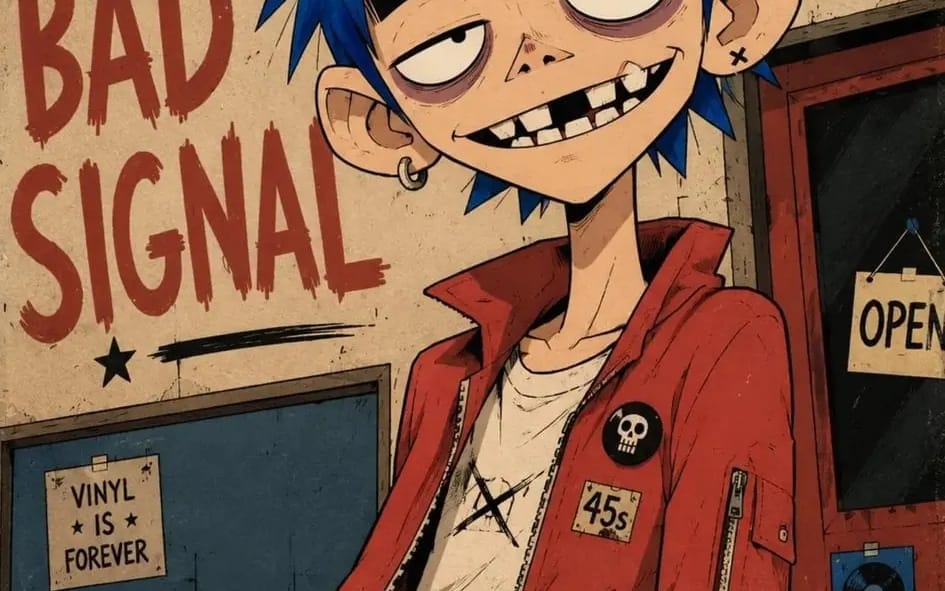
प्रॉम्प्ट
द्वि-आयामी वैकल्पिक पात्र चित्रण [Character Name] का, जो [Pose] में फ़्रेम का लगभग पचहत्तर प्रतिशत हिस्सा घेरता है, [Hair Style] और [Expression] के साथ। अत्यधिक बड़ी गोलाकार खोपड़ी, छोटा चपटा निचला चेहरा, संकीर्ण जबड़ा, लंबी पतली गर्दन, थोड़े बड़े कान, बड़ी हल्की अंडाकार आँखें जिनमें छोटी केंद्र से हटी पुतलियाँ, अत्यधिक मोटी क्षैतिज काली भौहें, भारी काली ऊपरी पलकें, हल्के मॉव रंग के आँखों के नीचे के घेरे, छोटी चौड़ी त्रिकोणीय नाक, और चौड़ी असममित मुस्कान जिसमें अलग-अलग खींचे गए अनियमित आयताकार दाँत दिखाई देते हैं, एक स्पष्ट रूप से गायब ऊपरी दाँत, एक टूटा हुआ दाँत और गहरे काले अंतराल। पात्र को [Clothing] पहनाएँ, जिसे चौड़े ग्राफ़िक आकारों में सरलीकृत किया गया हो, मोटे सीम, न्यूनतम सिलवटें और छोटे हाथ से बनाए गए सहायक उपकरण हों। आत्मविश्वासी काली स्याही की रूपरेखाएँ, मोटे बाहरी सिल्हूट, मध्यम-मोटाई की चेहरे की रेखाएँ, पतले कोणीय बालों के लट और आँखों, बालों और कपड़ों की सीमों के आसपास केवल कुछ छोटे खरोंच के निशानों का उपयोग करते हुए; सपाट अपारदर्शी रंग क्षेत्रों, प्रत्येक रूप के लिए एक कठोर किनारे वाली सेल-शैडो आकृति, विरल पेंसिल हैचिंग, सूक्ष्म स्याही वॉबल, हल्का रंग मिसरजिस्ट्रेशन और संयमित घिसे-पुराने कागज़ की बनावट का उपयोग करें। नियंत्रित [Color Palette] पैलेट, हर रंग को स्पष्ट रूप से अलग और मध्यम संतृप्त रखते हुए। पात्र को [Background] के सामने रखें, जिसे बड़े सपाट आकारों, कुछ ढीले ढंग से खींचे गए पर्यावरणीय विवरणों और अत्यधिक बड़ी खुरदरी हाथ से पेंट की गई लिखावट जिसमें “[Text]” लिखा हो, में सरलीकृत किया गया हो; केंद्र से हटी कमर से ऊपर की संरचना, हल्का कैमरा झुकाव, क्रॉप की गई पृष्ठभूमि टाइपोग्राफ़ी, ढीले पोस्टर मार्जिन और हल्के से घिसे हुए मुद्रित किनारों का उपयोग करें। 4:5 AR।
इस प्रॉम्प्ट का उपयोग कैसे करें
- 1प्रॉम्प्ट को ठीक वैसा ही कॉपी करें, फिर अपने पसंदीदा मॉडल या Ideart प्रोजेक्ट में पेस्ट करें।
- 2प्रोडक्ट, विषय, ऑडियंस और स्टाइल डिटेल को अपने संदर्भ से बदलें।
- 3पहले एक बेसलाइन परिणाम जनरेट करें, फिर सबसे मजबूत दिशा को कैंपेन, इमेज सेट या वीडियो कॉन्सेप्ट में रीमिक्स करें।
पास के प्रॉम्प्ट पथ देखें
मॉडल
इस प्रॉम्प्ट से बनाएं
छवि प्रॉम्प्ट को तैयार क्रिएटिव प्रोजेक्ट में बदलें।
प्रॉम्प्ट सेव करें, रेफ़रेंस इमेज या नोट्स जोड़ें और Ideart को उसी क्रिएटिव थ्रेड से अगला उत्पादन कदम आकार देने दें।