
छविGPT Image 2
YouTube डार्क मोड डेस्कटॉप UI मॉकअप
डेस्कटॉप OS पर डार्क मोड में वीडियो स्ट्रीमिंग होमपेज का एक विस्तृत UI मॉकअप, जो वेब डिज़ाइन संदर्भों और लेआउट जनरेशन के लिए उपयोगी है।
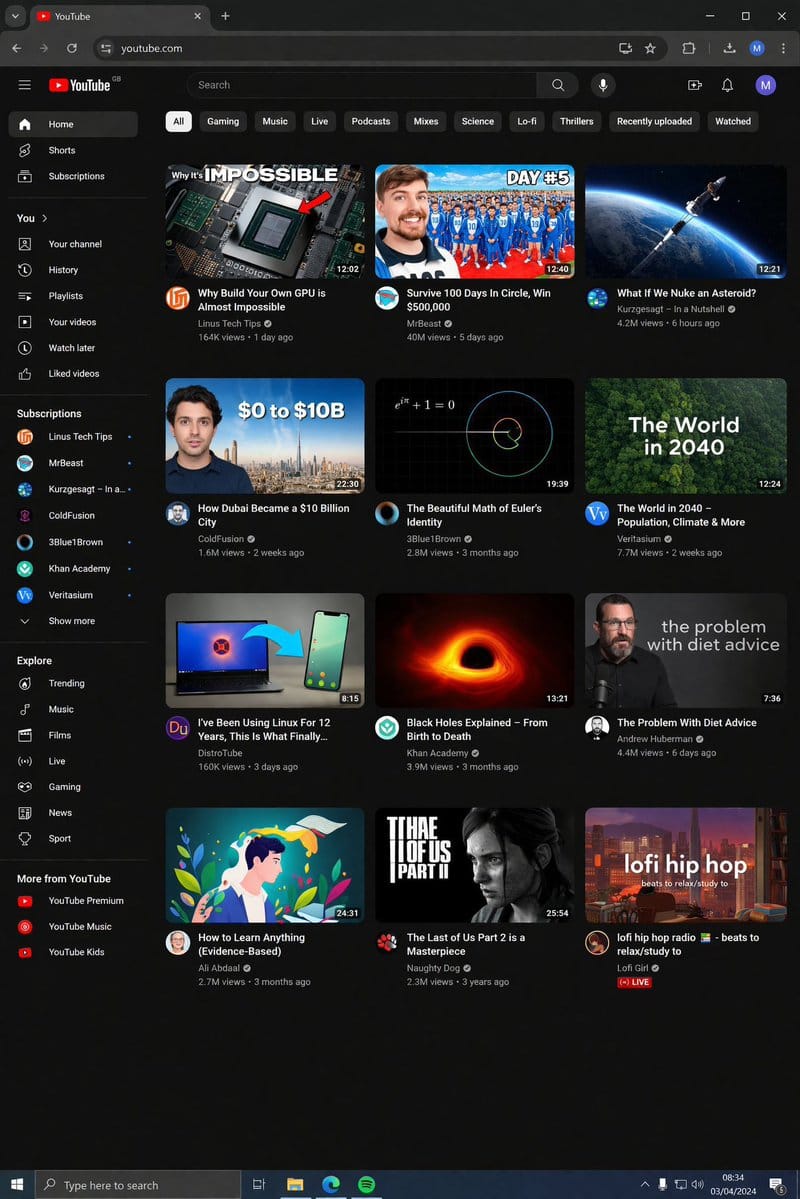
प्रॉम्प्ट
{
  "type": "डेस्कटॉप वेब ब्राउज़र UI स्क्रीनशॉट",
  "environment": "{argument name=\"os environment\" default=\"Windows 11 डेस्कटॉप\"}",
  "theme": "{argument name=\"ui theme\" default=\"डार्क मोड\"}",
  "browser_window": {
    "tabs": ["YouTube", "नया टैब"],
    "url_bar": "youtube.com",
    "profile_icon": "{argument name=\"profile initial\" default=\"M\"}"
  },
  "app_interface": {
    "header": {
      "logo": "{argument name=\"website name\" default=\"YouTube\"} GB",
      "search_bar": "खोजें",
      "icons": ["माइक", "बनाएं", "सूचनाएं", "प्रोफ़ाइल"]
    },
    "filter_bar": {
      "active_filter": "{argument name=\"active filter\" default=\"सभी\"}",
      "count": 11,
      "labels": ["सभी", "गेमिंग", "संगीत", "लाइव", "पॉडकास्ट", "मिक्स", "विज्ञान", "Lo-fi", "थ्रिलर", "हाल ही में अपलोड किए गए", "देखे गए"]
    },
    "sidebar": {
      "sections": [
        { "title": "मुख्य", "count": 3, "labels": ["होम", "Shorts", "सदस्यता"] },
        { "title": "आप", "count": 6, "labels": ["आपका चैनल", "इतिहास", "प्लेलिस्ट", "आपके वीडियो", "बाद में देखें", "पसंद किए गए वीडियो"] },
        { "title": "सदस्यता", "count": 8, "labels": ["Linus Tech Tips", "MrBeast", "Kurzgesagt - In a Nutshell", "ColdFusion", "3Blue1Brown", "Khan Academy", "Veritasium", "और दिखाएं"] },
        { "title": "एक्सप्लोर करें", "count": 7, "labels": ["ट्रेंडिंग", "संगीत", "फ़िल्में", "लाइव", "गेमिंग", "समाचार", "खेल"] },
        { "title": "YouTube से और अधिक", "count": 3, "labels": ["YouTube Premium", "YouTube Music", "YouTube Kids"] }
      ]
    },
    "main_content": {
      "layout": "3 कॉलम और 4 पंक्तियों का ग्रिड",
      "count": 12,
      "video_cards": [
        { "title": "अपना खुद का GPU बनाना लगभग असंभव क्यों है", "channel": "Linus Tech Tips", "stats": "164K व्यूज़ • 1 दिन पहले", "thumbnail": "CPU/GPU चिप" },
        { "title": "सर्कल में 100 दिन जीवित रहें, $500,000 जीतें", "channel": "MrBeast", "stats": "40M व्यूज़ • 5 दिन पहले", "thumbnail": "नीले ट्रैकसूट में भीड़ के साथ MrBeast" },
        { "title": "क्या होगा अगर हम किसी क्षुद्रग्रह पर परमाणु बम गिराएं?", "channel": "Kurzgesagt - In a Nutshell", "stats": "4.2M व्यूज़ • 6 घंटे पहले", "thumbnail": "अंतरिक्ष में क्षुद्रग्रह से टकराती मिसाइल" },
        { "title": "दुबई $10 बिलियन का शहर कैसे बना", "channel": "ColdFusion", "stats": "1.6M व्यूज़ • 2 सप्ताह पहले", "thumbnail": "आदमी और दुबई स्काईलाइन" },
        { "title": "यूलर की पहचान का सुंदर गणित", "channel": "3Blue1Brown", "stats": "2.8M व्यूज़ • 3 महीने पहले", "thumbnail": "गणित समीकरण और सर्पिल ग्राफ" },
        { "title": "2040 में दुनिया - जनसंख्या, जलवायु और बहुत कुछ", "channel": "Veritasium", "stats": "7.7M व्यूज़ • 2 सप्ताह पहले", "thumbnail": "हरे-भरे जंगल का हवाई दृश्य" },
        { "title": "मैं 12 साल से Linux का उपयोग कर रहा हूँ, यह आखिरकार क्या है...", "channel": "DistroTube", "stats": "160K व्यूज़ • 3 दिन पहले", "thumbnail": "Linux लोगो के साथ लैपटॉप और स्मार्टफोन" },
        { "title": "ब्लैक होल की व्याख्या - जन्म से मृत्यु तक", "channel": "Khan Academy", "stats": "3.9M व्यूज़ • 3 महीने पहले", "thumbnail": "चमकता हुआ ब्लैक होल एक्रेशन डिस्क" },
        { "title": "डाइट सलाह के साथ समस्या", "channel": "Andrew Huberman", "stats": "4.4M व्यूज़ • 6 दिन पहले", "thumbnail": "चश्मा पहने हुए बात करता आदमी" },
        { "title": "कुछ भी कैसे सीखें (साक्ष्य-आधारित)", "channel": "Ali Abdaal", "stats": "2.7M व्यूज़ • 3 महीने पहले", "thumbnail": "किताब पढ़ रहे आदमी का वेक्टर चित्रण" },
        { "title": "The Last of Us Part 2 एक उत्कृष्ट कृति है", "channel": "Naughty Dog", "stats": "2.3M व्यूज़ • 3 साल पहले", "thumbnail": "The Last of Us से ऐली" },
        { "title": "lofi हिप हॉप रेडियो - आराम करने/पढ़ने के लिए बीट्स", "channel": "Lofi Girl", "stats": "लाइव", "thumbnail": "डेस्क पर पढ़ रही लोफी गर्ल" }
      ]
    }
  },
  "taskbar": {
    "os": "Windows",
    "icons": ["स्टार्ट", "खोज", "टास्क व्यू", "फ़ाइल एक्सप्लोरर", "Edge", "Spotify"],
    "system_tray": "08:34 03/04/2024"
  }
}इस प्रॉम्प्ट का उपयोग कैसे करें
- 1प्रॉम्प्ट को ठीक वैसा ही कॉपी करें, फिर अपने पसंदीदा मॉडल या Ideart प्रोजेक्ट में पेस्ट करें।
- 2प्रोडक्ट, विषय, ऑडियंस और स्टाइल डिटेल को अपने संदर्भ से बदलें।
- 3पहले एक बेसलाइन परिणाम जनरेट करें, फिर सबसे मजबूत दिशा को कैंपेन, इमेज सेट या वीडियो कॉन्सेप्ट में रीमिक्स करें।
पास के प्रॉम्प्ट पथ देखें
मॉडल
इस प्रॉम्प्ट से बनाएं
छवि प्रॉम्प्ट को तैयार क्रिएटिव प्रोजेक्ट में बदलें।
प्रॉम्प्ट सेव करें, रेफ़रेंस इमेज या नोट्स जोड़ें और Ideart को उसी क्रिएटिव थ्रेड से अगला उत्पादन कदम आकार देने दें।