
ImmagineAI
Class ModernistExhibitionPoster: def init(self
class ModernistExhibitionPoster: def __init__(self, topic="[Topic]"): self .style = "Swiss modernist + Bauhaus editorial poster" self.canvas = "square or vertical poster" self.grid = "strict asymmetric grid with large negative space"...
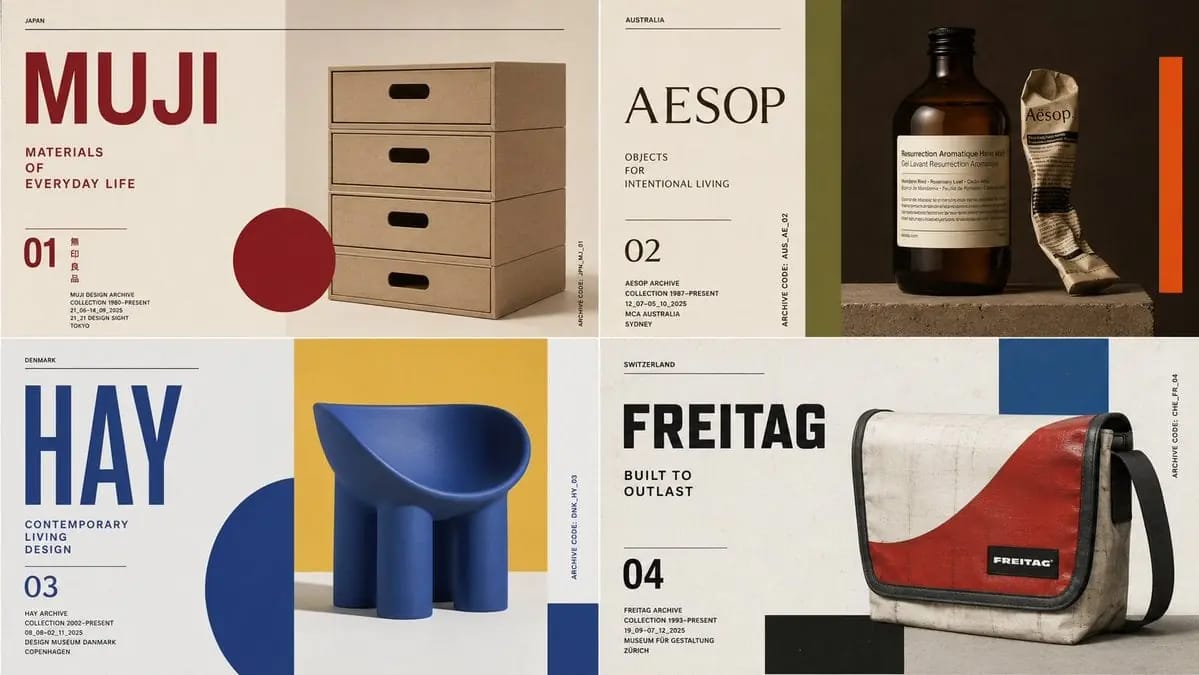
Prompt
class ModernistExhibitionPoster: def __init__(self, topic="[Topic]"): self .style = "Swiss modernist + Bauhaus editorial poster" self.canvas = "square or vertical poster" self.grid = "strict asymmetric grid with large negative space" self.palette = AI_INFER("3-5 bold colors from topic mood and cultural context") self.typography = "oversized condensed sans or elegant modern serif" def infer_hero_image(self): return AI_INFER( "the most iconic visual representation of TOPIC: portrait, object, silhouette, artifact, architecture, animal, machine, landscape, symbol, or scene" ) def poster_system(self): return { "title": AI_INFER("one short powerful title derived from TOPIC"), "subtitle": AI_INFER("2-5 word exhibition phrase"), "index_number": AI_INFER("series number / chapter mark / archive code"), "microcopy": AI_INFER("small location/date/collection-style text"), "geometry": AI_INFER("rectangles, circles, bars, margins, rules, or blocks that echo TOPIC") } # EXECUTE: # Render TOPIC as a premium modernist exhibition poster. # One dominant hero image + strict grid + bold color geometry + museum-grade typography.Come usare questo prompt
- 1Copia il prompt esattamente e incollalo nel modello preferito o in un progetto Ideart.
- 2Sostituisci prodotto, soggetto, pubblico e dettagli di stile con il tuo contesto.
- 3Genera prima un risultato base, poi remixa la direzione più forte in una campagna, una serie di immagini o un concept video.
Esplora percorsi prompt vicini
Modello
Costruisci da questo prompt
Trasforma un prompt immagine in un progetto creativo finito.
Salva il prompt, aggiungi immagini di riferimento o note e lascia che Ideart modelli il prossimo passo produttivo dallo stesso thread creativo.