
ImmagineGPT Image
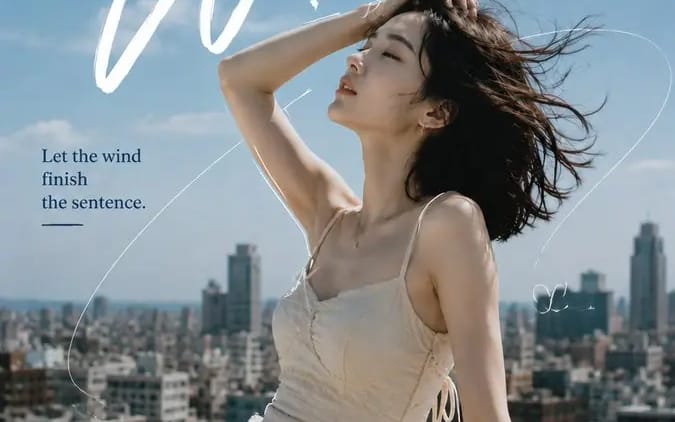
Create a 9:16 editorial portrait poster combining realistic
Create a 9:16 editorial portrait poster combining realistic photography, expressive typography, and minimal hand-drawn linework. Subject: [Person Outfit Pose] Scene: [Location] Mood: [Mood] Main title: [Headline] Secondary text: [Short...
Prompt
Create a 9:16 editorial portrait poster combining realistic photography, expressive typography, and minimal hand-drawn linework.

Subject: [Person Outfit Pose]
Scene: [Location]
Mood: [Mood]
Main title: [Headline]
Secondary text: [Short Phrase]
Palette: [Colors]

Use a realistic portrait as the main visual, with natural skin texture, expressive eyes, and believable lighting.

Let the typography respond to the subject’s pose, body direction, hair movement, and negative space instead of using a fixed layout.

Add 1 strong headline, 1 secondary handwritten element, and 1 short supporting sentence.

Use only a few hand-drawn lines:
1 main flowing line connecting the composition
1–2 short lines partially following the subject’s silhouette
a few minimal doodles or symbols

Do not fully outline the person. Keep plenty of clean breathing space.

The drawn lines should feel connected to the scene:
wind trails, city routes, circular motion, light paths, etc.

Keep the overall balance around 70% photography / 30% graphic design.

Style: fashion editorial, independent magazine, cinematic portrait photography, refined typography, subtle film texture, clean composition, no dates, numbers, page codes, or excessive decorative text.
Come usare questo prompt
- 1Copia il prompt esattamente e incollalo nel modello preferito o in un progetto Ideart.
- 2Sostituisci prodotto, soggetto, pubblico e dettagli di stile con il tuo contesto.
- 3Genera prima un risultato base, poi remixa la direzione più forte in una campagna, una serie di immagini o un concept video.
Esplora percorsi prompt vicini
Modello
Costruisci da questo prompt
Trasforma un prompt immagine in un progetto creativo finito.
Salva il prompt, aggiungi immagini di riferimento o note e lascia che Ideart modelli il prossimo passo produttivo dallo stesso thread creativo.