
ImmagineGPT Image
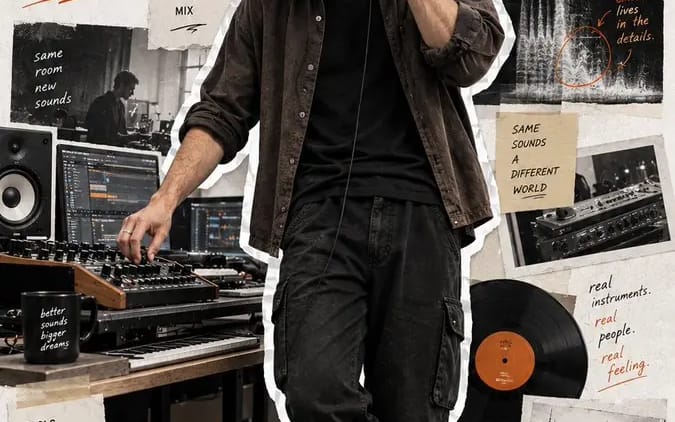
Crea un poster editoriale per ritratto a figura intera
Create a 9:16 full-body editorial portrait poster for a modern [Profession]. Subject: [Subject] Outfit: [Outfit] Working action: [Working Action] Workflow: [Workflow] Tools: [Tools] Final output: [Final Output] Headline: [Headline]...
Prompt
Crea un poster editoriale per ritratto a figura intera in formato 9:16 per un/a [Profession] moderno/a.

Soggetto: [Subject]
Abbigliamento: [Outfit]
Azione lavorativa: [Working Action]
Flusso di lavoro: [Workflow]
Strumenti: [Tools]
Risultato finale: [Final Output]
Titolo: [Headline]
Colore d’accento: [Accent Color]

Realizza il ritratto realistico a figura intera come elemento visivo dominante, occupando il 75–85% dell’altezza del poster. Utilizza proporzioni corporee naturali, pelle e capelli realistici, materiali di abbigliamento autentici e una illuminazione credibile da ambiente di lavoro. Mostra il soggetto intento a lavorare in modo naturale, senza posare né guardare la fotocamera.

Ritaglia la persona intera con un bordo ben visibile, leggermente irregolare, simile a carta/sticker bianco.

Usa uno sfondo pulito in carta ruvida color bianco sporco e circonda il soggetto con elementi editoriali di collage sobri che mostrino:
1. il flusso di lavoro,
2. strumenti e processo,
3. il risultato finito.

Utilizza foto con bordi strappati, nastro adesivo, schizzi, frammenti di UI, diagrammi, note scritte a mano, frecce e brevi frasi di processo. Mantieni tutti gli elementi di supporto pertinenti alla professione e visivamente secondari rispetto al ritratto.

Aggiungi il titolo grande “[Headline]” e usa [Accent Color] per la tipografia e piccole annotazioni grafiche.

Mantieni il risultato finale moderno, realistico, elegante e umano – come un ritratto di creatore, una storia di flusso di lavoro e un poster editoriale scrapbook in uno.

Niente numerazioni, numeri di pagina, numeri d’archivio, filtro vintage giallo, effetti cyberpunk, pose aziendali rigide, pelle da CGI, scarpe tagliate, mani deformi o collage sovraffollato.
Come usare questo prompt
- 1Copia il prompt esattamente e incollalo nel modello preferito o in un progetto Ideart.
- 2Sostituisci prodotto, soggetto, pubblico e dettagli di stile con il tuo contesto.
- 3Genera prima un risultato base, poi remixa la direzione più forte in una campagna, una serie di immagini o un concept video.
Esplora percorsi prompt vicini
Modello
Costruisci da questo prompt
Trasforma un prompt immagine in un progetto creativo finito.
Salva il prompt, aggiungi immagini di riferimento o note e lascia che Ideart modelli il prossimo passo produttivo dallo stesso thread creativo.