
ImmagineGPT Image 2
Layered Paper-Cut Illustration Poster
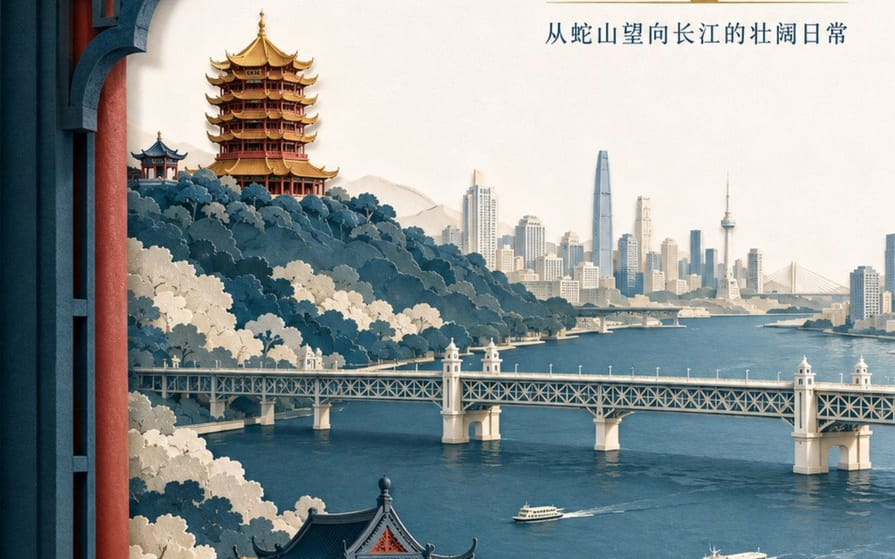
A detailed prompt for creating a sophisticated layered paper-cut illustration poster featuring Wuhan landmarks like the Yellow Crane Tower and the Yangtze River.
Prompt
Crea un poster illustrativo sofisticato in carta ritagliata a strati per il marchio turistico "{argument name="brand name" default="He Wang Wuhan"}" con il tema "{argument name="theme" default="Guardando il fiume dalla torre, vedendo a colpo d'occhio lo scheletro del paesaggio di Wuhan"}" in formato verticale 3:4. La composizione utilizza una finestra in primo piano, con cinque a sette strati di carta spessa e testurizzata che formano la Collina del Serpente, la Torre della Gru Gialla, il Fiume Yangtze, il Ponte sul Fiume Yangtze di Wuhan e lo skyline della città sulla sponda opposta. La Torre della Gru Gialla è situata sulla cresta sullo sfondo, con relazioni accurate tra le eaves stratificate, le piastrelle dorate e i pilastri vermigli. Il Ponte sul Fiume Yangtze si estende orizzontalmente nel piano medio, con due piccoli traghetti sul fiume in scala controllata. I bordi della carta sono netti, con un'illuminazione uniforme e morbida proveniente dall'angolo in alto a sinistra e ombre realistiche tra gli strati. I colori sono indaco, bianco caldo, rosso cinabro e una piccola quantità di oro dorato per il focus visivo. Il titolo principale "{argument name="main title" default="Vedere la città del fiume dalla torre"}" è posizionato nello spazio bianco grande in alto a destra in due righe di carattere moderno Song. Il nome del marchio "He Wang Wuhan" è posizionato in basso a sinistra in formato sigillo di carta, mantenendolo moderno piuttosto che imitare l'antico.Come usare questo prompt
- 1Copia il prompt esattamente e incollalo nel modello preferito o in un progetto Ideart.
- 2Sostituisci prodotto, soggetto, pubblico e dettagli di stile con il tuo contesto.
- 3Genera prima un risultato base, poi remixa la direzione più forte in una campagna, una serie di immagini o un concept video.
Esplora percorsi prompt vicini
Modello
Categorie
Costruisci da questo prompt
Trasforma un prompt immagine in un progetto creativo finito.
Salva il prompt, aggiungi immagini di riferimento o note e lascia che Ideart modelli il prossimo passo produttivo dallo stesso thread creativo.