
ImmagineGPT Image 2
Morning Sunlight Roomwear Portrait
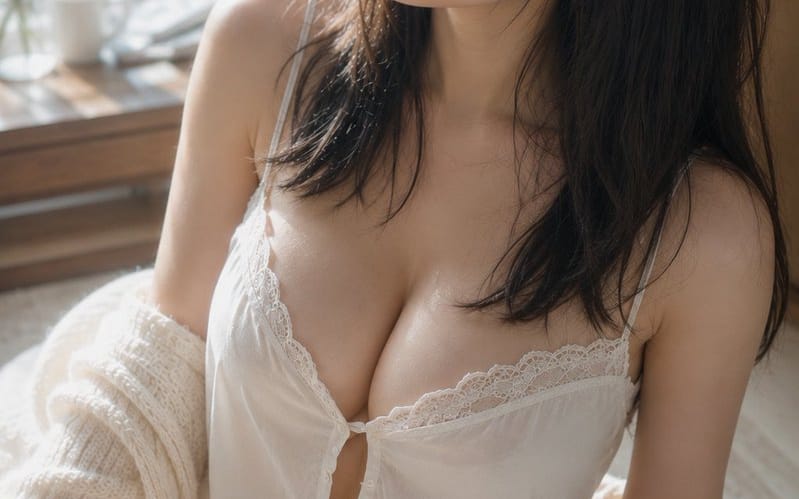
A detailed cinematic portrait prompt capturing a calm morning scene of a woman in roomwear by a sunlit window with soft, realistic lighting and textures.
Prompt
Subject: {argument name="theme" default="Morning light on damp hair"}

Subject: Ritratto verticale di una {argument name="person" default="adult woman in white roomwear"} seduta su un tappeto accanto a una finestra luminosa. La figura è posizionata in gran parte dal centro verso destra dell'inquadratura, mostrata dalla sommità della testa fino alle cosce. La parte superiore del corpo occupa circa due terzi dell'inquadratura, lasciando un morbido margine di sfondo e la finestra sulla sinistra.

Character/Expression: Capelli neri naturali semi-lunghi. Ciocche sottili di capelli, leggermente umide come dopo un bagno, scendono lungo le guance e il collo, con una frangia sottile che ricade sulla fronte. La testa è leggermente inclinata verso l'alto a sinistra dell'inquadratura, con uno sguardo tranquillo rivolto fuori dalla finestra. Occhi rilassati, labbra leggermente socchiuse e un'espressione calma con un accenno di sonnolenza residua. Trucco minimale incentrato su beige pallido e rosa, che mostra una pelle naturale con pori e peluria sottile.

Clothing/Pose: Una camiciola bianca con sottili spalline e delicato pizzo, e pantaloncini coordinati. Piccoli bottoni e morbide arricciature sul petto, con il tessuto leggero che cade naturalmente per gravità. Un cardigan color crema, dalla maglia grossolana, è sfilato dalle spalle e ricade morbidamente su gomiti e avambracci. Il corpo è leggermente ruotato verso sinistra, seduta con una gamba piegata in avanti in una posa naturale, con le spalle ad altezze leggermente sfalsate.

Background/Light: Una grande finestra sulla sinistra. Fuori dalla finestra, foglie verdi immerse nel sole del mattino si diffondono in un morbido bokeh. Una tazza bianca, un piccolo vaso di vetro e rametti sottili sono disposti con parsimonia su un tavolo di legno accanto alla finestra. La luce principale è una luce naturale calda che filtra dalla finestra in alto a sinistra. Crea riflessi morbidi sulle guance, sul ponte del naso, sulla clavicola, sulle spalle, sulle braccia e sulle cosce, mentre il lato destro dei capelli e il fondo della stanza sprofondano in ombre delicate. Una luce riflessa pallida rimbalza dal tessuto bianco e dal pavimento.

Composition/Camera: Verticale 2:3. Inquadratura ravvicinata ripresa verso il basso da una posizione leggermente elevata. Una composizione triangolare con il viso in alto al centro, il petto al centro e la gamba piegata in basso a sinistra. Il margine sul lato della finestra enfatizza la direzione dello sguardo, e lo sfondo è fortemente sfocato. Equivalente a 50mm, profondità di campo ridotta quasi a tutta apertura. La messa a fuoco è sugli occhi e sul viso, con la gamba in primo piano e la finestra sullo sfondo dolcemente sfocate.

Texture/Style: Un ritratto fotorealistico in interni scattato solo con luce naturale. Basato su avorio luminoso e venature chiare del legno, con tonalità della pelle sane e il verde all'esterno della finestra come sottili colori d'accento. Non eccessivamente levigato, ma raffigura con precisione la texture della pelle, la peluria sottile, la sensazione di ciocche raggruppate dei capelli umidi e le fibre di pizzo e maglia. Basso contrasto con sfumature morbide, come un'elegante fotografia analogica.

Negative: Persone che sembrano minorenni, volti innaturali, sguardi innaturali, occhi asimmetrici, dita extra, dita mancanti, fusione di arti, spalle o articolazioni collassate, vestiti che si conficcano, trasparenza innaturale del tessuto, capelli o vestiti che sfidano la gravità, ombre incoerenti con le fonti di luce, correzione eccessiva della pelle, pelle simile a plastica, testo, loghi, filigrane.Come usare questo prompt
- 1Copia il prompt esattamente e incollalo nel modello preferito o in un progetto Ideart.
- 2Sostituisci prodotto, soggetto, pubblico e dettagli di stile con il tuo contesto.
- 3Genera prima un risultato base, poi remixa la direzione più forte in una campagna, una serie di immagini o un concept video.
Costruisci da questo prompt
Trasforma un prompt immagine in un progetto creativo finito.
Salva il prompt, aggiungi immagini di riferimento o note e lascia che Ideart modelli il prossimo passo produttivo dallo stesso thread creativo.