
ImmagineGPT Image 2
Oriental Fantasy Celestial Realm
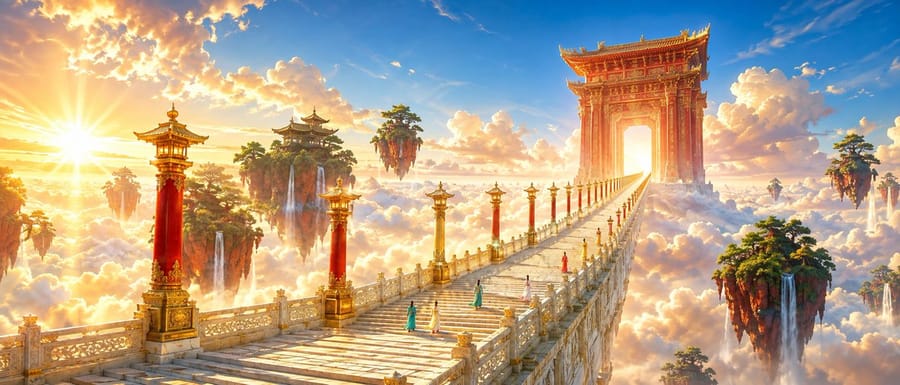
A complex cinematic prompt for a monumental oriental fantasy scene, featuring a golden jade staircase rising through a sea of clouds toward a celestial gate, inspired by traditional Xianxia aesthetics.
Prompt
Una scena cinematografica {argument name="theme" default="oriental fantasy"} luminosa e splendida, inquadratura cinematografica ultra-grandangolare. Prospettiva rigorosamente a un punto, una grandiosa scalinata celeste lastricata in giada color oro chiaro, che attraversa un mare di nuvole dall'angolo inferiore sinistro e si restringe bruscamente verso un punto di fuga nel terzo destro dell'inquadratura. Ai lati della scalinata si trovano alti lampioni in alternanza {argument name="lamp post colors" default="vermilion and gilding"}, con la loro spaziatura e dimensione che diminuiscono in base alla profondità. In lontananza si erge un'imponente porta celeste intagliata color Danxia, con un cielo luminoso che traspare. Accanto alla scalinata fluttuano diverse isole montuose rosse coperte di foreste di pini color smeraldo, con sottili cascate che cadono nel mare di nuvole bianco-oro. {argument name="traveler count" default="Five"} giovani viaggiatori vestiti con lunghe vesti color turchese, avorio e rosso corallo stanno salendo la scalinata, tutti visti di spalle e molto piccoli in scala, che servono solo come riferimenti di dimensione. Il cielo mostra un ricco gradiente di azzurro e oro albicocca, con grandi nuvole bianche i cui bordi sono illuminati di oro caldo dal sole al tramonto. La luce solare a bassa angolazione passa attraverso la porta da sinistra, creando chiare silhouette in controluce, raggi crepuscolari e starburst contenuti. Le ombre sono blu-viola trasparenti, evitando toni grigi. Uno schema di colori ad alta luminosità di azzurro, oro albicocca, rosso cinabro, verde smeraldo e bianco avorio, con alta saturazione, colori luminosi, cromia ricca ma elegante e una netta separazione caldo-freddo. I dettagli architettonici sono precisi, la giada ha texture naturali e la doratura è usata solo per dare risalto ai bordi. Fotogramma cinematografico, scala monumentale, minuscole figure umane, forte prospettiva aerea, raffinato realismo fantasy, nessun grading fangoso, nessun colore cupo, nessuna nebbia eccessiva, nessun testo, nessun watermark.Come usare questo prompt
- 1Copia il prompt esattamente e incollalo nel modello preferito o in un progetto Ideart.
- 2Sostituisci prodotto, soggetto, pubblico e dettagli di stile con il tuo contesto.
- 3Genera prima un risultato base, poi remixa la direzione più forte in una campagna, una serie di immagini o un concept video.
Costruisci da questo prompt
Trasforma un prompt immagine in un progetto creativo finito.
Salva il prompt, aggiungi immagini di riferimento o note e lascia che Ideart modelli il prossimo passo produttivo dallo stesso thread creativo.