
ImmagineAI
Ground Up
{ "style_name": "Ground Up", "style_slug": "cobalt-sky-blend-chunky-orange", "canvas": "4:5 portrait, flat cobalt field #0B4FD0 that blends seamlessly into the photographed sky", "color": { "field": "cobalt / ultramarine #0B4FD0",...
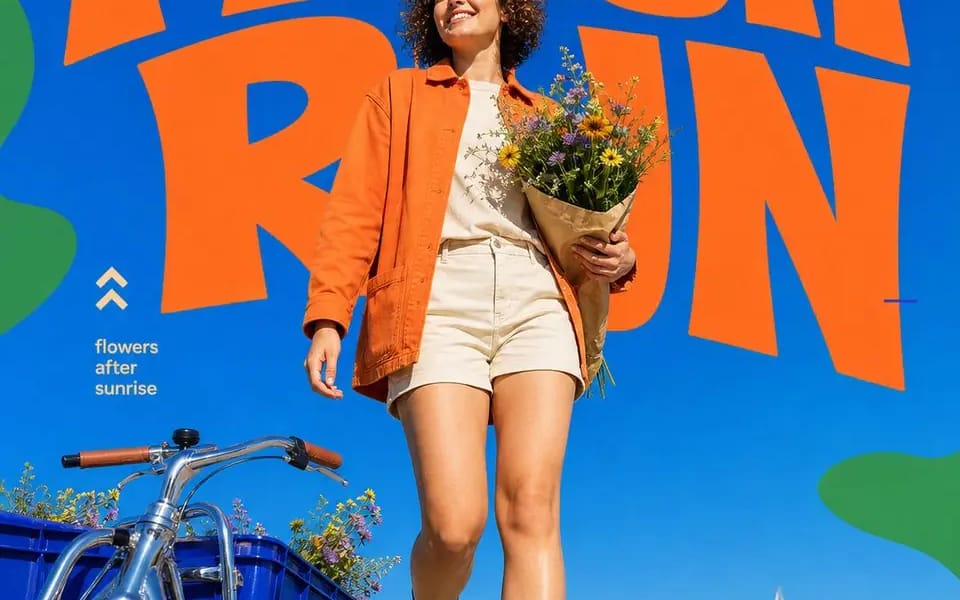
Prompt
{

  "style_name": "Ground Up",

  "style_slug": "cobalt-sky-blend-chunky-orange",

  "canvas": "4:5 ritratto, campo cobalt flat #0B4FD0 che si fonde perfettamente con il cielo fotografato",

  "color": {

    "field": "cobalto / ultramarino #0B4FD0",

    "display": "arancione caldo #F2652A",

    "shapes": "verde foglia #52B04E",

    "text": "crema #F7F0DC",

    "rule": "quattro colori, nessun quinto — e il blu piatto deve corrispondere esattamente al cielo fotografato in modo che l'orizzonte tra grafica e cielo sia invisibile"

  },

  "typography": {

    "headline": "imperativo di due parole, TUTTE MAIUSCOLE, display arrotondato e spesso con terminali morbidi e ondulati e baselines leggermente irregolari — sensazione di taglio a mano, non geometrico pulito; arancione, parte superiore della cornice, 1–2 righe, lettere quasi a contatto",

    "occlusion": "il soggetto o il loro oggetto sovrappongono il titolo dal basso, rompendo una o due lettere",

    "caption": "2–3 brevi righe di sans piccolo crema minuscolo, lato sinistro a metà altezza, frammenti di frase separati da una barra",

    "marks": "piccole linee blu o blu chiaro sparse attorno al titolo come segni di registrazione",

    "glyph": "un segno disegnato a mano vicino alla didascalia — doppia chevron / freccia diagonale / freccia curva / scintilla a quattro punte / luna crescente"

  },

  "graphic_shapes": "morbidi blob verdi organici e squiggles a nastro che si infiltrano dai bordi sinistro e destro, sempre ritagliati dalla cornice, mai fluttuanti in mezzo",

  "photography": {

    "angle": "camera bassa a terra, inclinata verso l'alto — il soggetto si erge e l'orizzonte si trova nel quarto inferiore",

    "light": "sole diretto di mezzogiorno, ombre dure, alta saturazione, cielo blu chiaro",

    "subject": "una persona in movimento — camminando, raggiungendo, sollevando, inclinando — guardando in alto o fuori dalla camera, rilassata e soddisfatta, mai in posa verso l'obiettivo",

    "wardrobe": "stilizzato SOLO dalla palette di quattro colori; l'outfit è parte del sistema di colori",

    "casting": "variare l'età in modo netto in tutto il set — adolescenti fino ai settant'anni",

    "prop": "un oggetto reale che nomina l'attività: fiori, un disco, un vaso, un telescopio"

  },

  "design_rules": [

    "la cucitura tra blu piatto e cielo reale deve essere impercettibile — questo è il trucco",

    "forme verdi toccano solo i bordi",

    "il titolo è un'istruzione, due parole, presente",

    "nessuna ombra sul tipo; si trova piatto sul blu come una serigrafia"

  ],

  "swap_variables": {

    "subject": "acquirente di fiori / DJ sul tetto / ceramista / giovane astronomo",

    "headline": "FRESH RUN / SPIN ON / SHAPE IT / LOOK UP",

    "caption": "fiori dopo l'alba / il suono viaggia · frequenza della città / le mani creano il futuro / piccoli mondi · cieli ampi",

    "glyph": "chevrons / freccia / scintilla / luna",

    "prop": "bouquet di fiori selvatici / vinile + giradischi a valigia / vaso grezzo / telescopio rifrattore"

  }

}Come usare questo prompt
- 1Copia il prompt esattamente e incollalo nel modello preferito o in un progetto Ideart.
- 2Sostituisci prodotto, soggetto, pubblico e dettagli di stile con il tuo contesto.
- 3Genera prima un risultato base, poi remixa la direzione più forte in una campagna, una serie di immagini o un concept video.
Esplora percorsi prompt vicini
Modello
Costruisci da questo prompt
Trasforma un prompt immagine in un progetto creativo finito.
Salva il prompt, aggiungi immagini di riferimento o note e lascia che Ideart modelli il prossimo passo produttivo dallo stesso thread creativo.